“Tools execute on your webpage visibly, so users gain trust that tasks are completed as expected. This also keeps your brand and human-centered design choices intact.”
— Chrome for Developers, “WebMCP”1
The question on Kari’s whiteboard
Trailhead’s product team meets on Monday mornings in a room above the warehouse in Lillestrøm. This Monday, Kari, who runs product, has written exactly one question on the whiteboard: What do we ship for agents, and how will we know it worked?
Jonas, the front-end lead, has spent the last month with the earlier chapters of this book. He has a branch where search_products and add_to_cart are registered with document.modelContext, and he can show an agent finding a two-person tent under 4,000 NOK and putting it in the cart in four tool calls instead of forty clicks. Kari is impressed. She is also the person who has to explain all this to the rest of the company, so her questions are not about AbortSignal. Will agents find us? Which journeys first? Do we lose the customer to the assistant? What do we measure? Who owns the descriptions? And what happens if the standard changes, or never ships?
This chapter is for the people in that room. You can read most of it without the code, and the code that is here is short: a catalog that treats tools as product surface, a budget check for CI, a measurement wrapper and an attribution helper, all for Trailhead. Every listing runs, and the tests live in the book’s demos repository.2
Agent-readiness is not the new SEO (yet)
I hear this comparison in almost every planning conversation about agents. Twenty-five years ago companies learned to describe their pages for crawlers, so now they will learn to describe their features for agents. Part of it holds. A WebMCP tool’s name and description are text written for a machine reader, and their quality decides whether that reader uses your feature correctly. Chrome’s guidance on descriptions reads like a copywriting brief: “use verbs that describe exactly what happens”, describe “what the tool does and when to use it”, and “rely on positive language” rather than lists of limitations.3 Agents also choose between tools, and Chrome’s evaluation guide lists “Agent fails to select the correct tool” as the first failure mode to test for.4 Writing good tool copy is a skill worth having in-house, just as SEO copy once was.
The analogy breaks at the step that made SEO valuable in the first place: discovery. A search engine indexes your pages before anyone visits them, and that index sends you visitors you didn’t have. WebMCP has nothing like it. Chrome’s own overview lists this as a limitation: “Clients and browsers must visit a site directly to know if it has callable tools.”1 Chrome’s comparison with MCP says the same from the other side. For an MCP server, “the user or the app adds the server”. For WebMCP, “the page registers them dynamically in the active session”.5 There is no central registry of WebMCP sites, no crawler that reads registerTool() calls and no ranking for tools.
This is a design choice, not an oversight. The explainer considered “static declarative manifests”, tools listed in a file such as the Web App Manifest, and set them aside because they “prevent web developers from dynamically adding, updating, or removing tools based on the active page state or user authentication status”. It left the door open, though: static declarations could be “layered on in the future”.6 The supplementary explainer for service workers, which asks how an agent could use a site the user doesn’t have open, talks about discovery directly. It lists possible mechanisms (“installable PWAs”, “web search”, “curated site directories”, “direct links”) and floats the idea of sites advertising “high-level descriptions of the capabilities they offer” in a manifest or in page markup, so that crawlers and directories could recommend them. In the same breath it calls discovery “a complex topic which goes beyond the scope of this explainer”.7
Table 16.1 — Where the SEO analogy holds and where it breaks (November 2026)
| Search engine optimization | Agent-readiness with WebMCP | |
|---|---|---|
| Who reads your text | A crawler, ahead of time | An agent, during the user’s visit |
| What brings the user | The index sends new visitors | The user is already on your site |
| What you optimize | Pages, titles, structured data | Tool names, descriptions, schemas, results |
| Central registry or ranking | Yes, run by each search engine | None defined |
| How you measure | Impressions, clicks, rankings | Tool calls, outcomes, assisted conversions |
| What it mostly grows | Acquisition | Conversion and task completion |
If you remember one sentence from this chapter, make it this one. WebMCP, as specified today, converts visits you already have. It doesn’t bring new ones. An agent reaches Trailhead’s tools because the customer opened Trailhead: typed the address, followed a link or clicked a search result. That changes the investment case. You are not buying a new channel. You are cutting friction and failure out of the sessions you already pay to acquire. If the agents that arrive today and actuate your pages give up half-way through checkout, every one of those failures is a conversion you already paid for. That cost is measurable, and it is where the case for WebMCP is strongest.
Still in flux Manifests and directories. Static tool declarations were rejected as the primary mechanism, but the explainer says they could be added on top later, and the service-worker explainer discusses manifest fields and capability descriptions for crawlers and directories. Neither is in the specification.67 Sites that aren’t open. Letting agents call tools on sites the user doesn’t have open is an open question in the main explainer, which points to the service-worker proposal for it.8 Chapter 17 looks at what that would change.
Choosing the first journeys
If WebMCP converts visits you already have, the first journeys to expose are the ones where those visits fail today and where success is worth the most. Chrome frames the work around critical user journeys (CUJs), defined as “a user’s path to accomplish a goal, including any required context”, and its use-case guide walks through shopping, repeat purchases and form filling.9 For retail it suggests tools such as search_products(), add_to_wishlist() and a refine_search() for price ranges, and for repeat purchases a get_order_history() tool.9 The explainer’s own shopping scenario has an agent fetch product listings, filter them against the user’s request and call a second tool to update the store’s grid, so the shopper sees the agent’s choice on the page.10
Chrome’s guide on building effective tools, which André Cipriani Bandarra and I co-authored, puts the prioritization question in one line: “Start by identifying journeys where agentic support offers the most added value.”11 On a typical site four kinds of journey account for most of the candidates.
- Search and filter. Finding things in a catalogue, a timetable or an inventory. Read-only, high volume, and painful to actuate when the filters are custom widgets. The safest place to start.
- Configure. Choosing options, sizes, dates, seats or plans: the multi-step forms where agents guess at ambiguous fields. Chrome’s example is a tool that knows the difference between “a full name versus a separate first and last name”.1
- Book and buy. Adding to a cart, reserving, checking out. High value, and consequential at the last step.
- Support. Filing a claim, finding an order, opening a ticket. Chrome’s use-case guide includes a warranty claim, and its overview puts “Help your customers get support” first among its examples.91
Then rank the candidates. These are the questions I would ask, in roughly this order.
- How badly does actuation fail here today? If agents already complete the journey reliably, a tool adds little. Custom date pickers, steppers, infinite scroll and multi-step modals are the usual suspects.
- What is a completion worth? An abandoned checkout costs more than an abandoned “About us” page.
- Can we reuse the existing code? The explainer’s goal is that “any task that a user can accomplish through a page’s UI can be turned into a tool by reusing much of the page’s existing client-side code.”12 Chrome is just as clear about the opposite case: if a site is highly complex, “you likely need to refactor or add JavaScript to handle application and interface state.”1 A journey whose logic is tangled into components costs more to expose.
- What happens if the agent gets it wrong? A wrong search is free. A wrong order is a refund, a support call and a customer who won’t try it again. Consequential steps are possible, but they need the confirmation design from Chapter 13.
- How many tools does it need? There is no maximum, but Chrome notes that “each tool takes up part of the context window and adds to the time for completion”, and that overlapping tools make it harder for the agent to pick correctly.3 Journeys that need a small, distinct set of tools ship faster and are easier to test.
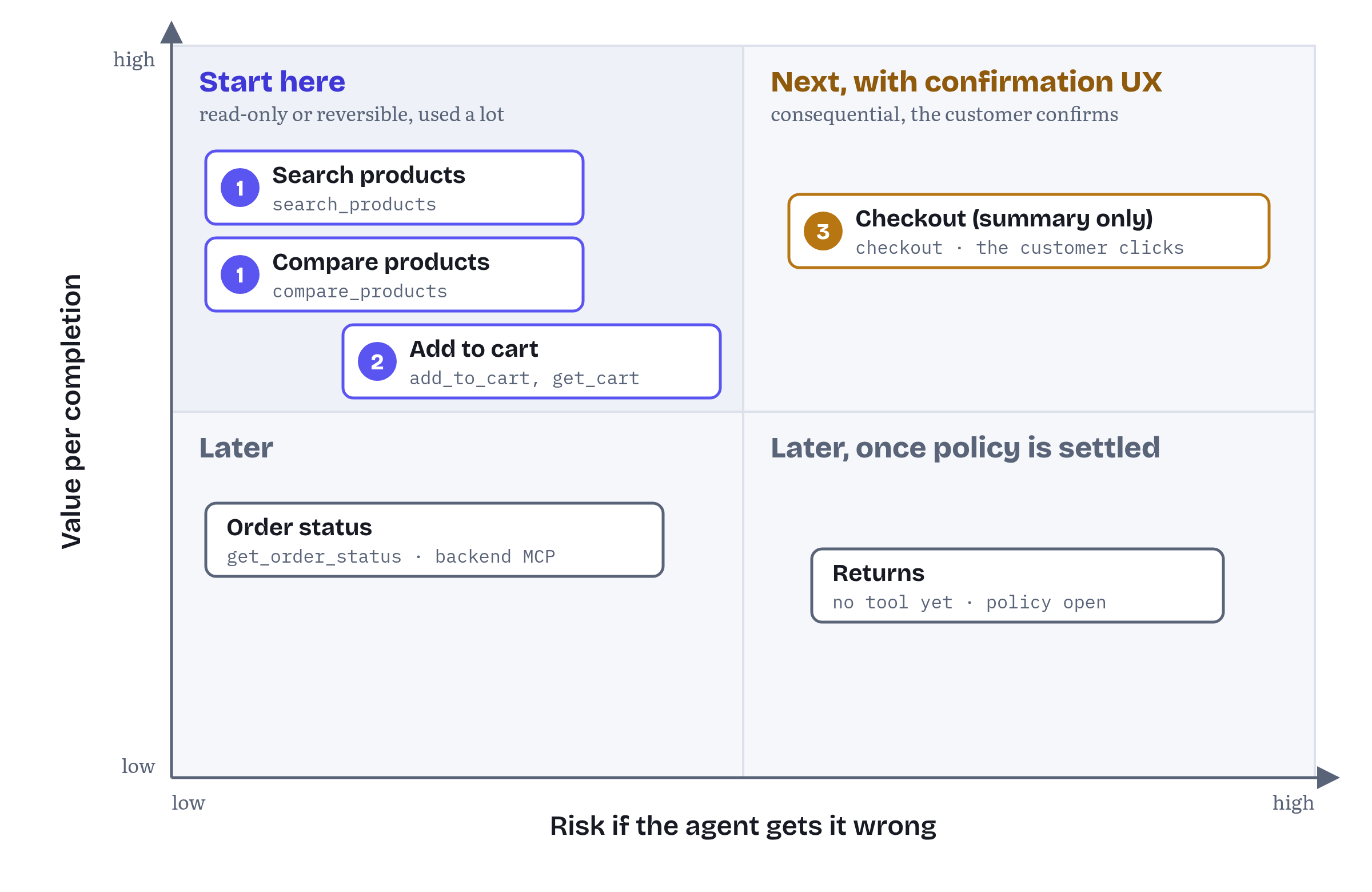
For Trailhead, Figure 16.1 gives an order that Kari can defend. Product search and comparison come first: read-only, heavily used and backed by code the React app already has (Chapter 10 builds them in React). The cart comes next, because adding an item is reversible and the cart badge makes the result visible. Checkout comes third, as a tool that opens the checkout summary and stops there. The customer places the order with their own click, which is how the canonical checkout tool works throughout this book. Order status and returns come later. Order status is already served by the backend MCP server from Chapter 3, and returns involve policy questions the team hasn’t answered yet.
Table 16.2 — Trailhead’s first release
| Journey | Tool | Annotation | Why now |
|---|---|---|---|
| Discover | search_products |
readOnlyHint |
Custom filter widgets defeat actuation, no risk |
| Decide | compare_products |
readOnlyHint |
The comparison table is hard to read from pixels |
| Buy | add_to_cart, get_cart |
none / readOnlyHint |
Reversible, visible in the cart badge |
| Buy | checkout |
consequentialHint |
Opens the summary only, the customer clicks “Place order” |
| Support | get_order_status |
none | Later on the page, already on the backend MCP server (Chapter 3) |
Five tools is a deliberate number. It is small enough for every tool to have an owner and an eval suite, and it still covers a complete journey from search to a placed order. A team that exposes fifty tools in its first release makes the agent’s choice harder and gives itself fifty things to test.
Keeping the agent a guest
The strategic fear behind many agent discussions is disintermediation. The assistant becomes the storefront, your site becomes a supplier behind it, and your brand shrinks to a line in a chat transcript. WebMCP’s authors share this fear and designed against it. One of the explainer’s stated goals is “Prevent web content disintermediation”, which it explains as preventing “disintermediation of web apps by backend integrations by adapting front-ends for use by agents, rather than replacing them”. Its non-goals include “replacement of human interfaces”: “The human web interface remains primary”, and agent tools “augment rather than replace user interaction.”12 Chrome puts it more sharply in the line quoted in Chapter 4: “Instead of your application being a guest within an agent, the agent is a guest on your platform.”5
That framing is accurate about the mechanics. Let’s be precise about what it does and doesn’t give you.
What it gives you is presence. Tools live in your tab and they are ephemeral: “Once the user navigates away from the page or closes the tab, the page’s WebMCP tools become unavailable.”5 Your tool runs your code and can update your interface while the user watches. That is why Chrome says tools “execute on your webpage visibly” and keep “your brand and human-centered design choices intact”.1 If search_products renders its results in Trailhead’s own grid, the customer sees Trailhead’s photography, prices and reviews, not a reformatted list in a chat bubble.
What it doesn’t give you is control over what the agent does with your answer. An agent can call your tools, take the JSON and compare it with three other stores. Chrome’s use-case guide describes exactly that: a shopper asks for “the best prices for the products on my shopping list at two or three local stores”, and each store’s tools feed the comparison.9 Structured results make you easier to compare, and in a commodity category easier to compare can mean easier to replace.
So the brand decisions are about what goes into the tool contract and what stays on the page.
- Show, don’t just return. Have every tool that finds something put it on screen. Chapter 5’s rule, “the user sees what the agent found”, is as much a brand rule as a UX rule.
- Return what helps the agent decide honestly. Ratings, stock, delivery times, the reasons to buy from you. If your advantage is next-day delivery to Tromsø, put it in the result. If it only exists in a banner image, the agent won’t see it.
- Keep consequential steps on your page. The spec’s
consequentialHintsignals that a tool performs a consequential action, “such as booking a flight or transferring money”, so that clients “can selectively enforce mandatory user confirmation prompts”.13 Trailhead goes one step further: thecheckouttool opens the summary, and only the customer’s click places the order. Your confirmation screen, your terms, your upsells, your brand. - Don’t over-ask. The spec’s privacy section describes “privacy leakage through over-parameterization”: tools designed with many optional parameters, so that helpful agents fill them in from the user’s personal context, creating “a personalization-to-fingerprinting pipeline”.14 Asking an agent for age, location and previous purchases “for better recommendations” will cost you trust the day someone notices, and the spec has already named it as an attack.
Tools are product surface
Trust in your tools is a brand asset, and the spec explains why it is fragile. Section 6.3.2, “Misrepresentation of Intent”, starts from the observation that “there is no guarantee that a WebMCP tool’s declared intent matches its actual behavior”. It lists two causes. One is deliberate deception. The other is accidental: “Poorly written descriptions, outdated documentation, or inherent imprecision in natural language.”15 A description that says “adds to cart” while the code also applies a promotional bundle is a misrepresentation, even if nobody meant it.
The fix is organizational as much as technical. Trailhead keeps every agent-facing string in one file, reviewed like product copy, with an owner and an eval suite per tool (Listing 16.1).
chapters/16-product-and-business-implications/src/tool-catalog.ts — Trailhead’s tool catalog, agent-facing text as owned product surface// tool-catalog.ts: Trailhead's agent-facing surface, owned like product copy.export type Journey = 'discover' | 'decide' | 'buy' | 'support';export interface CatalogEntry { name: string; title: string; description: string; journey: Journey; // which user journey this tool serves owner: string; // the team that answers for its behaviour evalSuite: string; // the task suite that must pass before it ships annotations: WebMCP.ToolAnnotations;}export const toolCatalog = [ { name: 'search_products', title: 'Search products', description: 'Search Trailhead outdoor gear by keyword, with optional category, ' + 'maximum price in NOK and an in-stock filter. Shows the results on ' + 'the page and returns up to 10 products with SKU, name, price and rating.', journey: 'discover', owner: 'search', evalSuite: 'evals/search.jsonl', annotations: { readOnlyHint: true }, }, { name: 'compare_products', title: 'Compare products', description: 'Compare 2 to 4 products side by side by SKU. Opens the comparison ' + 'table on the page and returns the same rows: price, weight, rating, stock.', journey: 'decide', owner: 'search', evalSuite: 'evals/compare.jsonl', annotations: { readOnlyHint: true }, }, { name: 'add_to_cart', title: 'Add to cart', description: 'Add a product to the shopping cart by SKU, quantity 1 to 10. ' + 'Updates the cart badge and returns the new cart total in NOK.', journey: 'buy', owner: 'checkout', evalSuite: 'evals/cart.jsonl', annotations: {}, }, { name: 'get_cart', title: 'Show cart', description: 'Return the items in the cart with quantities and the total in NOK.', journey: 'buy', owner: 'checkout', evalSuite: 'evals/cart.jsonl', annotations: { readOnlyHint: true }, }, { name: 'checkout', title: 'Go to checkout', description: 'Open the checkout summary for the current cart. The customer reviews ' + 'the order and places it with their own click; this tool never pays.', journey: 'buy', owner: 'checkout', evalSuite: 'evals/checkout.jsonl', annotations: { consequentialHint: true }, },] as const satisfies readonly CatalogEntry[];export type ToolName = (typeof toolCatalog)[number]['name'];Three details matter here. The descriptions say what the tool does and what it returns, in positive language, as Chrome recommends.3 The checkout description states the boundary (“this tool never pays”), because a description is the only promise the agent can read. And as const satisfies keeps the literal names as types, so the registration code in Listing 16.4 can’t register a tool that isn’t in the catalog.
Measuring agent-driven conversion
Kari’s second question was how they will know it worked. The good news: WebMCP is unusually measurable. Every tool call runs your own execute callback in your own page, so ordinary front-end analytics can see each call, its outcome and its timing. The bad news: you will know that an agent called you, but not which agent, or why.
What the platform tells you
Look at what your callback receives. In the specification’s IDL, execute gets the input object and a ToolExecuteCallbackOptions dictionary whose only member is the signal.16 No caller identity, no agent name, no model, no conversation. The spec defines agents broadly (its introduction says tools can be invoked by “agents, browser’s agents, and assistive technologies”), and it doesn’t ask any of them to identify themselves to the page.17 Chrome’s comparison table is just as broad about who can call your tools: “Any agent or client with access to the rendered page (browsers, webviews, etc.)”.5
ModelContext also fires two events: toolactivated, dispatched when the execution of a tool begins, and toolcancel, dispatched when an execution is cancelled. Both carry only a toolName.18 In my tests on 2 November 2026, Chromium 156 with the WebMCP testing flag fired toolactivated on document.modelContext for each in-page executeTool() call, in the same order as the calls.2 The events are handy for a lightweight counter that doesn’t touch tool code, but they can’t tell you whether a call succeeded.
The declarative API, which Chapter 8 covers and which left the specification on 8 October 2026, adds an agentInvoked member to SubmitEvent so that form handlers can tell agent submissions from human ones.19 The imperative API has no equivalent, and it doesn’t need one: a call to execute is an agent call. Please note that even agentInvoked is not settled ground. In the W3C charter discussion at the end of October, Shopify’s Ilya Grigorik called it “unspecified and incomplete” and asked for a general way to attribute agent-originated interaction to the page it acts on (webmcp issue #365).20
Recording outcomes
The most useful single metric is the outcome of each call. Chapter 5 set the rule of returning recoverable failures as values, and Chapter 11 settled their shape for the whole book: { status, code, message }. The status says who acts next. 'error' is for something the agent can fix, like an unknown SKU. 'needs_input' is for when only the user knows the answer. 'refused' is for when a rule says no, as with an out-of-stock item (code OUT_OF_STOCK). And 'cancelled_by_user' is for when the person declined in the page’s own UI. Exceptions are only for real faults. That convention makes outcomes easy to classify. Listing 16.2 wraps any tool and reports one record per call, without changing what the agent receives.
chapters/16-product-and-business-implications/src/measure.ts — measuring every call without touching the tool// measure.ts: one wrapper, every outcome, no change to the tool itself.// Chapter 11's four statuses for a call that fell short, plus two for a call that never returned.export type Outcome = | 'ok' | 'error' | 'needs_input' | 'refused' | 'cancelled_by_user' | 'threw' | 'aborted';const FELL_SHORT = new Set(['error', 'needs_input', 'refused', 'cancelled_by_user']);export interface ToolCallRecord { tool: string; outcome: Outcome; code?: string; // the result's stable code, e.g. 'OUT_OF_STOCK' ms: number;}export function withMeasurement( tool: WebMCP.ModelContextTool, report: (record: ToolCallRecord) => void,): WebMCP.ModelContextTool { return { ...tool, async execute(input, options) { const started = performance.now(); const done = (outcome: Outcome, code?: string) => report({ tool: tool.name, outcome, code, ms: Math.round(performance.now() - started) }); try { const result = await tool.execute(input, options); // Chapter 11's convention: a call that falls short says so in `status`, with a `code`. const { status, code } = (result ?? {}) as { status?: string; code?: string }; if (options.signal.aborted) done('aborted'); else if (status && FELL_SHORT.has(status)) done(status as Outcome, code); else done('ok'); return result; } catch (err) { done(options.signal.aborted ? 'aborted' : 'threw'); throw err; } }, };}Each outcome starts a different conversation. A falling ok rate after a release means a description or schema regressed, and your eval suite should have caught it. A rising error rate points the same way: agents call the tool with arguments it can’t use. A rising refused rate with one dominant code (OUT_OF_STOCK, say) is a merchandising problem, not an engineering one. needs_input and cancelled_by_user show how often the person had to step in. Threw is a bug. Aborted means the caller aborted the call’s signal, so the agent never sees a result even if your code ran on (Chapter 6 covers what that does to your code). It isn’t a result status: a person who declines in your own UI shows up as cancelled_by_user. Durations tell you where agents wait, and Chrome’s best practices remind you to update the interface once the function completes, because “agents may rely on the interface to plan next steps”.3
Note what the record leaves out: the input. Tool name, outcome, code and duration are enough for every metric in this chapter. Logging arguments means logging whatever the agent drew from the user’s context, and that is exactly the data the over-parameterization warning is about.14 If you need inputs for debugging, sample them, strip personal data and keep them out of your marketing warehouse.
From calls to conversions
Tool metrics tell you whether the tools work. Conversion is a business number, and it has to be joined to orders. Trailhead takes the simplest approach I can defend: it remembers which tools succeeded in the current tab session and attaches that list to the order when the customer places it (Listing 16.3).
chapters/16-product-and-business-implications/src/attribution.ts — attributing an order to agent help// attribution.ts: remember which tools helped, attach it to the order.const KEY = 'trailhead.agentAssist';export function noteAgentAssist(toolName: string): void { const used = new Set<string>(JSON.parse(sessionStorage.getItem(KEY) ?? '[]')); used.add(toolName); sessionStorage.setItem(KEY, JSON.stringify([...used]));}// Called by the checkout page when the customer clicks "Place order".export function orderAttribution(): { agentAssisted: boolean; toolsUsed: string[] } { const toolsUsed: string[] = JSON.parse(sessionStorage.getItem(KEY) ?? '[]'); return { agentAssisted: toolsUsed.length > 0, toolsUsed };}sessionStorage is scoped to the tab, which matches WebMCP’s own scope: tools belong to a document in a tab, and so does the assistance. An order placed in a tab where the agent searched and added to the cart is agent-assisted. An order placed in a fresh tab is not.
Listing 16.4 connects the pieces. The catalog decides what is registered, the wrapper measures it, and successful calls are noted for attribution. It also follows a rule that Chrome added to its best practices on 30 October 2026: “Register tools all at once: The page must expose either the complete tool surface or none of it. Roll back the whole batch on failure instead of leaving half a workflow callable.”3 A cart without a checkout is exactly that kind of half workflow, so the listing combines the caller’s signal with a batch signal of its own and aborts the batch if any registration fails.
chapters/16-product-and-business-implications/src/register-tools.ts — registering the catalog, all or nothing, with measurement and attribution// register-tools.ts: the catalog decides what agents see; code supplies behaviour.import { toolCatalog, type ToolName } from './tool-catalog.js';import { withMeasurement, type ToolCallRecord } from './measure.js';import { noteAgentAssist } from './attribution.js';import { schemas, handlers } from './trailhead-tools.js'; // the store's own codeimport { analytics } from './analytics.js';function report(record: ToolCallRecord) { analytics.send('webmcp_tool_call', record); if (record.outcome === 'ok') noteAgentAssist(record.tool);}export async function registerTrailheadTools(signal: AbortSignal): Promise<void> { const modelContext = document.modelContext; if (!modelContext) return; // progressive enhancement: no WebMCP, no tools // All or nothing: if one registration fails, roll back the ones before it. const batch = new AbortController(); const both = AbortSignal.any([signal, batch.signal]); try { for (const entry of toolCatalog) { const name: ToolName = entry.name; const tool: WebMCP.ModelContextTool = { name, title: entry.title, description: entry.description, inputSchema: schemas[name], annotations: entry.annotations, // Delegate, so the store can swap a handler without re-registering. execute: (input, options) => handlers[name](input, options), }; await modelContext.registerTool(withMeasurement(tool, report), { signal: both }); } } catch (err) { batch.abort(); throw err; }}AbortSignal.any() gives each tool a signal that fires when either the page unregisters the catalog or the batch fails, so the rollback needs no bookkeeping of its own. The demos test it by occupying the name get_cart before the catalog registers: the call rejects at the fourth tool, and the three tools before it disappear.2
The execute property delegates to the current handler instead of capturing it. The explainer’s best practices point out that a tool’s implementation can change: as long as the name, description and schema stay accurate, the callback can hand off to code the application changes over time, and the tool doesn’t need to be registered again.21 Changing the description is different, and the section on ownership below comes back to it.
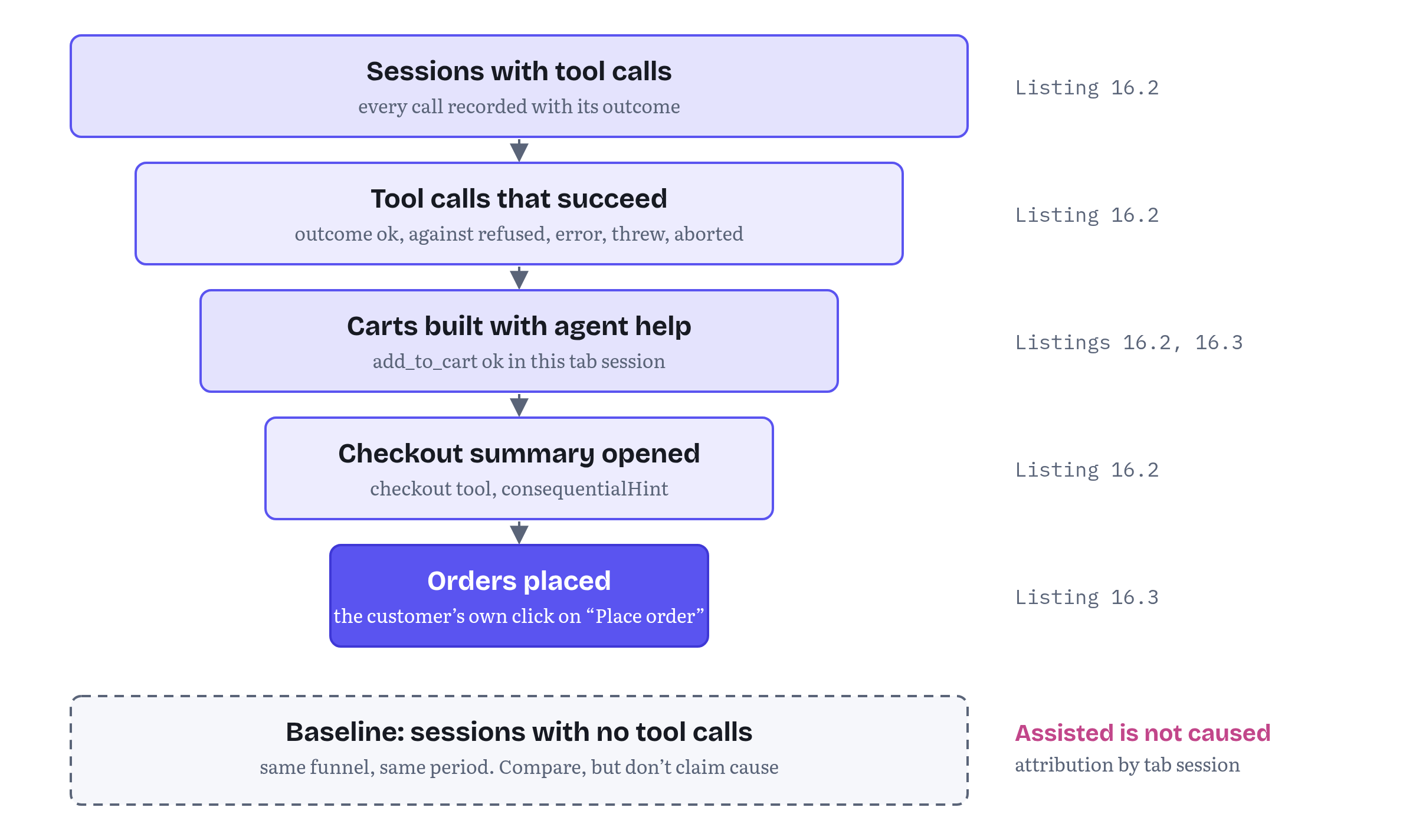
Figure 16.2 shows the resulting funnel, and Table 16.3 lists the metrics Trailhead reports every week.
Table 16.3 — Agent metrics Trailhead tracks
| Metric | From | Question it answers |
|---|---|---|
| Calls per tool, per day | Listing 16.2 | Is anyone using it? Which tools do agents reach for? |
| Outcome mix (ok, Chapter 11’s four statuses, threw, aborted) | Listing 16.2 | Does the tool work? Did a release regress it? |
Top refused, error and needs_input codes |
Listing 16.2 | What blocks agents: stock, input, policy? |
| Median and slow-tail duration | Listing 16.2 | Where do agents and customers wait? |
| Assisted order rate and value | Listing 16.3 | Do sessions with agent help end in orders? |
| Checkout opened → order placed | Listings 16.2–16.3 | Do customers confirm what agents prepare? |
The same numbers feed the tools themselves. The Chrome guide I mentioned earlier ends its production advice with exactly this loop: “Once the tool is deployed, analyze your interaction logs to identify where agents struggle or deviate from expected paths. Use those insights to continuously update your evals and tool definitions.”11
Two cautions belong in the report next to these numbers. First, assisted is not caused. A customer who uses an agent may be a more determined buyer to begin with, so compare assisted sessions with similar unassisted ones before you claim a lift, and run a holdout (tools off for a sample of sessions) if the decision is big enough. Second, today’s numbers are an origin-trial sample. Only users whose browser runs WebMCP and whose agent consumes it reach your tools at all. The project’s implementation-status page lists origin trials in Chrome and Edge, experimental support in Brave’s Leo, support in ChatGPT Desktop, and Meta’s Ray-Ban Display glasses as an integration that is announced but not yet available.22 At least one large platform is not waiting: in the same charter discussion, Ilya Grigorik wrote that “Shopify deploys WebMCP across millions of storefronts.”20 Still, treat early volumes as a signal of where your tools work and where they don’t, not as a market forecast.
Pricing and policy questions
WebMCP doesn’t change your pricing. What it does is surface pricing and policy questions that were easy to postpone while agents only clicked. None of them has a standard answer, and most need a decision from someone above the front-end team.
Will agents see the same prices as people? They should. A tool runs in the user’s session and reads the same data as the page, so the natural design shows the same price. Agent-only prices that the page doesn’t show are precisely the gap between declared intent and actual behaviour that the spec warns about.15 If you do want agent-specific offers, make them visible on the page the user is looking at.
Do you welcome price comparison? Chrome’s best practices assume you do: tools “should allow for reasonable repetition, such as for price comparison”, and a rate-limited tool should “return a meaningful error or advise the user to manually take on the task.”3 If your business depends on not being compared, WebMCP makes that harder to keep up, although agents could already compare prices by reading your pages.
What do your terms of service say about automation? Many terms of service were written to discourage scraping and bots. Browser agents already operate those sites on users’ behalf. A WebMCP tool is a sanctioned path, and the terms and the tools should agree. Registering add_to_cart while your terms forbid automated purchasing makes little sense.
How autonomous do you let it be? WebMCP’s design assumes a person is present. Chrome describes the API as “primarily designed for local browser workflows with a human in the loop”, and the explainer lists “fully autonomous workflows” as a non-goal.112 Your policy can lean on that design. Consequential steps wait for a click, and a session with nobody watching gets nothing it couldn’t get from your public pages.
Who is responsible when it goes wrong? If an agent orders the wrong tent, is that the agent’s mistake, your description’s or the customer’s? The spec describes the opposite worry too: malicious tools designed so that a harmful action “can be attributed to the agent”.15 And sometimes the law cares who clicked. In the same W3C charter thread, one participant pointed out that under Article 8(2) of the EU Consumer Rights Directive the consumer must explicitly acknowledge the obligation to pay, and that “whether an agent’s click satisfies that is an open question.”20 Precise descriptions, values for recoverable failures, a confirmation on your own page and an order history that records which steps a tool prepared are the evidence you will want if that conversation ever happens. I am not a lawyer, so take that one to yours.
What about content you don’t control? Product reviews and Q&A are user-generated, and a review can contain instructions aimed at an agent. The spec’s untrustedContentHint exists for this case. It marks a result whose payload “requires heightened security handling”, and Chrome recommends it for tools that return user-generated or externally sourced content.2324 Chapter 12 covers the threat model. The business point is simple: a tool that returns reviews needs a security review before it ships.
WebMCP and backend MCP in one plan
The last strategy question is whether WebMCP replaces Trailhead’s backend MCP server from Chapter 3. It doesn’t, and the explainer says so: WebMCP “is designed to complement, not replace, existing backend-focused protocols like MCP.”12 Chrome’s comparison guide has the clearest way I know to explain the split to a non-technical audience: “MCP is a call center. It’s available from anywhere, at any time.” And: “WebMCP is an in-store expert. It’s available only while the user is on your page.” Chrome’s recommendation is to use both: “Manage core logic with MCP”, so your server acts as “a foundational service layer” that is “platform-agnostic and always available to agents”, and “Build a contextual UI with WebMCP” for in-browser work “while the user has your website open.”5
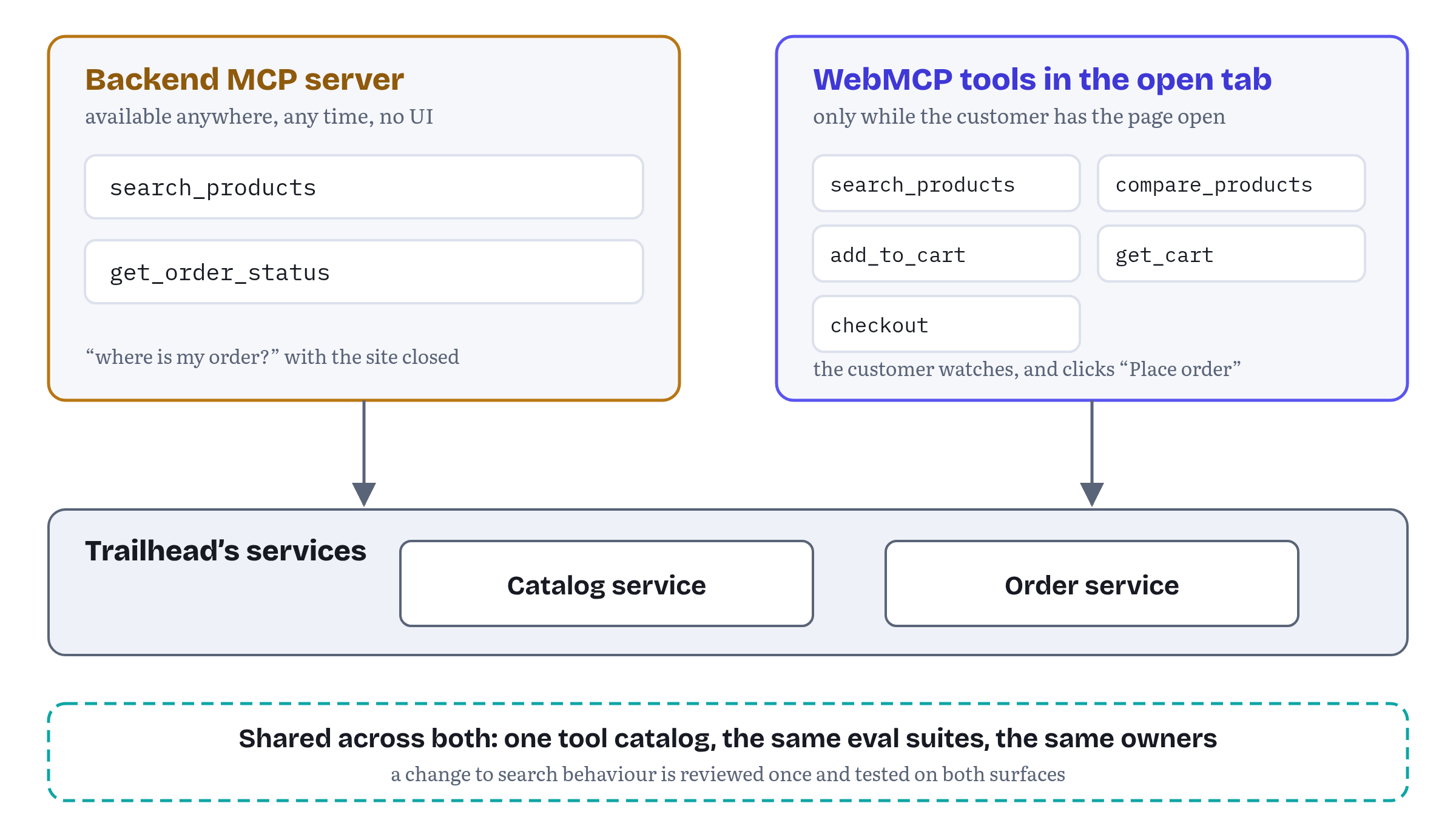
For Trailhead the division looks like Figure 16.3. The backend MCP server exposes search_products and get_order_status, the things an assistant might need when the customer is nowhere near the site (“where is my order?”). The page exposes the full journey, from search to the checkout summary, because that journey benefits from the customer’s session, cart and eyes. Three choices keep the two surfaces from drifting apart.
- One implementation, two adapters. Both surfaces call the same catalog service. The WebMCP tool adds the page update and the confirmation, the MCP tool adds authentication and pagination. Chrome’s best practices now say the same about the page alone: share “a single application service for validation, permissions, and side effects” between the UI, the WebMCP tools and the tests.3
- The same name and schema where the tools overlap.
search_productstakes the samequery,category,maxPriceandinStockOnlyin both places, so one set of evals and one description review covers both. - Different boundaries where the context differs. The backend server has no
checkouttool. Purchases need the customer’s confirmation, and the page is where that confirmation lives.
Who owns the tools
Kari’s last question, who owns all this, is the one most teams get wrong. A tool looks like code, so it gets owned like code. In reality a tool definition has at least four parts, and they belong to different people.
- The name and description are copy. The model reads them, and they decide whether a tool gets called at all. They deserve the care you give to checkout microcopy, and someone with a product or content role should approve changes.
- The input schema and result shape are an API contract. Engineering owns them, with the usual review for breaking changes.
- The evals are the acceptance test for both. Chrome’s guide says that before releasing tools into production “you must confirm agents understand when to call the tool, how to execute it, and what answers are acceptable”, and that classic deterministic tests should still cover everything that doesn’t talk to the model.4 Chapter 14 builds Trailhead’s suites.
- The annotations and exposure (
readOnlyHint,consequentialHint,untrustedContentHint,exposedTo) are security decisions. They belong in the same review as any change to who can do what on the site.24
A change to the copy is also a deployment event. A tool’s name, description and schema are read into the model’s context when the agent observes the tool. To change them you unregister the tool and register it again, and agents that watch for toolchange events refresh their lists.21 So a description edit should go through the same eval run as a code change. Trailhead’s CI enforces the mechanical part with Listing 16.5.
chapters/16-product-and-business-implications/src/check-budgets.ts — enforcing budgets and ownership in CI// check-budgets.ts: fail the build when agent-facing text outgrows its budget.import type { CatalogEntry } from './tool-catalog.js';// Chrome's provisional character budgets (WebMCP tool security guidance).export const BUDGET = { name: 30, description: 500, parameterDescription: 150 };export function checkBudgets(catalog: readonly CatalogEntry[]): string[] { const problems: string[] = []; const seen = new Set<string>(); for (const tool of catalog) { if (tool.name.length > BUDGET.name) { problems.push(`${tool.name}: name is ${tool.name.length} characters`); } if (tool.description.length > BUDGET.description) { problems.push(`${tool.name}: description is ${tool.description.length} characters`); } if (seen.has(tool.name)) problems.push(`${tool.name}: duplicate name`); seen.add(tool.name); if (!tool.owner || !tool.evalSuite) problems.push(`${tool.name}: no owner or eval suite`); } return problems;}The numbers come from Chrome’s tool-security guidance, which recommends 500 characters per tool description, 150 per parameter description, 30 per tool or parameter name and 1,500 per tool output. Chrome marks them as recommendations that may change and says specific limits “may be added to the API specification in the future”.24 The ownership check is Trailhead’s own rule: a tool without an owner and an eval suite doesn’t ship.
Table 16.4 — Who owns what in Trailhead’s agent surface
| Part | Owner | Reviewer | Gate |
|---|---|---|---|
| Names and descriptions | Product (per journey) | Content design | Eval suite passes, Listing 16.5 passes |
| Schemas and results | Engineering (per team) | API review | Type check, deterministic tests |
Annotations, exposedTo |
Engineering | Security | Threat-model review (Chapter 12) |
| Eval suites | QA / ML | Product | Run on every description or schema change |
| Agent metrics | Analytics | Product | Weekly report (Table 16.3) |
| Spec and trial tracking | One named engineer | Tech lead | Release notes reviewed each Chrome milestone, versions pinned in test reports |
The last row deserves emphasis. WebMCP is a Community Group draft in origin trials, and it changes. Chapter 15 records the churn, and Chapter 17 the open questions. Someone has to read the release notes, watch the issues that affect your tools and pin what each test run used. The Chrome guide puts it as “Record and isolate the specification revision, browser version, agent client, and model during testing to track compatibility drift.”11 And someone has to send the team’s findings back. Chrome’s origin-trial announcement describes the trial as a way of “gathering user feedback, with the goal of informing future iterations of the API”, and its documentation invites feedback on the API shape in the explainer’s repository and Chromium bugs for implementation problems.2524 A company that runs WebMCP in production and never reports what it learned is leaving its influence on the standard unused. Personally for me, this is the cheapest seat at the table you will ever get.
Still in flux a few open threads could change these plans.
Who sees your tools. The explainer is considering a
native-agentkeyword forexposedTothat would control whether the browser’s built-in agent sees a tool, with different defaults for top-level pages and iframes.8 After the TPAC meeting at the end of October, participants also discussed a second permissions policy that would separate tools offered to other frames from tools offered to native agents (issue #236).26 Either could change how many agents reach your tools without any change on your side.Agent identity and confirmation. The page can’t tell which agent is calling. The design for asking the user for input during a call is still open: pull request #204 would replace
requestUserInteraction()withrequestUserInput(), and a proposal of 26 October 2026 in issue #165 adds an outcome for the case where no person can be reached at all.27 Chapter 13 tracks both.Budgets. Chrome’s character budgets are provisional and may become limits in the specification.24
Tool grouping. Proposals for higher-level “skills” (#161) and for tool collections with progressive disclosure (#255) could change how many tools a page can sensibly expose. On 3 September 2026 the Community Group resolved to “seek explicit model harness creator feedback and defer the tool collections feature”, and that feedback has started to arrive in the thread.28
Browser behaviour. In my tests Chromium 156 returned
getTools()in alphabetical order, not registration order, and firedtoolactivatedfor in-page calls. Chrome’s documentation describes the alphabetical order, but the specification doesn’t require it, so don’t build reports that depend on either.2
Trailhead’s plan on one page
By the end of Monday, Kari’s whiteboard holds a plan she can take upstairs.
- Release 1: discover and decide.
search_productsandcompare_products, read-only, with results rendered in Trailhead’s own grid and comparison table. Measurement and attribution from day one (Listings 16.2–16.4). - Release 2: the cart and the checkout handoff.
add_to_cart,get_cartandcheckout, with checkout stopping at the summary and the customer’s click placing the order. The confirmation design comes from Chapter 13. - In parallel: the backend MCP server.
search_productsandget_order_statusfor assistants that aren’t in the browser, sharing services, names and evals with the page (Chapter 3). - Governance. The catalog file (Listing 16.1) with an owner and an eval suite per tool, the CI check (Listing 16.5), the ownership table (Table 16.4) and one engineer tracking the spec.
- Success criteria for the quarter. A tool outcome mix above an agreed ok rate. Assisted orders measured against comparable unassisted sessions. A short list of findings sent back to the Community Group.
None of this needs WebMCP to win the standards debate. The tools wrap code Trailhead already has, the measurement is ordinary analytics, and the catalog is good practice for any agent surface, including the backend server. If WebMCP changes shape, the catalog and the evals carry over, and the adapter is the part that changes. Chapter 17 looks at how that adapter might need to change.
Chapter summary
- WebMCP converts visits you already have. Tools are discovered only during the user’s visit, there is no central registry, and discovery for sites that aren’t open is an open proposal. Agent-readiness shares SEO’s need for good machine-facing copy, but not its power to bring visitors.
- Choose the first journeys by actuation pain, value per completion, code reuse, the cost of a wrong action and the number of tools needed. Search and comparison first, then reversible cart steps, then a checkout that stops at your confirmation screen. Keep the tool count small.
- WebMCP keeps the agent a guest on your site: tools run in your tab, update your UI and disappear when the tab closes. It doesn’t stop agents comparing your structured results with a competitor’s. Show results on the page, return the facts that make you the right choice, keep consequential steps on your page and never over-ask.
- Every call runs your code, so tools are easy to measure, but the page can’t tell which agent is calling. Record outcomes (ok, Chapter 11’s four statuses, threw, aborted), codes and durations, never inputs. Register the catalog all or nothing. Attribute orders to agent help by tab session, and remember that assisted is not caused.
- Pricing and policy decisions surface early: the same prices for agents and people, rate limits that allow comparison, terms of service that match the tools you register, a human in the loop as policy, evidence for disputes (including who clicked), and
untrustedContentHintfor user-generated content. - Use WebMCP and backend MCP together: one implementation behind two adapters, the same names and schemas where they overlap, and different boundaries where the context differs.
- Tools are product surface. Copy, schema, evals and security annotations have different owners. Description changes need re-registration and an eval run. Enforce Chrome’s provisional budgets in CI, pin versions in test reports, and give one person the job of tracking the spec and reporting back.
Chapter 17 turns from today’s plan to the open questions (output schemas, streaming and multimodal data, cross-document responses, service-worker tools and the competing futures for the API) and ends with a checklist for building now in a way that survives whichever future arrives.
Notes
Notes
Chrome for Developers, “WebMCP” (published 18 May 2026, last updated 7 October 2026), including “Use cases” and “Limitations” (retrieved November 2026). https://developer.chrome.com/docs/ai/webmcp
Tested by the author on 2 November 2026 with Playwright 1.64 and Chromium 156.0.8078.4, both with a
document.modelContextmock and with the browser’s own implementation (--enable-features=WebMCPTesting). Code and tests: webmaxru/webmcp-book-demos, folder chapters/16-product-and-business-implications. https://github.com/webmaxru/webmcp-book-demos/tree/main/chapters/16-product-and-business-implicationsChrome for Developers, “WebMCP best practices” by Alexandra Klepper, Maxim Salnikov and François Beaufort (published 18 May 2026, last updated 30 October 2026): “Enforce architectural constraints”, “Create a tool strategy”, “Use clear language and semantic code” and “Prioritize reliability” (retrieved November 2026). https://developer.chrome.com/docs/ai/webmcp/best-practices
Chrome for Developers, “Test WebMCP with Evals” (published 19 May 2026, last updated 28 May 2026), including “Failure modes” (retrieved November 2026). https://developer.chrome.com/docs/ai/webmcp/evals
Chrome for Developers, “When to use WebMCP and MCP” (published 11 March 2026, last updated 27 October 2026): the introduction, “Control UI access”, the comparison table and “Use WebMCP and MCP” (retrieved November 2026). https://developer.chrome.com/docs/ai/webmcp/compare-mcp
WebMCP explainer, “Alternatives Considered”, §2 “Static Declarative Manifests”, webmachinelearning/webmcp. https://github.com/webmachinelearning/webmcp#alternatives-considered
Brandon Walderman, “WebMCP for Service Workers” (supplementary explainer, first published 28 August 2025), “Discovery and Installation” and “Appendix A: Discovery”. https://github.com/webmachinelearning/webmcp/blob/main/docs/service-workers.md
WebMCP explainer, “Open Questions” (built-in agent exposure by default, service workers integration). https://github.com/webmachinelearning/webmcp#open-questions
Chrome for Developers, “How WebMCP fits in user journeys” (published 18 May 2026): critical user journeys, “Help users make purchases”, “Support repeat purchases” and the warranty-claim example (retrieved November 2026). https://developer.chrome.com/docs/ai/webmcp/use-cases
WebMCP explainer, “Use Cases”, “E-Commerce & Tailored Shopping”. https://github.com/webmachinelearning/webmcp#use-cases
Chrome for Developers, “Build your user’s agentic workflows with WebMCP tools” by André Cipriani Bandarra and Maxim Salnikov (published 26 August 2026, last updated 30 October 2026): “Which goals to prioritize?”, “Manage reliability during testing” (“Pin versions”) and “Deploy to production” (retrieved November 2026). https://developer.chrome.com/docs/ai/webmcp/build-tools
WebMCP explainer, “Goals & Non-Goals”. https://github.com/webmachinelearning/webmcp#goals--non-goals
WebMCP specification, Draft Community Group Report, 27 October 2026, §6.4.5 Consequential Annotation for Tool Executions. https://webmachinelearning.github.io/webmcp/#security-privacy
WebMCP specification, Draft Community Group Report, 27 October 2026, §6.3.3 Privacy Leakage Through Over-Parameterization. https://webmachinelearning.github.io/webmcp/#security-privacy
WebMCP specification, Draft Community Group Report, 27 October 2026, §6.3.2 Misrepresentation of Intent (including §6.3.2.2 Misalignment Types). https://webmachinelearning.github.io/webmcp/#security-privacy
WebMCP specification, Draft Community Group Report, 27 October 2026, §4.2 ModelContext interface, §4.2.2 ToolExecuteCallbackOptions dictionary and the IDL index. https://webmachinelearning.github.io/webmcp/#api
WebMCP specification, Draft Community Group Report, 27 October 2026, §1 Introduction and §2 Terminology. https://webmachinelearning.github.io/webmcp/
WebMCP specification, Draft Community Group Report, 27 October 2026, §4.3 Events (§4.3.1 ToolActivatedEvent, §4.3.2 ToolCancelEvent). https://webmachinelearning.github.io/webmcp/#api
WebMCP, “Declarative API Explainer”, section “Events” (
SubmitEvent.agentInvokedandrespondWith()). The declarative API was removed from the specification by pull request #338, merged 8 October 2026. https://github.com/webmachinelearning/webmcp/blob/main/declarative-api-explainer.mdw3c/strategy issue #576, “Agentic Web Working Group” charter refinement, comments of 26 October 2026 by Ilya Grigorik (Shopify) and by GitHub user frmoretto, and webmachinelearning/webmcp issue #365, “Spec & generalize
agentInvoked: signal events an agent originates” (open on 2 November 2026). https://github.com/w3c/strategy/issues/576WebMCP explainer, “Best Practices”: “Tool Strategy and Budget” and “Keeping agent-facing parts of a tool definition updated”. https://github.com/webmachinelearning/webmcp#best-practices
WebMCP, “Browser and Agent Implementation Status” (the project’s own page, unchanged since before 15 October 2026 and read again on 2 November 2026, vendor claims not independently confirmed). https://github.com/webmachinelearning/webmcp/blob/main/implementation-status.md
WebMCP specification, Draft Community Group Report, 27 October 2026, §6.4.4 Untrusted Annotation for Tool Responses. https://webmachinelearning.github.io/webmcp/#security-privacy
Chrome for Developers, “WebMCP tool security” (published 9 June 2026, last updated 1 September 2026): “Use annotation hints”, “Expose your tools carefully”, “Set character budgets” and “Next steps” (retrieved November 2026). https://developer.chrome.com/docs/ai/webmcp/secure-tools
Chrome for Developers blog, “Join the WebMCP origin trial” (9 June 2026). https://developer.chrome.com/blog/ai-webmcp-origin-trial
webmachinelearning/webmcp issue #236, “Reposition feature as a generic communication tool?”, comments of 30 October 2026 by Benjamin VanderSloot and Johann Hofmann after the face-to-face meeting. https://github.com/webmachinelearning/webmcp/issues/236
webmachinelearning/webmcp issue #165, “WebMCP elicitation via requestUserInteraction()”, including Ilya Grigorik’s proposal of 26 October 2026, and pull request #204, “Replace requestUserInteraction with requestUserInput” (both open on 2 November 2026). https://github.com/webmachinelearning/webmcp/pull/204
webmachinelearning/webmcp issue #161, “Proposal: Skills — workflow-level context for tool composition” (opened 3 April 2026), and issue #255, “Tool collections: coarse-grained grouping with progressive disclosure” (opened 22 August 2026), including the Community Group resolution of 3 September 2026 and harness feedback of 20 October 2026. Both open on 2 November 2026. https://github.com/webmachinelearning/webmcp/issues/255