“Instead of your application being a guest within an agent, the agent is a guest on your platform.”
— Chrome for Developers, “When to use WebMCP and MCP”1
Two Fridays at Fjord Table
Wednesday evening in Oslo. Ingrid wants a table for four at Fjord Table on Friday, around seven, by the window if possible. She doesn’t open the site and fight its date picker. She types one sentence into the assistant panel of her browser and goes back to her email.
Let’s see how that request plays out on most of the web today. The agent takes a screenshot of the Fjord Table homepage, reads the accessibility tree and decides that the blue button saying “Reserve” is probably the way in. It clicks. A modal opens with a calendar widget built from forty nested div elements. The agent counts squares to find Friday, clicks what it thinks is the 20th, takes another screenshot to check, notices that the month header says October, finds the small arrow and tries again. The party-size control is a custom stepper, so it clicks “+” three times and checks again. The time slots load asynchronously, and on the first attempt the agent reads them before they arrive. After a dozen model round trips it reaches a confirmation screen. Or it doesn’t — because Fjord Table shipped a redesign on Tuesday, and the button now says “Book”.
Now replay the same Friday on a Fjord Table that is agent-ready. When Ingrid’s browser agent looks at the tab, it sees more than pixels and markup. It sees that the page offers two tools: search_availability, which takes a date, a time and a party size, and book_table, which takes a slot and a seating preference. Each tool has a plain-language description and a JSON Schema for its inputs. The agent calls search_availability once. Fjord Table’s own JavaScript (the same code the date picker already uses) runs the search, updates the booking panel on screen so Ingrid sees the options, and hands back three time slots. The agent proposes 19:00 at a window table. Ingrid glances over, sees the familiar Fjord Table booking panel already filled in, and confirms.
Nothing in the second Friday needs a new server, a new login or a new app inside the agent. The restaurant’s website did the work — in the user’s own session, while the user was watching. In simple words, that’s WebMCP in one scene. The rest of this chapter takes it apart: what WebMCP is, which problem it solves, how it relates to the Model Context Protocol from Chapter 3, where it came from, who is building it, and how contested it still is. Part II then goes deep into the API itself.
What WebMCP is
The specification starts with one sentence: “The WebMCP API enables web applications to provide JavaScript-based tools to AI agents.”2 Its introduction then gives the mental model the rest of the design follows. Web pages that use WebMCP “can be thought of as Model Context Protocol servers that implement tools in client-side script instead of on the backend.”2
Three ideas are packed into that description.
- Tools, not clicks. A tool is a JavaScript function with a name, a natural-language description and a structured input schema. The page declares what it can do, and the agent stops guessing from the layout.
- Client-side. The tool runs in the page, in the browser tab the user already has open. It reuses the application’s existing front-end logic and state, and it inherits the user’s signed-in session.
- MCP-shaped. The vocabulary (tools, descriptions, input schemas, results) comes from MCP, so after Chapter 3 you’ll recognise it. As we’ll see, though, WebMCP is not MCP running in a browser.
In API terms the surface is small. Every document gets a modelContext object (document.modelContext), and a page calls registerTool() on it to offer a tool.3 The browser’s own agent, or an agent embedded in the page, can then discover the tool and call it. The page’s callback does the work and returns a result. That’s the core of it. Annotations, cancellation, cross-origin frames and the rest are refinements of that loop, and they get their own chapters.
Formally, WebMCP is a Draft Community Group Report of the W3C Web Machine Learning Community Group. This chapter was checked against the draft dated 27 October 2026, and its status section is blunt: “It is not a W3C Standard nor is it on the W3C Standards Track.”2 Chrome and Edge run time-limited origin trials. That status shapes how you should read everything that follows, and we’ll come back to it near the end of the chapter.
The problem: the actuation tax
Chapter 1 introduced actuation, which Chrome’s documentation defines as “the act of an agent simulating manual mouse clicks and text input, as though it were the human user engaging with your website.”4 It’s how today’s general-purpose browser agents get things done when nothing better is available. The WebMCP explainer describes the technique plainly: agents observe “the browser state through a combination of screenshots, and DOM and accessibility tree snapshots, and then interact with the page by simulating human user input.”5
Actuation is impressive when it works. But it comes with a tax — and every site and every agent pays it.
- It’s brittle. The agent infers intent from presentation. Rename a button, move a field, swap a native
<select>for a custom component, and an agent that worked yesterday fails today. Your design team has no idea it broke anything. - It’s slow and expensive. Every step is a model call over a screenshot or a large DOM snapshot, and booking a table can take a dozen round trips. The explainer notes that “even when agents succeed, simple operations often require multiple steps and can be slow or unreliable.”5
- It’s ambiguous. Does “Name” mean the full name, or the first name with a separate surname field below? Is this date picker showing check-in or check-out? Humans resolve this from context. Agents guess.
- The site has no say. The site owner can’t tell the agent “this is the right way to book” or “please stay away from the admin menu”. It can only hope the agent finds the intended path.
The obvious alternative is to skip the page and give the agent an API. That’s what MCP servers, OpenAPI descriptions and platform plug-ins do. The explainer calls them backend integrations, and it’s candid about why they don’t fit interactive web apps well.5 First, UI disintermediation and context loss: the conversation happens between the agent and your server, and your interface (the thing you designed, and the place where the user sees what’s going on) is bypassed. Second, replicated state and authentication: the user is already signed in to the tab, but the backend integration needs its own credentials and its own copy of whatever the user was looking at. Third, developer burden: exposing something your front end already does means writing and operating a separate server.
The explainer illustrates the mismatch with a browser agent that combines both worlds. It scrapes the page, calls a backend MCP tool, and then has to “scrape / actuate DOM to reconcile visible UI”, because the server’s state and the screen have drifted apart.5 If you have ever seen an agent book something through an API and then try to show the user what it did, you know the problem very well.
WebMCP’s answer sits between the two. Keep the page, keep the session and keep the user’s view, but let the page describe its capabilities as tools, so the agent doesn’t have to reverse-engineer them. The explainer’s phrase for it is a “lightweight way to adapt web content for use by AI agents”.5
The core idea: tools that live in the tab
The most important property of a WebMCP tool is where it runs. It lives in a document’s event loop, on the same main thread as the rest of your page script.6 When an agent calls it, your code runs with everything the page already has: the signed-in session and its cookies, the application state in memory, the components on screen. Chrome’s comparison guide puts it in one line: “Tools run in the page with the user’s session.”1
The explainer describes the lifecycle of a tool call in five steps. Figure 4.1 shows them for Fjord Table.5
- Registration. The page registers one or more tools with
document.modelContext.registerTool(). - Discovery. An agent connected to the page asks the browser which tools are active and what their schemas are.
- Invocation. The agent requests a tool call, with structured arguments that match the tool’s input schema.
- Execution. The browser mediates the call and runs the tool’s
executecallback in the page. - Response. The callback returns a result, which goes back to the agent so it can carry on with the user.
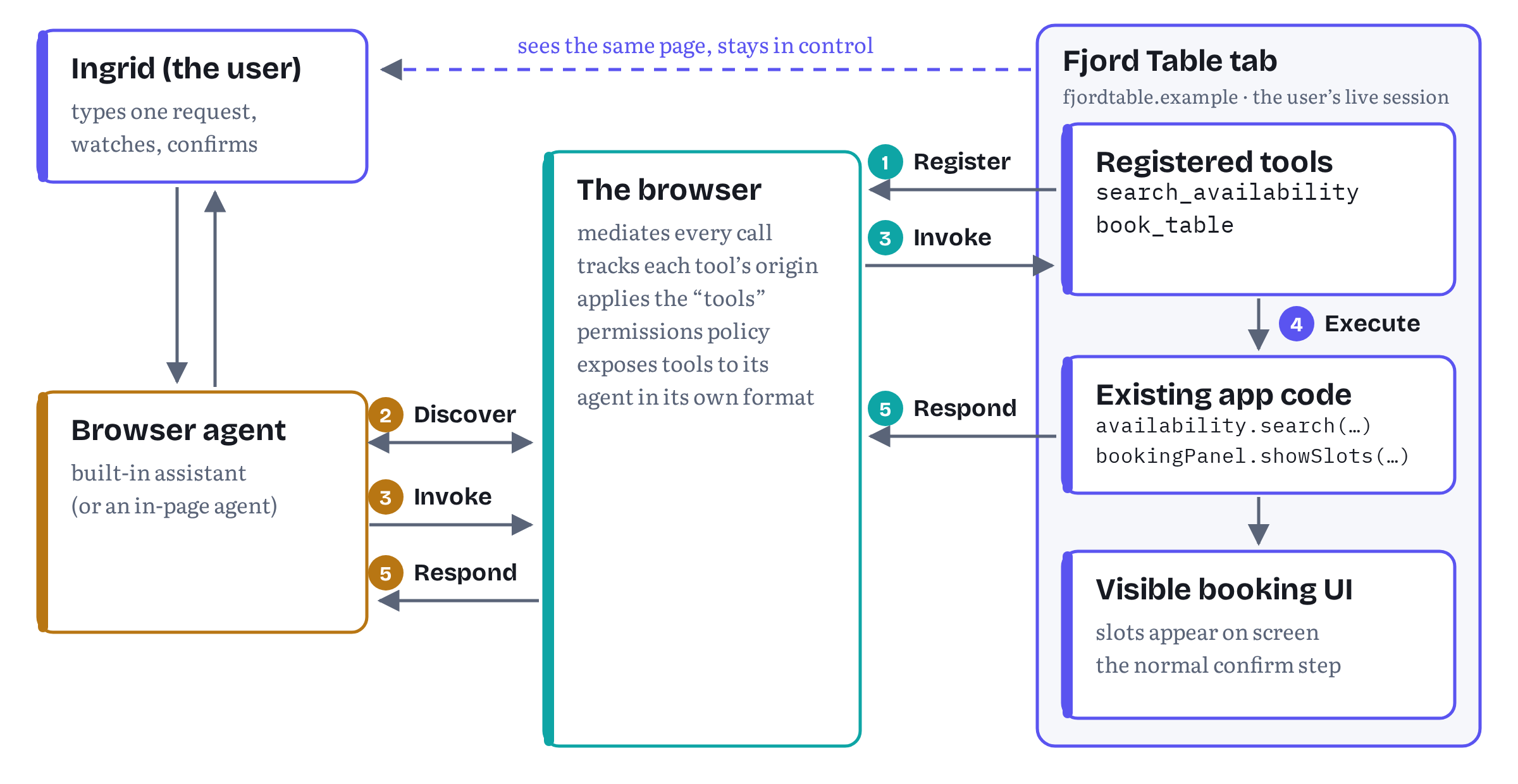
Three consequences follow from running in the tab, and together they explain most of WebMCP’s design.
The user stays in the loop
The explainer’s first stated goal is to “enable human-in-the-loop workflows”, cooperative scenarios in which users delegate tasks while “maintaining visibility, history, and control over web pages.”7 Because the tool runs in the visible page, it can (and should) update the visible page. When Ingrid’s agent calls search_availability, the booking panel shows the slots. When it calls book_table, Fjord Table’s normal confirmation screen appears. The agent becomes a fast pair of hands on an interface the user can still see and correct. The spec’s introduction describes exactly this: WebMCP “enables collaborative workflows where users and agents work together within the same web interface”.2
Tools are ephemeral and tab-bound
A WebMCP tool exists while the page that registered it exists. Chrome’s guide says it plainly: “WebMCP tools are ephemeral. They exist only when your page is open. Once the user navigates away from the page or closes the tab, the page’s WebMCP tools become unavailable.”1 Pages can also add and remove tools as the user moves around. Fjord Table might offer book_table only once a date and a party size are on screen. I see this as a feature: the set of tools reflects what the user could do right now in the UI.
The browser is the broker
Agents don’t talk to your page directly. The browser mediates. It knows which origin registered each tool, applies a permissions policy (a feature called tools, allowed by default only for the page itself and same-origin frames) and decides how to present the tools to its agent.8 The spec deliberately leaves that last part open. Despite the name, it “does not prescribe the format in which tools are exposed to the browser agent. Browsers are free to distill and expose tools via Model Context Protocol, other proprietary ‘function calling’ methods, or any other way it deems appropriate.”6 For a page author, this means you write against one web API, and each browser’s agent consumes your tools in whatever form its model prefers.
There are two kinds of consumer. The first is the browser agent, built into or hosted by the browser (think of a sidebar assistant), which reads a snapshot of the page’s tools together with screenshots and other context. The second is an in-page agent written in JavaScript, such as a chat widget, possibly running in an iframe, which discovers tools with getTools() and calls them with executeTool().3 Mozilla’s standards-position thread contains a revealing admission from the editors: WebMCP “was conceived with only the first use case in mind”, and support for agents in cross-origin iframes was added “due to developer demand.”9 Chapter 7 covers that second world in detail.
Goals, and what WebMCP is deliberately not
The explainer lists six goals: human-in-the-loop workflows, simpler and more reliable agent integration, preventing web content disintermediation, reusing existing client-side code, improving accessibility through agents, and headless scenarios that reuse the same tools.7 The non-goals matter just as much, because they mark the edges of the design.
- Not for fully autonomous workflows. The API “is not intended for fully autonomous agents where a browser UI is not present.” Chrome’s own limitations note says that while headless use may be possible, the API “is primarily designed for local browser workflows with a human in the loop.”47
- Not a replacement for backend integrations. WebMCP is designed to “complement, not replace” protocols like MCP.7
- Not a replacement for human interfaces. In the explainer’s words, “the human web interface remains primary”, and agent tools “augment rather than replace user interaction.”7
- Not a replacement for actuation. An agent that can’t finish the job with a page’s tools can still fall back to screenshots and clicks. The explainer says WebMCP “will not conflict with these existing automation techniques.”5
Two more things it isn’t, and it helps to say them early. WebMCP isn’t an accessibility API: the explainer says it’s not designed for ingestion by assistive technology or to interact with the accessibility tree.7 And it isn’t a trust mechanism. The spec’s security section admits that “there is no guarantee that a WebMCP tool’s declared intent matches its actual behavior.”10 A tool description is a claim made by the site, and agents and browsers still have to decide how far to believe it. Part IV is about that problem.
A first taste of code
Chapter 5 covers registration properly. Still, it’s easier to think about an API once you’ve seen it, so here is the smallest useful WebMCP tool for Fjord Table, written against the current draft. It offers a read-only availability search that reuses the code behind the site’s date picker.
fjord-table/search-availability.js (excerpt) — Fjord Table’s first tool, loaded as a module// Progressive enhancement: do nothing where WebMCP isn't available.if ('modelContext' in document) { const agentTools = new AbortController(); await document.modelContext.registerTool({ name: 'search_availability', title: 'Search available tables', description: 'Find open tables at Fjord Table for a date, time and party size. ' + 'Returns up to five nearby time slots. Does not make a booking.', inputSchema: { type: 'object', properties: { date: { type: 'string', description: 'Visit date, YYYY-MM-DD' }, time: { type: 'string', description: 'Preferred time, 24h HH:MM' }, partySize: { type: 'integer', minimum: 1, maximum: 12 } }, required: ['date', 'partySize'] }, annotations: { readOnlyHint: true }, async execute({ date, time, partySize }, { signal }) { // The same function the date picker calls when a human searches. const slots = await availability.search({ date, time, partySize, signal }); bookingPanel.showSlots(slots); // the user sees what the agent found return { date, partySize, slots: slots.map((s) => s.time) }; } }, { signal: agentTools.signal }); // Later, e.g. when the user leaves the booking view: // agentTools.abort(); // unregisters the tool}Let’s have a look at what those few lines do. The name must be 1 to 128 characters from a small ASCII set (letters, digits, underscore, hyphen and full stop), and the description can’t be empty.3 The inputSchema is ordinary JSON Schema. The execute callback receives the agent’s arguments as an object, plus a signal the browser uses to cancel the call. Whatever the callback returns is serialized to JSON for the agent. readOnlyHint tells the agent this tool changes nothing. Registration returns a promise, which rejects if the name is already taken or the inputs are invalid. And to unregister, you don’t call a method at all: you abort the AbortSignal you passed at registration.3
The second listing shows the other side of the loop. Let’s say Fjord Table embeds its own assistant widget. That in-page agent finds the tool and calls it with two methods.
fjord-table/dev/in-page-agent.js (excerpt) — an in-page agent calling the toolconst tools = await document.modelContext.getTools();const search = tools.find((t) => t.name === 'search_availability');const json = await document.modelContext.executeTool(search, { date: '2026-11-20', time: '19:00', partySize: 4});console.log(JSON.parse(json).slots); // e.g. ["18:30", "19:00", "20:15"]executeTool() resolves to the stringified result, which is why the widget parses it. A browser’s built-in agent doesn’t use these methods. It gets the page’s tools through the browser’s own internal mechanism, which the spec calls an observation.6
Still in flux If you’ve read older blog posts, you’ve probably seen
navigator.modelContextand methods calledprovideContext()andclearContext(). Both are gone. The two methods were removed from the draft on 5 March 2026 (pull request #132), and in May 2026 themodelContextobject moved fromnavigatortodocument, scoped to each document (pull requests #177 and #184).11 Some community polyfills and tutorials still use the old shapes. Every listing in this book follows the current draft, and Appendix D collects the migration notes. Treat any WebMCP snippet without a date on it with suspicion.
Notice what Listing 4.1 doesn’t do. It doesn’t open a port, mint a token or describe Fjord Table’s backend. It wraps a function the site already had and puts the result on screen. The explainer calls this goal code reuse: “Any task that a user can accomplish through a page’s UI can be turned into a tool by reusing much of the page’s existing client-side code.”7
WebMCP and MCP: siblings, not twins
The name invites the obvious question, and Google has a whole page answering it: “Will WebMCP replace Model Context Protocol (MCP)?” The answer is no, and the page calls the question a misunderstanding: “WebMCP is not an extension or a replacement of MCP. WebMCP and MCP address different needs.”1
Chrome’s analogy is a good one. “MCP is a call center. It’s available from anywhere, at any time.” WebMCP “is an in-store expert. It’s available only while the user is on your page”, and it helps agents use your site’s features directly, “instead of figuring out a UI designed for humans.”1 Both share a philosophy: structured tool discovery, predictable execution and explicit intent in place of guesswork. The key difference, in Google’s words, “is where the application functionality lives.”1
Table 4.1 — MCP and WebMCP side by side
| Aspect | MCP (Chapter 3) | WebMCP |
|---|---|---|
| What it is | A protocol connecting agents to backend systems | A front-end JavaScript API for web pages to offer tools to agents |
| Where tools run | On a server or local process you operate | In the page’s script, in the user’s tab |
| Who can call tools | Any MCP client | Any agent or client with access to the rendered page (browsers, webviews and so on) |
| When it’s available | Always, as long as the server is up | Only while the page is open |
| Transport | JSON-RPC 2.0 over transports such as stdio or HTTP | No wire protocol: the browser mediates, in a format the spec leaves open |
| Whose login it uses | Its own credentials and auth flow | The user’s current browser session |
| Building blocks | Tools, resources, prompts, plus client features such as elicitation | Tools only, in a web-native API with origins and a permissions policy |
| Tool discovery | The user or the app adds the server | The page registers tools dynamically in the active session |
| User’s view | None, or shown inside the agent’s app | Your own website, with the agent working on it |
| Governance | Versioned protocol (current version 2026-07-28, the stateless revision) | W3C Community Group draft |
Sources: Chrome’s comparison page (rewritten on 27 October 2026, which added the “Who can call tools” and “Building blocks” rows), the WebMCP explainer and spec, and the MCP versioning page.1512
A few rows deserve a sentence each.
No JSON-RPC. WebMCP borrows MCP’s vocabulary, not its wire format. Chrome’s guide asks you to consider WebMCP “a set of ‘MCP-inspired’ APIs, rather than a direct JavaScript implementation of MCP,” and notes that it omits server-side concepts such as resources.1 A browser can translate your tools into MCP for its agent, or into something else entirely.
Any agent with access to the page. Please note the third row. An earlier version of Chrome’s comparison page framed WebMCP as APIs that interact with the browser’s built-in agent. The current page says that any agent or client with access to the rendered page can call the tools, webviews included.1 That matches what the spec has said for a while: the browser’s agent is one consumer, and in-page agents are another.
Tools only. Chapter 3 spent time on MCP resources and prompts. Today’s WebMCP has neither. Its open questions include output schemas, progress reporting, streaming and a higher-level notion of “skills”, several of them explicitly modelled on MCP features.5 The two vocabularies may converge over time, but they haven’t yet.
Stateless protocol, stateful tab. The two also differ in where state lives. Since its 2026-07-28 revision, MCP is stateless: the initialize handshake is gone, and every request carries its own protocol version and client capabilities, so a server keeps no per-connection session.12 A WebMCP tool works the other way round. It runs inside a tab whose signed-in session, application state and visible UI persist from one call to the next.
Different lifecycles, complementary jobs. Google’s recommendation is to use both: “Manage core logic with MCP” as a platform-agnostic service layer that is always available, and “Build a contextual UI with WebMCP” for the moments when the user has your site open.1 For Fjord Table that split is natural. A backend MCP server, like the one we built for Trailhead in Chapter 3, could let an assistant check opening hours or cancel a booking from anywhere. The WebMCP tools handle the rich, visual work of choosing a table while the user watches.
Is “WebMCP” even the right name, then? Interestingly — not everybody thinks so. The W3C’s Technical Architecture Group asked exactly that on 26 October 2026. In an early comment that it explicitly marked as not a resolution, the TAG wrote that the name “implies a relationship to MCP, but the proposal only covers tool registration and is otherwise unrelated to this particular protocol,” and asked: “Is there time to rename the proposal to something like ‘Tools’?”13 As the author of a book called Tools, Not Clicks, I can’t say I mind that suggestion :) Whatever it ends up being called, the relationship to MCP also runs through people and history. Some of WebMCP’s earliest code was an attempt to put MCP itself into the browser, and the decision not to adopt MCP wholesale is one of the most important choices in the design. That’s where we go next.
Roads not taken
Good standards proposals explain the designs they rejected, and the WebMCP explainer lists three.14 They’re worth knowing, because each of them comes back regularly in issue threads and conference Q&A sessions.
1. Just adopt MCP
Why not run the Model Context Protocol in the browser and be done? The explainer gives two reasons. MCP “was built primarily for server-to-client and stdio/SSE process communication” and “lacks native web concepts like origins, standard browser permissions, DOM integration, and tab-level lifecycle management.” And “coupling a web API directly to an actively evolving backend protocol would hinder backward compatibility and platform stability.”14 Web APIs are effectively forever, while MCP is a fast-moving protocol with dated revisions. So WebMCP keeps a “common vocabulary” with MCP and leaves the browser free to bridge to whatever protocol its agent speaks.
2. Static manifests
Could sites list their tools in a static file, like the Web App Manifest? That would help background discovery. But static manifests “prevent web developers from dynamically adding, updating, or removing tools based on the active page state or user authentication status,” and a manifest can’t contain the code that runs the tool.14 The explainer leaves the door open to layering static declarations on top later, and a separate service-worker explainer explores how agents might discover tools on sites the user doesn’t have open.5
3. A toolcall event
A third design would have pages listen for a toolcall event and respond, much like a service worker’s fetch handler. As a service worker person, I have a soft spot for this shape. It was rejected anyway — it separates a tool’s declaration from its implementation and leads to sprawling switch statements (anyone who has maintained a big fetch handler knows the feeling). A hybrid, an interceptable event dispatched before the registered callback runs, is still on the table.14
The alternative WebMCP’s critics prefer
There is a fourth alternative that the explainer doesn’t list, and it’s central to the politics. Apple’s WebKit team argues that “when a site’s actions are hard for an agent to use, that is a gap in the page’s own semantics,” and that the fix belongs in HTML and ARIA, “where the user, assistive technology, and agents all benefit,” rather than in a parallel layer of JavaScript tools.15 The TAG’s early comment carries a version of the same worry: some members asked “to fully work out the declarative version before shipping the imperative one.”13 The declarative form API, which annotates existing HTML forms, is partly an attempt to meet that argument halfway. We look at it in Chapter 8, and at the wider dispute below.
Where WebMCP came from
Note This section mixes two kinds of evidence. Dates of repositories, explainers, specification changes and browser milestones come from primary sources: the GitHub repositories themselves, the explainer’s acknowledgments, Chrome Platform Status and the spec. The personal story of how MCP-B was created, and how the browser teams came to work with its author, comes from secondary sources, mainly interviews and community write-ups. I present it as community history, not as established fact.
WebMCP has the usual messy origins of a web feature: independent tinkering, parallel efforts inside browser vendors, and a convergence in a standards venue.
An early proposal (March 2025). Developer Jason McGhee published a repository called WebMCP in early March 2025, describing “a proposal and code for websites to support client side LLMs” in which “a website [can] be an MCP server.”16 His README now redirects readers to the W3C work and says, with some charm, “I was just a guy with a dream.”16
MCP-B (mid-2025). Around the same time Alex Nahas built MCP-B, the “B” standing for browser. His repository dates from June 2025, and its implementation of MCP transports between a page and a browser extension became the best-known prototype of the idea.17 According to an interview published by Arcade in February 2026, Nahas was a backend engineer at Amazon when MCP arrived. Faced with an unwieldy internal MCP setup, he tried running MCP in the browser, where single sign-on and session cookies already took care of identity, using the MCP TypeScript SDK and a custom postMessage transport to a Chrome extension.18 The same account says that teams at Google’s Chrome and Microsoft’s Edge had been exploring parallel ideas and joined forces with him through the W3C, and that Nahas initially pushed to port the full protocol to the browser before the group chose a looser coupling. Please treat these details as the community’s account: they are consistent with the primary record, but not documented by it.
Script tools at Google (July 2025). The primary record does show Google working in parallel. The Chrome Platform Status entry for WebMCP was created on 8 July 2025 and lists its “initial public proposal” as an explainer called script-tools in Google’s explainers repository, created later that month.1920
The joint explainer (August 2025). The WebMCP explainer in the Web Machine Learning Community Group’s GitHub organization was “first published August 13, 2025.” Its authors are three engineers from Microsoft (Brandon Walderman, Leo Lee and Andrew Nolan) and three from Google (David Bokan, Khushal Sagar and Hannah Van Opstal).21 The explainer credits MCP-B as prior art, and both the explainer and the spec thank Alex Nahas and Jason McGhee for sharing their implementation experience.221
From explainer to spec (late 2025 to 2026). The explainer notes that the specification “has evolved significantly, primarily driven by Dominic Farolino” of Google.21 Chrome shipped a developer trial behind a flag from Chrome 146 and opened an origin trial in Chrome 149, announced in June 2026.1922 Meanwhile the API went through the churn described in the callout above. The MCP-B project’s own README now sends developers to the Community Group’s repository, and its extension is no longer open source.17
Who decides, and how
If you build on WebMCP, it helps to understand its governance, because that’s how you predict the way it will change.
The venue. WebMCP is incubated in the W3C Web Machine Learning Community Group.23 Community Groups are open: anyone can join after agreeing to the W3C Community Contributor License Agreement, and they can publish reports. A Community Group report isn’t a standard. To get onto the standards track, the work has to be taken up by a Working Group, which requires broader agreement, including from other browser vendors. The first attempt to do that stalled in October 2026, as the status section below describes.
The editors. The 27 October 2026 draft lists four editors: Brandon Walderman (Microsoft), Khushal Sagar (Google), Dominic Farolino (Google) and Samuel Dallstream (Microsoft), who was added on 20 October 2026.224 The TAG review request names Google and Microsoft as the organizations driving the design.13
The workflow. Day to day, decisions happen in the open on GitHub. Issues collect use cases and objections, pull requests change the spec, and the group’s calls record resolutions in minutes. The removal of the declarative API on 8 October 2026 is a typical example: one pull request, merged after discussion, with the explainer updated to match.25 The group also meets in person, and the issue threads now carry follow-ups from the face-to-face sessions at TPAC 2026 in Dublin (26 to 30 October).26 If you want to influence WebMCP, an issue with a concrete use case from a real product is the most effective tool you have, and origin-trial feedback is explicitly invited for exactly that.22
The browser processes. Next to the Community Group run each vendor’s own shipping processes. In Chromium, a feature moves through public “intents” on the blink-dev mailing list, developer trials and origin trials, and the Chrome Platform Status entry lists the owners and links each step.19 An origin trial lets real sites use an experimental feature on their own origin with a token, for a limited number of releases. It exists to gather feedback, and the API can change between releases.
Status and standards politics, November 2026
Everything in this section was checked on 2 November 2026, and some of it will have moved by the time you read it. Chapter 15 returns to it in depth. For now, here is the picture.
Table 4.2 — Where WebMCP stands, 2 November 2026
| Party | Position or state | Source |
|---|---|---|
| Specification | Draft Community Group Report, 27 October 2026, four editors. Not on the W3C standards track | Spec2 |
| Chrome | Origin trial from Chrome 149, originally through 156, extended through Chrome 162. Chrome 156 reached the stable channel on 20 October 2026 | Chrome Platform Status, Chromium Dash1927 |
| Microsoft Edge | Origin trial from Edge 150 (released 2 July 2026), expiring 30 March 2027 | Edge origin trials and Edge 150 release notes28 |
| Mozilla (Firefox) | Position recorded as “neutral”. An updated position has been announced but not published | standards-positions #1412, TAG review913 |
| Apple (WebKit) | Position recorded as “oppose” | standards-positions #67015 |
| W3C TAG | Early review still open, labelled “Missing: Multi-stakeholder support”. An early, non-resolution comment was posted on 26 October 2026 | design-reviews #123813 |
| W3C chartering | Plan to add WebMCP to the WebML Working Group closed unmerged on 13 October 2026. A draft Agentic Web Working Group charter, with WebMCP as the initial input for a “Site Capabilities for Agents” deliverable, is in refinement | charter-drafts #829, Agentic Web WG charter draft2930 |
| Agents | Brave Leo (experimental), ChatGPT Desktop, and Meta Ray-Ban Display (listed as planned) | Project status page only31 |
The Chromium side
Google’s Chrome Platform Status entry records the origin trial as running from Chrome 149 to 156, with an extension through Chrome 162 added on 28 September 2026. Its stated reason: “OT feedback has suggested improvements to the API, which we are implementing.”19 In the meantime Chrome 156, the release this book’s probes ran on, has become the stable version.27 Microsoft runs its own origin trial, first listed in the release notes for Edge 150 (released 2 July 2026), and its trial page gives an expiry date of 30 March 2027.28 For local testing, there is a flag (chrome://flags/#enable-webmcp-testing), and Chrome publishes an inspector extension and an example agent extension for trying tools out.4
Mozilla: neutral, with conditions
Mozilla’s position is neutral. Its reviewer, Benjamin VanderSloot, framed WebMCP as a way for websites to declare dedicated “lanes” for automated interaction. With honest participants, he wrote, that helps both agents and developers. But “in an adversarial setting there is a risk that sites will provide tools that do not match the experience of a user on the page,” whether to trap agents, to hide prompt injection from users or to harvest data from tool inputs.9 Later in the thread Mozilla engineers said their position was not driven by the declarative variant, and pointed to issue #236, which proposes repositioning WebMCP more generally as a way to call functions between environments (windows, workers and origins), with agents as one consumer among several.926 An updated Mozilla position is expected: the TAG wrote on 26 October that it would take it into account. As of 2 November 2026 it isn’t published on Mozilla’s thread.139
WebKit: opposed, from first principles
WebKit’s opposition is the most substantial critique on record, and I recommend reading it in full. It has two parts. The first is practical: a parallel tool layer doesn’t deliver the promised reliability, because “the agent still selects and interprets a tool from its natural-language name and description,” so “the brittleness just moves from the DOM into the tool descriptions.” The second is architectural: an agent acting for a user “is, in effect, assistive technology,” and the site shouldn’t treat it differently, while WebMCP makes “an agent is driving” an observable fact.15 When the editors replied with questions, WebKit declined to evaluate the proposal piece by piece and asked instead for the underlying problem to be established first. Is HTML insufficient? Or how authors write it? Or today’s models?15 The issue’s labels list concerns about duplication, privacy, security, internationalization, portability, venue, use cases and API design, and tag it with the topic of meaningful user consent.
The TAG and “multi-stakeholder support”
The W3C’s Technical Architecture Group opened an early review of the Community Group work in June 2026. It’s still open, with a label that sums up the political situation: “Missing: Multi-stakeholder support.” With two Chromium-based browsers in favour, Firefox neutral and WebKit opposed, WebMCP lacks the cross-engine agreement a standard normally needs.13
On 26 October 2026 the TAG shared its “current thinking”, explicitly “not a resolution comment”. It sees the value: WebMCP bridges “the unstructured, natural-language, non-deterministic world of LLMs and the structured, programmatic, deterministic world of web applications.” But it lists concerns that “ought to be addressed before WebMCP ships”: an agent-only description of a page’s functionality that might be unreachable by human users or screen readers (a possible “web for agents”), a weaker incentive to build semantically rich, accessible sites, brittleness that remains because success still depends on the model, the schema and the descriptions, the language and direction of tool descriptions, the first use of JSON Schema by a web platform API, and the name. The TAG also plans a separate Finding on agentic browsing in general.13 Bottomline: the review is in progress, and none of these points has a resolution yet.
The venue question
The status table’s “W3C chartering” row records the move that most directly decides whether WebMCP gets onto the standards track. In June 2026 W3C staff opened a pull request adding WebMCP to the scope of the Web Machine Learning Working Group charter. On 13 August Marcos Cáceres of Apple replied on that pull request: “Just recording that Apple is opposed to this going working group. Expect a formal objection if this is merged.” He added that Apple would be open to “a different venue at the W3C and doing this properly from first principles (i.e., some new agentic web CG/WG).” On 28 September Philippe le Hégaret, who had opened the pull request, wrote that “the latest thinking is to have a working group dedicated to develop specifications that facilitate web pages and applications to be leveraged by LLMs and AI agents.” On 13 October 2026 he closed the pull request without merging it.29
The replacement is a draft charter for a new Agentic Web Working Group. Its normative deliverable is now called “Site Capabilities for Agents”, covering both imperative and declarative descriptions of what a site can do, and the charter states: “The initial input for this deliverable is the WebMCP specification.”30 The W3C opened charter refinement on 1 October 2026 and estimated that it would last “until approximately 10 November 2026.” The charter was discussed at TPAC, and its tracking issue keeps collecting requests. One of them came on 26 October from Ilya Grigorik of Shopify, who wrote that “Shopify deploys WebMCP across millions of storefronts” and asked the charter to cover attribution of agent-originated interaction to the page it acts on.30 A draft charter is not an approved one. The group has no chairs or dates yet, and whether Apple accepts this venue is not on the public record. Chapter 15 follows the chartering process and what each outcome would mean for your code.
Still in flux Here is what may have changed by the time you read this.
The declarative API. On 8 October 2026 the HTML-forms version of WebMCP was removed from the spec and moved to a separate explainer (pull request #338). Chrome’s documentation still describes it as one of the “two APIs you can use”, and the trial ships it.425 Chapter 8 treats it as an experimental extension, not part of the standard.
User confirmation. Chrome’s security guidance mentions a
requestUserInteraction()method for asking the user for input during a tool call, but the current draft contains no such method. Issue #165 is still discussing elicitation, and pull request #204, still open on 2 November 2026, proposes replacing it with arequestUserInput()method modelled on MCP elicitation.32The shape of a tool. Pull request #348, opened by Dominic Farolino on 15 October 2026, would replace the
RegisteredTooldictionary that in-page agents receive with aToolinterface. It is open, and Chapter 7 shows where it would matter.33Who sees which tools. An open question in the explainer proposes a keyword that would let authors control whether the built-in browser agent can see a tool, with different defaults for top-level pages and iframes.5
What WebMCP is for. Issue #236 asks whether WebMCP should become a general cross-environment function-calling API, a shift that Mozilla called “pretty significant”.926
Agent support. Support from ChatGPT Desktop, Brave and Meta is claimed only on the project’s implementation-status page, not in those vendors’ own documentation.31
The Working Group charter. The Agentic Web Working Group charter is a draft in refinement. Its scope, its deliverables and even whether it’s approved with WebMCP in it can still change.30
None of this means WebMCP is going away. It means the honest description of WebMCP in late 2026 is this: a well-resourced, actively developed proposal with two shipping trials and a serious, unresolved debate about whether the web needs it in this form. So build on it the way you build on any experimental web feature — something I’ve done for years with service worker APIs. Make it a progressive enhancement over a site that works without it, and keep your tools close to logic you already have, so that following an API change stays cheap.
What this means for your product
If you lead a product or a team, three practical points come out of this chapter.
- WebMCP is an enhancement, not a channel. It doesn’t put your product into an agent’s marketplace. It makes your existing site cheaper, faster and more reliable for agents that visit it together with a user, and it keeps that user on your interface, under your brand and your design.
- Start from your highest-value journeys. The candidates are the flows where actuation hurts most and where the user wants to stay in control: search and filtering, configuration, multi-step forms, bookings. Chrome’s tool-building guide (I’m one of its co-authors) gives the same advice: “Start by identifying journeys where agentic support offers the most added value.”34 For Fjord Table, that means availability search and the booking itself, not the “About us” page.
- Keep MCP in the plan. If agents also need to reach you when your site isn’t open, a backend MCP server is still the right tool. The two share a vocabulary, so a well-designed tool can often be offered in both places.
For web developers, the message is even simpler — and a bit less exciting. The API surface is small, the hard parts are design and trust, and the details are still moving. Write your tools as thin wrappers over code you already have.
Bridge to Part II
We now have the idea, the history and the politics. Part II turns to the API in detail. Chapter 5 takes Listing 4.1 apart line by line: feature detection and secure contexts, the name and schema rules, what happens to return values, and how unregistration works. Chapter 6 covers the four annotation hints, the step-by-step lifecycle of a call, cancellation and errors. Chapter 7 moves to the multi-frame world of exposedTo, getTools() and page-embedded agents. Chapter 8 returns to Fjord Table’s plain HTML forms and the declarative API, which is out of the spec but still in the browser.
Chapter summary
- WebMCP is a proposed web API that lets a page register JavaScript tools (a name, a description, a JSON Schema for inputs and an async callback) through
document.modelContext.registerTool(), so agents can call them instead of scraping and clicking. - It addresses the actuation tax (brittle, slow, ambiguous agent interaction with human-first UIs) without the costs of backend integrations: bypassing your interface, duplicating state and auth, and running a separate server.
- Tools run in the user’s live tab, with the user’s session and in front of the user. They are ephemeral and tab-bound, and the browser mediates every call.
- WebMCP borrows MCP’s vocabulary but not its protocol: there is no JSON-RPC, it offers tools only, any agent with access to the rendered page can call them, and the format for agents is left to the browser. Google frames the two as complementary: MCP is the call centre, WebMCP the in-store expert. The TAG has asked whether the name should change to something like “Tools”.
- The design rejected adopting MCP directly, static manifests and a pure
toolcallevent. WebKit argues for a different alternative altogether: better HTML and ARIA. - Its roots include community prototypes by Jason McGhee and Alex Nahas (MCP-B), Google’s script-tools work and a joint Microsoft–Google explainer published in August 2025, now incubated in the W3C Web Machine Learning Community Group.
- As of 2 November 2026 it is a Community Group draft (27 October 2026) in origin trials in Chrome (149 to 162) and Edge (from 150, until 30 March 2027), with Mozilla neutral, WebKit opposed and a TAG review that has shared concerns but no resolution. The plan to move it into the WebML Working Group was dropped after Apple warned of a formal objection, and a draft Agentic Web Working Group charter takes WebMCP as the initial input for its “Site Capabilities for Agents” deliverable. Build on it as a progressive enhancement.
Notes
Notes
Chrome for Developers, “When to use WebMCP and MCP” (published 11 March 2026, updated 27 October 2026, retrieved November 2026). The page was titled “WebMCP and MCP compared” when the first edition of this book quoted it. https://developer.chrome.com/docs/ai/webmcp/compare-mcp
WebMCP specification, Draft Community Group Report, 27 October 2026 (retrieved November 2026), Abstract, Status of this document, §1 Introduction and §8 Acknowledgements. https://webmachinelearning.github.io/webmcp/
WebMCP specification, §4.1–4.2 (Extensions to Document, the ModelContext interface, registerTool(), getTools(), executeTool() and the IDL index). https://webmachinelearning.github.io/webmcp/#api
Chrome for Developers, “WebMCP” (published 18 May 2026, updated 7 October 2026, retrieved November 2026), including “Local WebMCP”, “Use WebMCP APIs” and “Limitations”. https://developer.chrome.com/docs/ai/webmcp
WebMCP explainer (README), “Background and Motivation”, “Existing web actuation techniques” and “Open questions”, webmachinelearning/webmcp. https://github.com/webmachinelearning/webmcp
WebMCP specification, §5.1 Event loop integration and §5.2 Page observations. https://webmachinelearning.github.io/webmcp/#interaction-with-agents
WebMCP explainer, “Goals & Non-Goals”. https://github.com/webmachinelearning/webmcp#goals--non-goals
WebMCP specification, §4.4 Permissions policy integration (policy-controlled feature “tools”, default allowlist ‘self’). https://webmachinelearning.github.io/webmcp/#permissions-policy
Mozilla standards-positions issue #1412, “WebMCP” (position: neutral, comments June–August 2026, no newer comments as of 2 November 2026). https://github.com/mozilla/standards-positions/issues/1412
WebMCP specification, §6.3.2 Misrepresentation of Intent. https://webmachinelearning.github.io/webmcp/#misrepresentation-of-intent
webmachinelearning/webmcp pull requests #132 (removed provideContext() and clearContext(), merged 5 March 2026), #177 (merged 19 May 2026) and #184 (moved the modelContext getter to Document, merged 27 May 2026). https://github.com/webmachinelearning/webmcp/pull/184
Model Context Protocol, “Versioning” (current protocol version 2026-07-28, re-checked November 2026) https://modelcontextprotocol.io/specification/versioning, and MCP specification 2026-07-28, Overview (“Stateless, self-contained requests”) and Key Changes (“Make MCP stateless: remove the initialize / notifications/initialized handshake”). https://modelcontextprotocol.io/specification/2026-07-28/changelog
W3C TAG design review #1238, “Incubation: WebMCP” (opened 11 June 2026, open as of 2 November 2026), including Christian Liebel’s comment of 26 October 2026 on behalf of the TAG (“This is not a resolution comment”). https://github.com/w3ctag/design-reviews/issues/1238
WebMCP explainer, “Alternatives Considered”. https://github.com/webmachinelearning/webmcp#alternatives-considered
WebKit standards-positions issue #670, “WebMCP” (position: oppose, WebKit comments of 3 June and 17 June 2026). https://github.com/WebKit/standards-positions/issues/670
Jason McGhee, jasonjmcghee/WebMCP (repository created March 2025, README note added 12 February 2026). https://github.com/jasonjmcghee/WebMCP
Alex Nahas, MiguelsPizza/WebMCP (MCP-B, repository created June 2025, README status notes). See also mcp-b.ai. https://github.com/MiguelsPizza/WebMCP
RL Nabors, “WebMCP: The Web Standard That Makes Every Website a Tool for Agents”, Arcade.dev, 11 February 2026 (secondary source, an interview with Alex Nahas). https://www.arcade.dev/blog/web-mcp-alex-nahas-interview/
Chrome Platform Status, “WebMCP” (feature 5117755740913664): owners, developer trial from M146, origin trial M149–M156, extension to M162 recorded 28 September 2026 (re-checked November 2026). https://chromestatus.com/feature/5117755740913664
Google, explainers-by-googlers/script-tools (repository created July 2025), listed by Chrome Platform Status as the initial public proposal. https://github.com/explainers-by-googlers/script-tools
WebMCP explainer, “Acknowledgments” (first published 13 August 2025, authors and credits) and “Prior Art”. https://github.com/webmachinelearning/webmcp#acknowledgments
Chrome for Developers blog, “Join the WebMCP origin trial” (9 June 2026). https://developer.chrome.com/blog/ai-webmcp-origin-trial
W3C Web Machine Learning Community Group. https://www.w3.org/community/webmachinelearning/
webmachinelearning/webmcp pull request #352, which added Samuel Dallstream as an editor (merged 20 October 2026). https://github.com/webmachinelearning/webmcp/pull/352
webmachinelearning/webmcp pull request #338, “Remove declarative API from spec” (merged 8 October 2026), and the Declarative API Explainer. https://github.com/webmachinelearning/webmcp/pull/338
webmachinelearning/webmcp issue #236, “Reposition feature as a generic communication tool?” (opened 3 August 2026, with follow-ups after the TPAC 2026 face-to-face meetings, last updated 30 October 2026). https://github.com/webmachinelearning/webmcp/issues/236
Chromium Dash, release data for the Stable channel (Chrome 156.0.8078.80, stable since 20 October 2026, Chrome 157 scheduled for 3 November 2026), retrieved 2 November 2026. https://chromiumdash.appspot.com/releases?platform=Windows
Microsoft Edge Origin Trials, “WebMCP” (trial expiration date 30 March 2027) https://developer.microsoft.com/en-us/microsoft-edge/origin-trials/trials/0b76fe60-b266-458e-a285-04e375c0c31a, and Microsoft Edge 150 web platform release notes (2 July 2026), “Origin trials”, which list WebMCP (the Edge 149 notes don’t). https://learn.microsoft.com/en-us/microsoft-edge/web-platform/release-notes/150
w3c/charter-drafts pull request #829, “[wg/webmachinelearning] Adds WebMCP in scope”, including Marcos Cáceres’s comment of 13 August 2026 and Philippe le Hégaret’s comment of 28 September 2026 (closed without merging, 13 October 2026). https://github.com/w3c/charter-drafts/pull/829
W3C, “Agentic Web Working Group Charter” (draft, retrieved 2 November 2026), “Normative Specifications: Site Capabilities for Agents” https://w3c.github.io/charter-drafts/2026/agenticweb-wg.html, Xueyuan Jia, “Start of refinement for a draft Agentic Web Working Group charter”, public-new-work, 1 October 2026 https://lists.w3.org/Archives/Public/public-new-work/2026Oct/0002.html, w3c/strategy issue #576 (label “In Charter Refinement”), including Ilya Grigorik’s comment of 26 October 2026. https://github.com/w3c/strategy/issues/576
WebMCP, “Browser and Agent Implementation Status” (the project’s own page, unchanged since 15 October 2026, vendor claims not independently confirmed). https://github.com/webmachinelearning/webmcp/blob/main/implementation-status.md
Chrome for Developers, “WebMCP tool security” (updated 1 September 2026, retrieved November 2026) https://developer.chrome.com/docs/ai/webmcp/secure-tools, webmachinelearning/webmcp issue #165, “WebMCP elicitation via requestUserInteraction()”, and pull request #204, “Replace requestUserInteraction with requestUserInput” (open, last updated 29 October 2026). https://github.com/webmachinelearning/webmcp/pull/204
webmachinelearning/webmcp pull request #348, “Introduce the
Toolinterface” (opened 15 October 2026, open as of 2 November 2026). https://github.com/webmachinelearning/webmcp/pull/348Chrome for Developers, “Build your user’s agentic workflows with WebMCP tools”, by André Cipriani Bandarra and Maxim Salnikov (published 26 August 2026, updated 30 October 2026, retrieved November 2026), section “Define the user goal”. https://developer.chrome.com/docs/ai/webmcp/build-tools