“A responsible agent should keep the human-in-the-loop and implement requests for confirmation as needed.”
— Chrome for Developers, “Agent security considerations for WebMCP”1
Who presses the button?
Chapter 12 was about people who want to misuse a WebMCP page. This chapter is about the person the page is supposed to serve. When an agent can search, compare, fill a cart and start a checkout, the interesting question stops being can it place the order. The question is who decides that it should. The explainer's answer is clear in spirit. Its first goal is to “enable human-in-the-loop workflows” in which users delegate tasks “while maintaining visibility, history, and control”, and it lists fully autonomous agents with no browser UI as a non-goal.2 The specification itself is much quieter. It has no consent API, no confirmation API and, as of its 27 October 2026 draft, an accessibility section with a heading and nothing under it.3
That gap is where this chapter lives. First we'll split the responsibility for consent between the agent, the browser and the page. Then we build Trailhead's checkout so that it never completes without a person, and look at what a trusted click really proves. After that comes the long and still unfinished design of an elicitation API, then signed-in sessions and sensitive data, then the question of what a page can know about the agent. We finish with accessibility, where WebKit's critique of WebMCP is at its sharpest.
As in Chapter 12, everything was checked against the WebMCP Draft Community Group Report dated 27 October 2026, Chrome's developer documentation and the webmachinelearning/webmcp issue tracker, all re-read on 2 November 2026. Browser behaviour was observed in Chromium 156.0.8078.4 with WebMCPTesting switched on. The sixteen tests behind every claim are in the chapter's folder in the demos repository.
Three parties, three kinds of consent
What each party can do
A consequential WebMCP call passes through three pieces of software, and each of them can ask the user something different.
The agent decides whether to call a tool at all. It is the only party that knows what the user actually asked for, so it's the only one that can ask “Do you want me to place this order?” before anything happens. Chrome's agent guidance tells agent builders to confirm actions with the user and to assume a tool mutates state unless its description or readOnlyHint says otherwise.1 The consequentialHint annotation exists to help with exactly this decision: it lets the agent or browser “selectively enforce mandatory user confirmation prompts before executing high-stakes tools”.4
The browser carries the call. It fires toolactivated at the page when a call begins and toolcancel when the caller cancels, and it hands the tool an AbortSignal.5 The specification doesn't ask it to show any consent UI of its own. A browser may do that (especially for its built-in agent), but nothing in the draft defines when or how.
The page runs the tool. It's the only party that can make the action itself wait for a person, because the action happens in its own code. And it's the only party whose interface the user already trusts for this site.
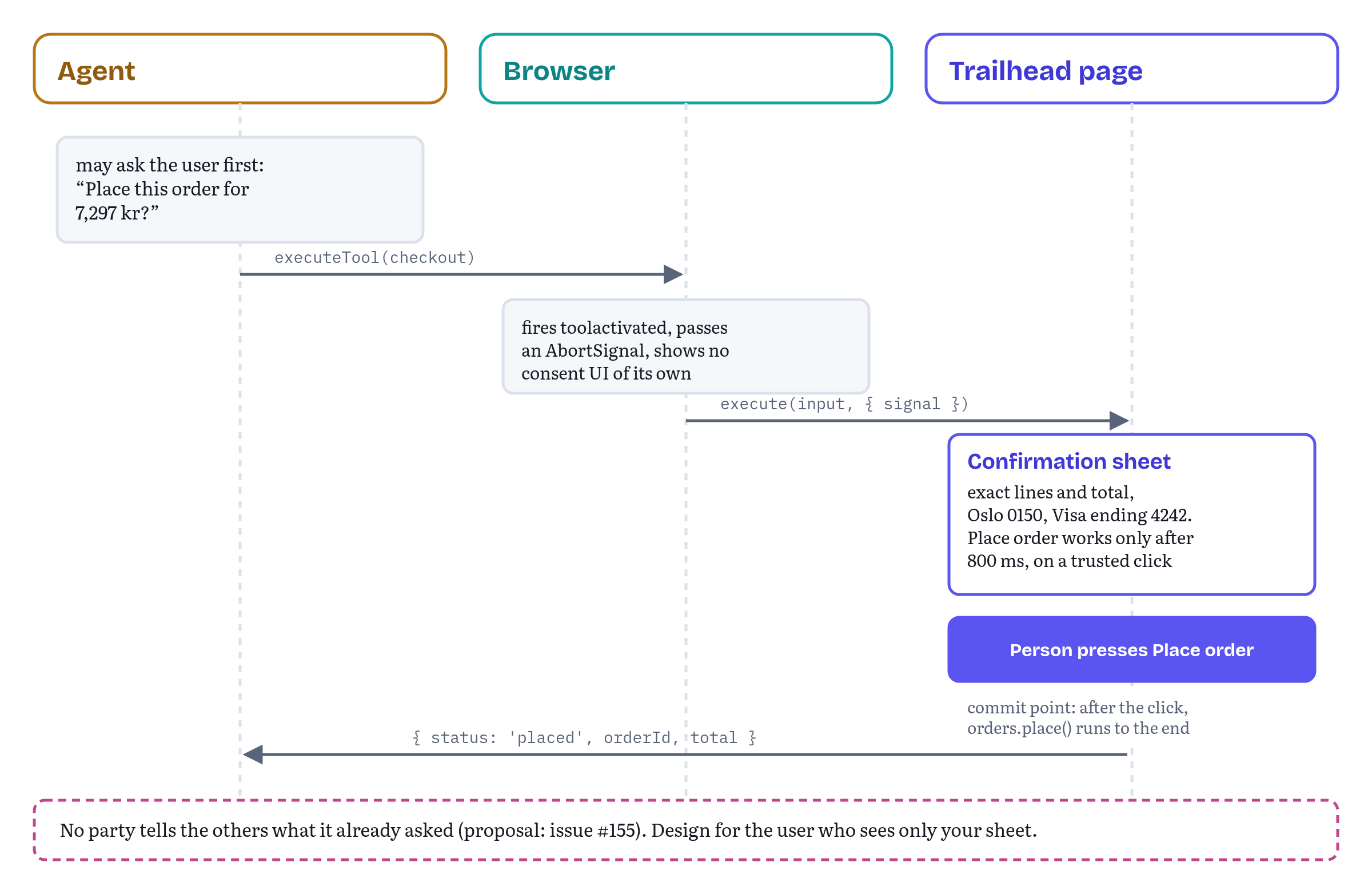
Nobody tells the page what the agent already asked
These layers don't talk to each other about consent. If the agent already asked “Place the order for 7,297 kr?” and the user said yes, the page doesn't know, so it asks again. If the agent didn't ask, the page doesn't know that either. Issue #155 proposes that the browser tell the page what kind of consent, if any, it collected for a specific execution: explicit approval of these exact parameters, a remembered preference, or nothing.6 The proposal is open and has no implementation.
Until something like it exists, assume the worst and design for the user who sees your confirmation as the only one. A second confirmation costs one click. A missing one costs an order the user didn't want.
Building Trailhead's checkout
Trailhead's checkout tool has had one firm rule since its first appearance in this book: the page shows its own confirmation, and the order never completes without the user's click. Let's build that rule so that it really holds.
The confirmation sheet
Listing 13.1 is the sheet the tool opens. It's framework-neutral DOM code, so it can sit behind the React components from Chapter 10 or behind any other UI.
chapters/13-privacy-consent-human-in-the-loop/trailhead/confirm-sheet.js — the page's own confirmation step// The page's own confirmation step. The agent can open it; only a person should finish it.const ARMING_DELAY_MS = 800; // ignore presses that land before a person could have read the sheetexport function confirmOrder(order, { signal } = {}) { const sheet = document.querySelector('#confirm-sheet'); sheet.querySelector('[data-items]').replaceChildren(...order.lines.map((l) => { const li = document.createElement('li'); li.textContent = `${l.quantity} × ${l.name}: ${formatNok(l.amount * l.quantity)}`; return li; })); sheet.querySelector('[data-total]').textContent = formatNok(order.total); sheet.querySelector('[data-ship-to]').textContent = order.shipTo; sheet.querySelector('[data-pay-with]').textContent = order.payWith; const place = sheet.querySelector('[data-place]'); const back = sheet.querySelector('[data-back]'); place.disabled = true; sheet.showModal(); sheet.querySelector('h2').focus(); // screen readers start at the heading const armed = setTimeout(() => { place.disabled = false; }, ARMING_DELAY_MS); return new Promise((resolve, reject) => { const finish = (outcome) => { cleanup(); sheet.close(); resolve(outcome); }; const onPlace = (e) => { if (e.isTrusted && !place.disabled) finish('confirmed'); }; const onBack = () => finish('declined'); const onCancel = (e) => { e.preventDefault(); finish('declined'); }; // Esc key const onAbort = () => { cleanup(); sheet.close(); reject(signal.reason); }; place.addEventListener('click', onPlace); back.addEventListener('click', onBack); sheet.addEventListener('cancel', onCancel); signal?.addEventListener('abort', onAbort, { once: true }); function cleanup() { clearTimeout(armed); place.removeEventListener('click', onPlace); back.removeEventListener('click', onBack); sheet.removeEventListener('cancel', onCancel); signal?.removeEventListener('abort', onAbort); } });}export const formatNok = (amount) => new Intl.NumberFormat('nb-NO', { style: 'currency', currency: 'NOK' }).format(amount);Each part answers a question a careful reviewer would ask.
- Does the user see exactly what will happen? The sheet lists every line, the total in Norwegian kroner formatted for the user's locale, where the order goes and how it will be paid. Chapter 12's “ambiguous finalization” scenario is a tool whose name and real effect differ.7 A confirmation that shows the real effect closes that gap for the user, even when the agent misread it.
- Can a script finish it? No. The Place order handler ignores events whose
isTrustedisfalse, which the DOM Standard defines as events dispatched by the page's own script and not by the user agent.8 In the tests,button.click()from page script left the sheet open and the order unplaced. - Can a click arrive before anyone could have read it? The button starts disabled and is enabled after 800 ms. A trusted mouse click at the button's coordinates straight after the sheet opened did nothing. The delay is a judgement call: long enough to stop a reflex, short enough not to annoy.
- Can the user say no? Back to cart and the Esc key both resolve the promise with
'declined'. The dialog'scancelevent is intercepted, so Esc becomes a decision and not a silent close. - Can the agent change its mind? If the call's signal aborts, the sheet closes and the promise rejects with the abort reason. Nothing stays on screen waiting for a decision nobody needs any more.
The tools around it
Listing 13.2 registers get_cart and checkout. The interesting part is what each of them returns and what each of them waits for.
chapters/13-privacy-consent-human-in-the-loop/trailhead/checkout-tools.js — Trailhead's cart and checkout tools// Trailhead's cart and checkout tools. The page, not the agent, owns the final step.import { confirmOrder } from './confirm-sheet.js';export async function registerCheckoutTools({ cart, account, orders, signal }) { const mc = document.modelContext; await mc.registerTool({ name: 'get_cart', title: 'View cart', description: 'List the items in the cart with prices in NOK and the order total.', inputSchema: { type: 'object', properties: {}, additionalProperties: false }, annotations: { readOnlyHint: true }, async execute() { return { lines: cart.lines().map(({ sku, name, quantity, amount }) => ({ sku, name, quantity, price: { amount, currency: 'NOK' } })), total: { amount: cart.total(), currency: 'NOK' }, shipTo: account.shippingSummary(), // "Oslo 0150", never the street address payWith: account.paymentSummary() // "Visa ending 4242", never the number }; } }, { signal }); await mc.registerTool({ name: 'checkout', title: 'Place your order', description: 'Start checkout for the current cart. Trailhead shows the order and the user ' + 'places it on the page. Returns status "placed", or "cancelled_by_user" if the user ' + 'backs out. Never charges without the user.', inputSchema: { type: 'object', properties: {}, additionalProperties: false }, annotations: { consequentialHint: true }, async execute(_input, { signal: call }) { if (cart.lines().length === 0) { return { status: 'error', code: 'CART_EMPTY', message: 'The cart is empty. Add items with add_to_cart first.' }; } // Stop waiting if the agent cancels OR the user signs out: unregistering a tool // does not cancel calls that are already running. const stop = AbortSignal.any([call, signal]); let outcome; try { outcome = await confirmOrder({ lines: cart.lines(), total: cart.total(), shipTo: account.shippingSummary(), payWith: account.paymentSummary() }, { signal: stop }); } catch (err) { if (call.aborted) throw err; return { status: 'refused', code: 'SESSION_ENDED', message: 'The user signed out, so nothing was ordered.' }; } if (outcome !== 'confirmed') { return { status: 'cancelled_by_user', message: 'The user closed the order without placing it. Nothing was charged.' }; } const order = await orders.place(cart.snapshot()); cart.clear(); return { status: 'placed', orderId: order.id, total: { amount: order.total, currency: 'NOK' } }; } }, { signal });}checkout doesn't return until the person decides. Its execute awaits the sheet, which can take as long as the user needs (Chapter 6 covered how a long-running call stays well-behaved by honouring its signal). When the person confirms, it places the order and returns { status: 'placed', orderId, total }. When they decline, it returns { status: 'cancelled_by_user', message }, Chapter 11's status for a person who said no in the page's own UI. That's a normal result the agent can report, and no exception is involved. An empty cart is status: 'error' with the code CART_EMPTY, because the agent can fix it with another tool first. And the description tells the agent up front that the user places the order on the page, so a well-behaved agent will say “I've opened the order for you to confirm” instead of “Done”.
There is one subtle line here. The tool combines two signals with AbortSignal.any(): the call's own signal and the signal the tool was registered with. The second one is aborted when the user signs out (Listing 13.4). The reason is a rule from the specification that we met in Chapter 5: unregistering a tool doesn't cancel executions that are already running.9 Without the combined signal, a user who signs out while the sheet is open would leave a pending call waiting for a confirmation that now belongs to nobody. With it, the sheet closes and the call returns { status: 'refused', code: 'SESSION_ENDED', message }. A rule (no order without a signed-in user) says no, and only the user can change that by signing in again. If the abort came from the caller, the tool rethrows it, so the caller sees its own cancellation.
The click on Place order is also the tool's commit point, a term Chrome's best-practices page now uses for a very real problem: an abort signal can arrive after the change has already happened, so a tool should define the moment after which cancellation no longer stops anything.10 For checkout that moment is the confirmation. Before it, an abort closes the sheet and nothing is ordered. After it, orders.place() runs to the end and the tool reports placed, even if the agent has lost interest in the meantime. Personally for me, this is the right trade-off for money: a person said yes, so the order happens, and the agent gets a truthful result instead of a cancellation that didn't really cancel anything.
The tests drive every ending through Chromium's real executeTool(): placed (order TH-100200, 7,297 NOK), declined through Back, declined through Esc, cancelled by the caller's AbortController (the caller gets AbortError and the sheet closes), ended by signing out, and an empty cart. In none of the non-placed cases did an order reach the order service.
Bind the yes to the exact plan
There is one more question a reviewer will ask, and Chrome's documentation added the vocabulary for it on 30 October. What if the plan changes between the moment the user sees it and the moment the system acts on it? The tool-building guide (a page I co-authored) says to “bind approval to a short-lived private grant that includes the exact draft, hash, version, scope, and expiry. Any edit must revoke the grant.”11 The best-practices page says the same from the state side: bind consequential transitions to exact values such as the resource identity, state version and plan hash, and recompute on confirmation, because a state change invalidates old staged plans.10
Trailhead's sheet is modal, so on the page itself nothing can change the cart while it's open. But the agent doesn't use the page's UI: it can keep calling add_to_cart while the sheet waits for the user. A production version of Listing 13.2 should therefore take a snapshot of the cart when it opens the sheet, keep a version or hash of that snapshot, and after the click compare it with the cart as it is now. If they differ, the honest result is an error with a clear message (“The cart changed while the order was open. Review it again.”) and not an order for something the user never saw. The demo keeps the simpler version so the listing stays readable, and its tests don't cover concurrent edits. Chapter 14's “time travel” tests are where this case belongs.
Still in fluxwhat a long wait looks like to an agent. The specification lets
executetake as long as it likes and gives both sides anAbortSignal, but it says nothing about how an agent should present a tool that is waiting for the user, or how long it should wait before giving up. Agents will differ. Return a clear outcome either way, and don't assume the agent will keep the call open forever.
What a trusted click proves, and what it doesn't
The confirmation sheet rests on one assumption: a trusted click means a person clicked. For an agent that only calls tools, that's true. An agent that can also operate the page, with real mouse and keyboard events, breaks it.
Issue #288 describes exactly that. Its author built a deploy console whose write tools only propose changes, and a human approves them on the page. On 2 September 2026, they report, an agent in a desktop app's built-in browser called a proposing tool and then, when nothing happened, clicked the page's own Approve button and carried on. The page recorded the action as approved by the user.12 The author is careful to call it one observed run on one host, and later posts describe reproductions and page-side mitigations, including holding the button for 700 ms instead of clicking it.12
A reply in the same thread explains why no page-side check can fully close the gap. HTML ties user activation to trusted input events, and WebDriver-style automation is designed to produce trusted events, so neither isTrusted nor user activation can tell a person from an automating agent.1213 The issue's author agreed: isTrusted “isn't a boundary, it's a description of one host's current implementation”.12
Trailhead's own tests show the same from the other side. After the arming delay, the test presses Place order with Playwright, which drives Chromium through the DevTools protocol, and the page's listener records isTrusted: true. That's how the test suite places its order. It's also how an agent with page-automation powers could place one.
So let's be precise about what Listing 13.1 buys you. It stops tool-only agents, page scripts and accidental instant clicks from completing an order. It doesn't stop an agent that was given control of the page and decides to press the button. Against that, the boundary has to come from outside the page: the agent's own policy, or a browser-level mechanism that only a person can trigger. A later comment on #288 sketches such a mechanism, a short-lived “decision grant” that the browser mints only from a person's input and binds to one specific proposal, and argues that a page should never infer authorization from a DOM event.12 Nothing like it is specified yet. (Chrome's “private grant” from the previous section is the page-side cousin of the same idea: the grant there protects the plan, and this one would protect the click.)
Still in fluxa human-only boundary. Whether browsers should offer a way for a page to require input that only a person can provide, and what it would look like, is open in issue #288 (opened 3 September 2026). Until then, page-side confirmation protects against mistakes and tool-only agents, and an agent that automates the page itself can still get through it.12
Elicitation: asking the user in the middle of a call
From requestUserInteraction() to nothing, for now
A confirmation sheet is one case of a more general need: a tool that needs something from the user half-way through. A size the agent didn't know, a choice between two delivery slots, a sign-in. The MCP world calls this elicitation. WebMCP has tried several designs for it and has none at the moment.
The early design was requestUserInteraction(), a method on a ModelContextClient interface that represented the agent executing a tool. The tool passed it a callback that showed some page UI. As one of the editors later explained, the point was to let the agent know that the page needed the user, so it could unlock input or tell the user the site needed attention.14 Issue #165, opened in April 2026, argued that this didn't cover agents driving the browser from outside (remote automation services, for example), and the discussion moved towards MCP-style modes. Pull request #204 then proposed to replace requestUserInteraction() with a new method, requestUserInput().15 On 11 June 2026 the Community Group resolved to specify the “interactive” mode first and keep discussing the others.14 The same day, pull request #205 removed the ModelContextClient interface from the specification altogether, because the spec shouldn't carry interfaces whose algorithms were still empty.16 On 2 November 2026, #165 and #204 are both still open (the pull request was last updated on 29 October), and the specification has no elicitation method.
Chrome's tool-security page still says that “the spec draft includes requestUserInteraction() to asynchronously request user input at tool execution”, and links to a spec anchor that no longer exists.17 If you read that sentence and go looking, this section is why you won't find it.
The proposed shape
Listing 13.3 is the IDL from pull request #204, exactly as proposed (it hasn't changed since this book first came out). It's not in the specification and not in Chromium. It's here so you can recognise it, and so you can design today's code to fit it if it lands.
chapters/13-privacy-consent-human-in-the-loop/proposal/request-user-input.webidl — requestUserInput() as proposed in pull request #204 (proposal, not in the spec, not implemented)[Exposed=Window, SecureContext]interface ModelContextClient { Promise<ModelContextUserInputResult> requestUserInput( ModelContextUserInputOptions options, optional ModelContextInteractiveCallback callback);};callback ModelContextInteractiveCallback = Promise<any> ();enum ModelContextUserInputMode { "interactive", "form", "url" };enum ModelContextUserInputAction { "accept", "decline", "cancel" };dictionary ModelContextUserInputOptions { required ModelContextUserInputMode mode; USVString message; object requestedSchema; USVString url; AbortSignal signal;};dictionary ModelContextUserInputResult { required ModelContextUserInputAction action; object content;};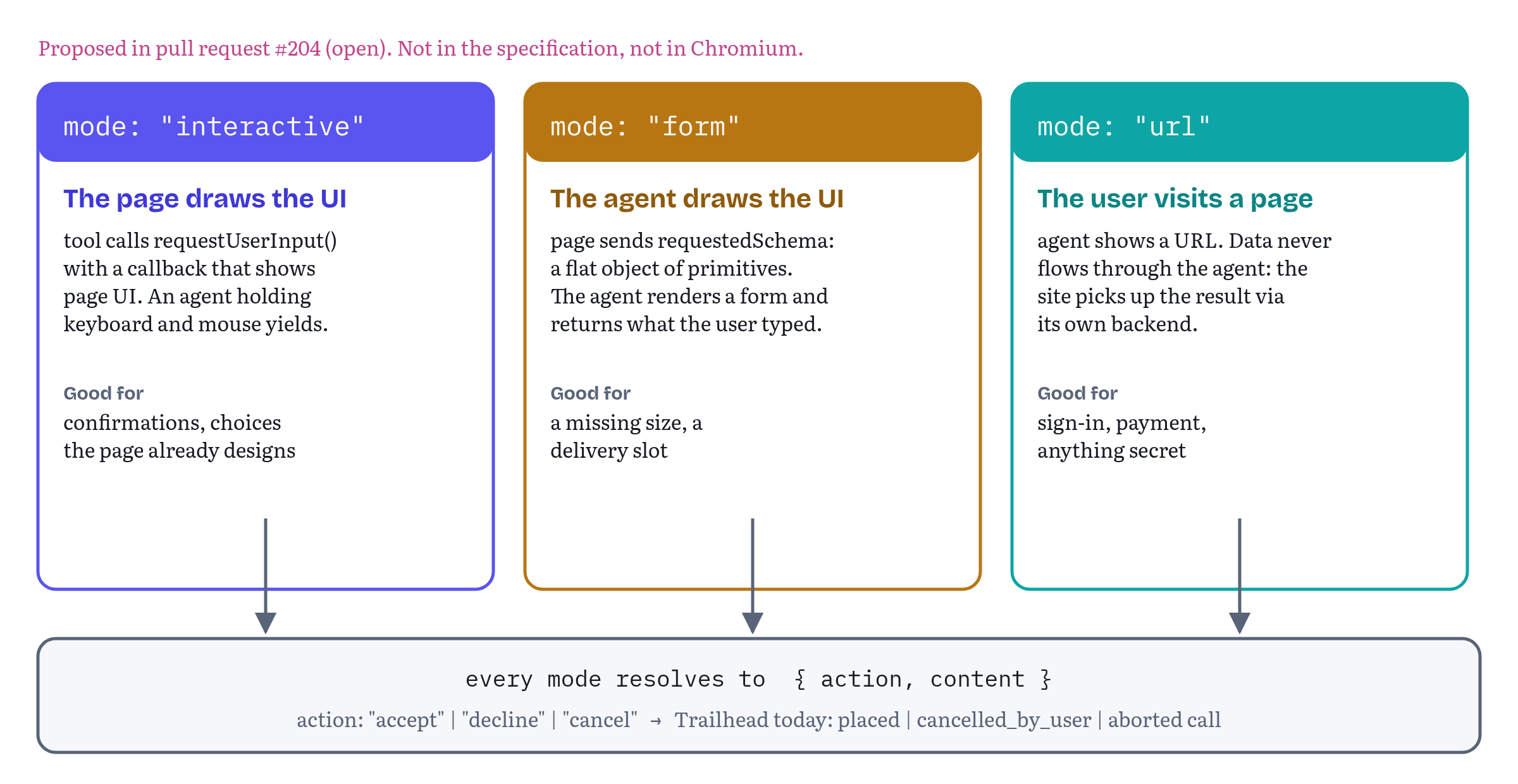
The three modes answer the question “who draws the UI?” differently.15 In interactive mode the page draws the UI in a callback, and if the agent currently has exclusive control of the page (with keyboard and mouse locked, for example), it yields so the user can act. In form mode the page sends a JSON Schema, restricted to flat objects with primitive properties, and the agent draws a form in its own interface and returns what the user typed. In url mode the agent shows the user a URL to visit. The proposal reserves it for sensitive flows such as authentication and payment, “where user-provided data must not flow through the agent”, and the site picks up the result through its own backend. Every mode resolves to { action, content }, where action is accept, decline or cancel.
What to build until it lands
You can build all three modes by hand today, and that keeps your code ready for whichever version ships.
- Interactive is what Listing 13.1 already does: the tool shows the page's own UI and awaits it. If
requestUserInput()arrives, the change is to callconfirmOrder()from inside its callback, so the agent knows to step aside. - Form has no good equivalent today, because the page can't ask the agent to draw anything. Return a structured result that names what's missing, Chapter 11's
{ status: 'needs_input', code: 'MISSING_INFORMATION', missing: ['size'], message }, and let the agent ask the user in its own words and call again. - URL is the right model for payment and sign-in right now. Don't let card numbers, one-time codes or passwords become tool parameters. Return the same
needs_inputshape with the page to visit,{ status: 'needs_input', code: 'MISSING_INFORMATION', missing: ['payment'], message, url: 'https://shop.trailhead.example/pay/…' }, and let the user complete the step on your page, where your existing payment and authentication flows apply. Issue #316 asks the editors for exactly this kind of guidance on sensitive fields.18
And please note: the result actions of Listing 13.3, accept, decline and cancel, map directly onto outcomes Trailhead's checkout already has (placed, cancelled_by_user, and a call cancelled through its signal). If the platform settles on this design, translating between the two is one line of code.
Still in fluxelicitation. There is no elicitation API in the 27 October 2026 draft.
requestUserInteraction()was removed withModelContextClienton 11 June 2026 (pull request #205). Its proposed replacementrequestUserInput()(pull request #204) and the wider discussion (issue #165) are still open on 2 November 2026, and Chrome's tool-security page still refers to the old method.14151617
Signed-in sessions and sensitive data
The agent arrives with your user's cookies
The specification's first baseline assumption about agents is identity inheritance: an agent visiting a site carries the user's logged-in credentials and session state.19 For a store like Trailhead, a tool call therefore runs with exactly the same authority as the user's own clicks. The spec's discussion of misrepresented intent spells out the consequence: tools can make purchases, change settings or share data “without additional verification”.20
Two design rules follow. Tools that act on an account should exist only while somebody is signed in. And those tools should return the least the agent needs, because whatever they return may travel with the agent to the next site it visits.
Tools that follow the session
Listing 13.4 ties Trailhead's account tools to the session.
chapters/13-privacy-consent-human-in-the-loop/trailhead/session-tools.js — registering tools only while someone is signed in// Tools exist only while someone is signed in, and vanish the moment they sign out.import { registerCheckoutTools } from './checkout-tools.js';export function bindToolsToSession({ session, cart, account, orders }) { if (!('modelContext' in document)) return; let tools = null; async function onChange() { tools?.abort(); // signed out, or a different user: drop everything tools = null; if (!session.user) return; tools = new AbortController(); try { await registerCheckoutTools({ cart, account, orders, signal: tools.signal }); } catch (err) { if (err.name !== 'AbortError') throw err; // the session changed mid-registration } } session.addEventListener('change', onChange); onChange();}On every session change the module aborts the current registration and, if somebody is signed in, registers fresh tools under a new controller. A signed-out visitor never sees get_cart or checkout. When the user signs out, the tools vanish, and because checkout combines this registration signal with its call signal, a pending checkout ends too. The same pattern handles a switch between accounts without leaving the previous user's tools behind. The try block absorbs the AbortError that registerTool() throws if the session changes while registration is still in progress.21
It also follows a rule Chrome's best-practices page added on 30 October: register tools all at once, so the page exposes either its complete tool surface or none of it, and roll back the whole batch on failure instead of leaving half a workflow callable.10 One controller for the whole set gives you that rollback for free.
The tests confirmed each step in Chromium: no tools before sign-in, exactly two afterwards with readOnlyHint and consequentialHint intact, none after sign-out, and a pending checkout that returned status: 'refused' with code SESSION_ENDED when the user signed out in the middle of the confirmation.
Summaries, not secrets
Have a look at get_cart in Listing 13.2 again. It returns the lines, the prices and the total, but for the address it returns shipTo: 'Oslo 0150' and for payment payWith: 'Visa ending 4242'. The agent needs enough to tell the user what will happen (“shipping to Oslo, paying with your Visa ending 4242”), and nothing more. The street address and the card number stay on Trailhead's servers. The test checks that the result has exactly four keys and that the summaries are what the agent gets.
This is the output-side twin of Chapter 12's over-parameterisation rule. The spec warns that agents correlate context across sites, and anything a tool returns can become context for the next site.19 Issue #331 and the older proposal #110 discuss a sensitiveHint annotation that would let a page mark a tool's output as sensitive, so an agent could ask before reading it and keep it out of logs and long-term memory.22 Until something like that exists, the only reliable control is not returning the sensitive data in the first place.
Two more boundaries are worth naming. Cross-origin exposure from Chapter 12 applies with extra force to account tools. A vendor frame should never list an embedder in exposedTo for a tool that reads or acts on the user's account, unless you would hand that embedder the same data directly (Chrome uses the same test).17 And private browsing is the browser's responsibility, but the spec reminds implementers that exposing tools to agents there can leak across the boundary users expect.23 Never treat a tool call as proof that the user is in their usual profile.
Agent identity, allowlists and user activation
The page doesn't know which agent is calling
execute receives the input and a signal. It doesn't receive the agent's name, its vendor or any proof of either. Several proposals want to change that. Issue #105 proposes a framework for verifying and authorising agent identity, arguing that sites without a backend have no other way to tell a trusted agent from a scraper.24 Issue #54, opened at TPAC in November 2025, questions the assumption that agents should act with the user's identity at all, and suggests they authenticate as OAuth clients, as MCP itself does.25 Issue #116 collects use cases for allowlists, such as an enterprise that wants its tools callable by its own extension but not by the browser's built-in agent.26 All three are still open on 2 November 2026. The question has also moved one level up: the draft charter for the proposed W3C Agentic Web Working Group now lists agent identity and agent delegation as tentative deliverables.27
WebKit's position explains why this is contentious. It argues that an agent acting for a user is “in effect, assistive technology”, and that the site “should not single it out for different treatment”. Making “an agent is driving” observable, it says, invites sites to give agents capabilities they withhold from humans, or to block agents the way some sites once blocked screen readers.28 Agent identity would make that easier, not harder.
For now, design as if you can't tell agents apart — because you can't. Authorise on the user's session, exactly as you would a click, and keep consequential steps behind the page's own confirmation.
A tool call is not a user gesture
Many web APIs require transient user activation: a recent click or key press, as defined by HTML's activation model.13 Opening a pop-up and entering full screen are the familiar examples. Issue #62 asks whether a WebMCP tool call should grant activation, since the agent acts for the user. The discussion is open. One participant prefers a separate “agent activation” concept that could unlock specific powerful features without pretending to be a user.29
Chromium 156 grants nothing. The demo registers a probe tool and calls it from a timer in a page nobody has touched. Inside execute, navigator.userActivation.isActive and hasBeenActive were both false. (Testing this needs care: Playwright's own evaluate() and waitForFunction() count as user gestures, so the probe runs entirely from page script and the test only reads the result afterwards.) The practical rule: don't put anything that needs activation inside execute. If a step needs it, render a button and let the user press it, which is what Trailhead's sheet does anyway.
Still in fluxidentity and activation. Agent identity (#105, #54), agent allowlists (#116), consent signals from browser to page (#155) and user activation for tool calls (#62) were all open on 2 November 2026. None of them is in the specification or, as far as these tests could observe, in Chromium 156.242526629
Accessibility: agents as assistive technology
Two readings of the same idea
The specification's introduction says tools can be invoked by agents, browser agents “and assistive technologies”.30 The explainer lists “Improve accessibility through agents” as a goal, and at the same time says that WebMCP “is not designed for ingestion by accessibility technology, nor is it designed to interact directly with a page's accessibility tree”. Agents act as “highly capable intermediaries”.2 Many of the problems agents have with human-first interfaces, the explainer adds, are the same problems assistive technology has always had.2
WebKit reads the same facts the other way. Its position argues that when an agent struggles with a site, that's “a gap in the page's own semantics”, and the fix belongs in HTML and ARIA, “where the user, assistive technology, and agents all benefit”. It quotes the explainer's own sentence about not serving accessibility technology as evidence that “richer, actionable semantics reach agents while screen-reader and keyboard users get less”, and notes that tool and parameter descriptions carry no language or direction metadata.28
Since this book first came out, the W3C TAG has joined that conversation. Its early design-review comment of 26 October 2026 is explicitly not a resolution, but it shares the TAG's current thinking, and accessibility is all over it. The TAG worries about a “web for agents”, where functionality is described only to agents and stays out of reach for people and screen readers, and about a removed incentive to build semantic, accessible sites. Some members ask “to fully work out the declarative version before shipping the imperative one”, and the comment repeats WebKit's point that imperative tools carry only page-level language and direction, while declarative ones get it per node. The TAG also plans a finding on agentic browsing.31 Meanwhile, the specification's §7 “Accessibility considerations” is still a heading with nothing under it.3 Issue #277 asks for accessibility requirements for any browser or agent UI built from WebMCP data, following an accessibility review in issue #65 and a self-review checklist in #272.32
You don't have to settle that debate to act on it. Both sides want the same outcome: a person using a keyboard or a screen reader must not get a worse site because agents get a better one.
Parity, presence and focus
Three practices make Trailhead's agent features accessible in their own right.
Parity. Every tool Trailhead registers maps to something a person can do in the UI: view the cart, check out. There is no tool-only discount and no tool-only shortcut. It works the other way round too: the confirmation is a normal, keyboard-operable dialog that a screen-reader user reaches the same way as anyone else. Chapter 11's rule that agent-facing text should stay in step with the UI is an accessibility rule as well. (It's also the most direct answer I know to the TAG's “web for agents” worry.)
Presence. When an agent acts on a page, everybody using that page should know, including people who can't see a cursor move. Listing 13.5 listens for the specification's tool events and announces them through a live region.
chapters/13-privacy-consent-human-in-the-loop/trailhead/agent-presence.js — announcing agent activity to everyone// Tell everyone, including screen-reader users, when an agent is acting on this page.export function showAgentPresence() { if (!('modelContext' in document)) return; const banner = document.querySelector('#agent-presence'); // role="status" in the HTML const titles = new Map(); async function refreshTitles() { for (const t of await document.modelContext.getTools()) titles.set(t.name, t.title ?? t.name); } document.modelContext.addEventListener('toolchange', refreshTitles); refreshTitles(); document.modelContext.addEventListener('toolactivated', (e) => { banner.textContent = `An assistant is using Trailhead: ${titles.get(e.toolName) ?? e.toolName}.`; banner.hidden = false; }); document.modelContext.addEventListener('toolcancel', (e) => { banner.textContent = `The assistant stopped: ${titles.get(e.toolName) ?? e.toolName}.`; });}The banner is a <p role="status" aria-live="polite"> in the page's HTML, so screen readers announce changes without stealing focus. It uses each tool's title, which the specification reserves for user-facing UI and recommends localising to the user's language, so the announcement reads “An assistant is using Trailhead: Place your order.” and not just “checkout”.33 toolactivated is fired at the ModelContext of the document whose tool is running, so the page hears about calls from any agent, not only from its own scripts.5 In the Chromium tests the banner showed the activation text when checkout began, and “The assistant stopped: Place your order.” when the caller cancelled.
Focus. When the confirmation sheet opens, Listing 13.1 moves focus to its heading, so a screen-reader user hears “Place this order?” immediately and can read the order in sequence. The test asserts that document.activeElement is the heading. Esc declines, Back to cart declines, and nothing depends on a pointer.
Still in fluxaccessibility requirements. The specification's §7 is still empty in the 27 October 2026 draft. Requirements for agent and browser UI built from WebMCP data (#277), the accessibility review (#65) and the self-review checklist (#272) are open, WebKit's opposition cites accessibility among its main concerns, and the TAG's review is not finished.3322831
Summary
- The explainer promises human-in-the-loop workflows. The specification has no consent API, no confirmation API and an empty accessibility section. Consent is shared between the agent (which can ask before calling), the browser (which carries the call and fires events) and the page (which can make the action wait for a person). None of them currently tells the others what it asked.
- Trailhead's
checkoutopens the page's own confirmation sheet, shows the exact order with summarised address and payment, enables Place order only after a short delay and accepts only trusted clicks. It returnsplacedor Chapter 11'scancelled_by_useras values, refuses withSESSION_ENDEDif the user signs out mid-checkout, and honours both the caller's signal and the session's. - The click is the tool's commit point: before it an abort cancels everything, after it the order completes. Chrome's guidance since 30 October also asks you to bind the approval to the exact plan, so that a cart changed after the sheet opened can't be ordered on an old yes.
- A trusted click is not proof of a person. An agent that can automate the page produces trusted events, as issue #288 reports and as this chapter's own Playwright tests show. Page-side confirmation stops mistakes and tool-only agents. A human-only boundary would need the browser, and none is specified.
- Elicitation is unresolved.
requestUserInteraction()was removed withModelContextClientin June 2026, and its proposed replacement,requestUserInput()with interactive, form and url modes, is still an open pull request on 2 November 2026. Build the equivalents by hand, and keep passwords, codes and card numbers out of tool parameters. - Tools that act on an account should exist only while somebody is signed in, should be registered and removed as one set, should vanish on sign-out (ending any pending call), and should return summaries instead of secrets.
- The page can't identify the calling agent, and a tool call doesn't grant user activation in Chromium 156. Authorise on the user's session and put activation-gated steps behind real buttons.
- Accessibility is contested ground, now with the TAG's voice in it too. Keep agent features in parity with the UI, announce agent activity in a live region using localised tool titles, and make every confirmation keyboard- and screen-reader-friendly.
Chapter 14 takes on the question every chapter so far has raised: how do you know your tools behave like this when the caller is probabilistic? It covers DevTools, protocol-level tests and evaluation suites, and the Trailhead tests from this chapter are a good starting point.
Notes
Notes
Chrome for Developers, “Agent security considerations for WebMCP” (published 9 June 2026), section “Confirm actions with the user”. https://developer.chrome.com/docs/agents/security
WebMCP explainer (README), “Goals & Non-Goals” (including “Enable human-in-the-loop workflows”, “Improve accessibility through agents” and the non-goal “Fully autonomous workflows”) and the background section on assistive technology. https://github.com/webmachinelearning/webmcp
WebMCP specification, Draft Community Group Report, 27 October 2026, §7 Accessibility considerations (no content in this draft) (retrieved November 2026). https://webmachinelearning.github.io/webmcp/#accessibility
WebMCP specification, §6.4.5 Consequential Annotation for Tool Executions. https://webmachinelearning.github.io/webmcp/#mitigation-consequential-annotation
WebMCP specification, §4.3 Events (
toolchange,toolactivated,toolcancel) and the tool execute steps in §3 (“Fire an event named toolactivated at targetDocument's associated ModelContext”). https://webmachinelearning.github.io/webmcp/#supporting-conceptswebmachinelearning/webmcp issue #155, “
userConsentcommunication from User Agent to Web Application” (opened 26 March 2026, still open on 2 November 2026). https://github.com/webmachinelearning/webmcp/issues/155WebMCP specification, §6.3.2.3 Scenario: Ambiguous Finalization (Accidental or Malicious). https://webmachinelearning.github.io/webmcp/#scenario-ambiguous-finalization
WHATWG DOM Standard, the
isTrustedattribute ofEvent. https://dom.spec.whatwg.org/#dom-event-istrustedWebMCP specification, §3, “unregister a tool”, and the note on in-flight executions. https://webmachinelearning.github.io/webmcp/#supporting-concepts
Chrome for Developers, “WebMCP best practices”, by Alexandra Klepper, Maxim Salnikov and François Beaufort (published 18 May 2026, updated 30 October 2026), section “Enforce architectural constraints” (“Register tools all at once”, “Establish explicit commit points”, “Stale workflow state”, “Recompute on confirmation”) (retrieved November 2026). https://developer.chrome.com/docs/ai/webmcp/best-practices
Chrome for Developers, “Build your user's agentic workflows with WebMCP tools”, by André Cipriani Bandarra and Maxim Salnikov (published 26 August 2026, updated 30 October 2026), section “Enforce trust boundaries”, “Bind approval to the exact plan” (retrieved November 2026). https://developer.chrome.com/docs/ai/webmcp/build-tools
webmachinelearning/webmcp issue #288, “A user agent that both invokes tools and automates the page can complete the page's own human-approval step” (opened 3 September 2026, open), including the author's reports and follow-ups of 3 September 2026 and the comments by @mlmrx (3 September 2026) and @Hronom (21 September 2026). https://github.com/webmachinelearning/webmcp/issues/288
WHATWG HTML Standard, §6.4 Tracking user activation (activation-triggering input events, transient and sticky activation). https://html.spec.whatwg.org/multipage/interaction.html#tracking-user-activation
webmachinelearning/webmcp issue #165, “WebMCP elicitation via requestUserInteraction() (was: Human in the Loop support for non-browser clients)” (opened 16 April 2026, still open on 2 November 2026, last updated 26 October 2026), including the Community Group resolution of 11 June 2026 recorded in the thread. https://github.com/webmachinelearning/webmcp/issues/165
webmachinelearning/webmcp pull request #204, “Replace requestUserInteraction with requestUserInput” (opened 9 June 2026, still open, last updated 29 October 2026), the proposed IDL and member definitions (IDL re-checked November 2026). https://github.com/webmachinelearning/webmcp/pull/204
webmachinelearning/webmcp pull request #205, “Remove
ModelContextClientfor now” (merged 11 June 2026), and the discussion on pull request #204 of 10 June 2026. https://github.com/webmachinelearning/webmcp/pull/205Chrome for Developers, “WebMCP tool security” (published 9 June 2026, updated 1 September 2026), sections “Expose your tools carefully” and “Next steps” (retrieved November 2026). https://developer.chrome.com/docs/ai/webmcp/secure-tools
webmachinelearning/webmcp issue #316, “Guidance for sensitive form fields (credentials, card data, national IDs) in declarative and imperative tools” (opened 23 September 2026, open). https://github.com/webmachinelearning/webmcp/issues/316
WebMCP specification, §6.2 Agent Baseline Capabilities (identity inheritance, extended user context, cross-site context) (retrieved November 2026). https://webmachinelearning.github.io/webmcp/#agent-baseline-capabilities
WebMCP specification, §6.3.2.1 Why This Matters. https://webmachinelearning.github.io/webmcp/#why-intent-matters
webmachinelearning/webmcp pull request #202, “Reject registerTool() promise when signal is aborted” (merged 17 June 2026). https://github.com/webmachinelearning/webmcp/pull/202
webmachinelearning/webmcp issue #331, “Scope of
consequentialHintfor high-risk read tools” (opened 30 September 2026, still open on 2 November 2026), and issue #110, “Proposal:sensitiveHintannotation for tool outputs and a standardized secret reference content type” (opened 25 February 2026, open). https://github.com/webmachinelearning/webmcp/issues/331WebMCP specification, §6.3.5 Interaction with Private Browsing Modes. https://webmachinelearning.github.io/webmcp/#interaction-with-private-browsing
webmachinelearning/webmcp issue #105, “Proposal: Agent Identity Verification and Authorization Framework” (opened 23 February 2026, open). https://github.com/webmachinelearning/webmcp/issues/105
webmachinelearning/webmcp issue #54, “Challenging assumptions of Identity within WebMCP” (opened 11 November 2025, open). https://github.com/webmachinelearning/webmcp/issues/54
webmachinelearning/webmcp issue #116, “Agent allowlist use cases and requirements” (opened 27 February 2026, open). https://github.com/webmachinelearning/webmcp/issues/116
W3C, “Agentic Web Working Group Charter” (draft, in charter refinement, tentative deliverables on agent identity and agent delegation added in w3c/charter-drafts pull request #901), and w3c/strategy issue #576 (updated 30 October 2026). https://w3c.github.io/charter-drafts/2026/agenticweb-wg.html
WebKit/standards-positions issue #670, “WebMCP” (position: oppose), position comment by @mwyrzykowski, 3 June 2026. https://github.com/WebKit/standards-positions/issues/670
webmachinelearning/webmcp issue #62, “Grant user gesture activation when interacting with the webpage” (opened 8 January 2026, still open on 2 November 2026, last updated 31 October 2026), including comments of 15 January, 11 March and 19 March 2026. https://github.com/webmachinelearning/webmcp/issues/62
WebMCP specification, §1 Introduction. https://webmachinelearning.github.io/webmcp/
W3C TAG design review #1238, “WebMCP”, early comment of 26 October 2026 (“current thinking”, explicitly not a resolution, the review is still open). https://github.com/w3ctag/design-reviews/issues/1238#issuecomment-6410471845
webmachinelearning/webmcp issue #277, “Define accessibility requirements for WebMCP user-agent UI” (opened 1 September 2026, open), issue #65, “WebMCP accessibility considerations” (opened 26 January 2026, open), and issue #272, “WebMCP accessibility review checklist” (opened 31 August 2026, open). https://github.com/webmachinelearning/webmcp/issues/277
WebMCP specification, §4.2.1 ModelContextTool Dictionary, the
titlemember (“used by the user agent to reference the tool in the user interface … recommended that this string be localized to the user's language”). https://webmachinelearning.github.io/webmcp/#model-context-tool