“Much of a site’s functionality is provided via semantic HTML elements like
<form>, and its various inputs.”— WebMCP Declarative API Explainer1
A form is already a tool
Let’s look at Fjord Table’s booking page the way an agent would. Long before anyone typed registerTool(), the page already had a search form with a date, a preferred time, a number of guests and a seating choice. Next to it sits a booking form that asks for the same things plus a note for the kitchen. Every field has a name and a label, some are required, the number of guests is limited with min and max, and each form has one submit button and does one job. Now compare that with a tool definition — a name, a description, typed parameters with constraints, and an action. Pretty much the same list, right? So the question behind the declarative API is a very natural one. Can we just say “this form is a tool” with a few HTML attributes and let the browser work out the rest?
In Chrome’s implementation, we can. Add toolname and tooldescription to a <form>, and the browser builds a tool definition from the form’s controls. When an agent calls the tool, the browser fills in the fields in front of the user and then either waits for the user to press Submit or submits the form itself. Your page gets an ordinary submit event with one new property, agentInvoked, and can answer the agent through respondWith(). On top of that there are two events for the start and the end of a call, and two CSS pseudo-classes for highlighting the form the agent is working on.2
This chapter covers all of it, using Fjord Table’s two forms. And it has to cover one more thing, quite unusual for a book chapter: the API it describes is not in the specification. On 8 October 2026 the WebMCP specification removed the declarative API.3 It still ships in Chrome, in the WebMCP origin trial and behind the testing flag. Chrome’s documentation still describes it and links the trial, and the Chrome team has said it plans to ship it “shortly after” the imperative API.3 But no specification describes it, and on 2 November 2026, when I re-checked everything for this edition, that was still the case.4 The browser’s behaviour is the only reference, so I tested it. Everything marked observed in this chapter comes from Chromium 156.0.8078.4 with the WebMCPTesting feature enabled (the switch behind chrome://flags/#enable-webmcp-testing). The observations were first made on 14 October 2026, and every one of them is a test in the book’s companion repository. I re-ran the whole suite on 2 November 2026 against the same build: 17 of 17 passed.5 Chrome 156 became the Stable release on 20 October 2026 (the current Stable build, 156.0.8078.80, is a later one than I tested), and Chrome 157 follows on 3 November.6 Run them against whatever Chrome you have, and you’ll know whether anything moved.
Still in flux Out of the spec, still in Chrome. Pull request #338, “Remove declarative API from spec,” was opened on 7 October 2026 and merged on 8 October. It deleted the specification’s placeholder section on declarative WebMCP, which had never been more than a to-do note, together with its two placeholder algorithms, and rewrote the repository README to say that a declarative counterpart “is being explored separately” and “is not part of the specification at this time.”3 The current draft, dated 27 October 2026, still defines only
registerTool(),getTools(),executeTool()and the tool events.4 Chrome’s “Declarative API” page (last updated 25 September 2026) still documents every attribute, event and pseudo-class in this chapter.27 On 13 October 2026, the author of the removal PR, who also co-authors Chrome’s WebMCP documentation, added: “The Chrome team plans to ship the imperative API first, with the declarative API following shortly after.”3 What to do with all this? Use the attributes as a progressive enhancement on forms you already have, and treat every detail below as an implementation fact about Chromium 156, not as a standard. If you need guarantees, use the imperative API from Chapter 5. It can do everything in this chapter, and more.
Where the declarative API came from
The idea is almost as old as WebMCP’s public repository. In September 2025, a month after the explainer repository opened, issue #22 asked why WebMCP was “being pursued exclusively as a JavaScript API,” and suggested that “simply adding a few attributes, combined with existing HTML semantics should do the trick for a lot of scenarios.” Its sketch used a <form> with tool-name, tool-description and a per-input tool-prop-description.8 A community pull request that same month, #26, worked out a fuller proposal. According to its description, the design came from building a real application and a polyfill during a hackathon.9 The editors replaced it with their own Declarative API Explainer, pull request #76, merged on 9 March 2026.10
The explainer states the motivation plainly. Not all site functionality is exposed through JavaScript functions, and the functions that are exposed “take some effort to rewrite with an agent invoker in mind.” A great deal of what a site does lives in its forms. So the proposal has three parts: attributes that turn forms and their controls into tools, an algorithm that “compiles” a form into an input schema, and two ways to send a result back to the agent.1
There is a second reason the declarative API matters, and Chapter 4 already touched on it. WebKit’s objection to WebMCP is that a separate JavaScript layer for agents duplicates what HTML and ARIA already describe. Annotating the forms a site already has, so that people and agents use the very same controls, is the closest WebMCP has come to answering that objection. And WebKit is not alone. On 26 October 2026 the W3C TAG posted its early thinking on the WebMCP design review (explicitly not a resolution). It worries that WebMCP “creates an agent-only description of a page’s functionality that might be unreachable by human users or screen readers,” and reports that some TAG members, concerned that WebMCP removes the incentive to build semantically rich, accessible sites, “ask to fully work out the declarative version before shipping the imperative one.”11 That is the opposite order from Chrome’s plan. Personally for me, this is the strongest argument that the declarative idea will come back in some form, even though it has left the spec.
The removal itself was not a rejection. The specification never had a declarative algorithm, only placeholders. The explainer still admits that the schema-synthesis algorithms are not decided yet, and that “Chromium is implementing a loose version of this and will conduct testing/trials to see if what we’ve come up with should be supported by the community as a general approach.”1 Pull request #338 brought the spec in line with that: the imperative API is specified, and the declarative API is an experiment Chrome is running. The README says it plainly: “Even if a declarative API is added, it would complement rather than replace the imperative API.”3
Three attributes
Here is Fjord Table’s search form as it was before anyone thought about agents. It submits to a results page with a GET request, uses native controls, and labels every field.
chapters/08-declarative-api/listings/listing-8-1-search-form-before.html — Fjord Table’s search form, before<form id="search-form" class="search" action="results.html" method="get"> <label for="search-date">Date</label> <input id="search-date" name="date" type="date" required> <label for="search-time">Preferred time</label> <input id="search-time" name="time" type="time"> <label for="search-party">Guests</label> <input id="search-party" name="partySize" type="number" min="1" max="12" required> <label for="search-seating">Seating</label> <select id="search-seating" name="seating"> <option value="">No preference</option> <option value="window">By the window</option> <option value="indoor">Indoor</option> <option value="terrace">On the terrace</option> </select> <button type="submit">Find a table</button></form>Listing 8.2 makes it a tool. Have a look at what changed: three attributes on the <form> element and one on the time input. That’s all.
chapters/08-declarative-api/listings/listing-8-2-search-form-tool.html — the same form as a declarative tool<form id="search-form" class="search" action="results.html" method="get" toolname="search_availability" tooldescription="Find open tables at Fjord Table for a date, time and party size. Returns up to five nearby time slots. Does not make a booking." toolautosubmit> <label for="search-date">Date</label> <input id="search-date" name="date" type="date" required> <label for="search-time">Preferred time</label> <input id="search-time" name="time" type="time" toolparamdescription="Preferred time, 24h HH:MM. Leave out for any time."> <label for="search-party">Guests</label> <input id="search-party" name="partySize" type="number" min="1" max="12" required> <label for="search-seating">Seating</label> <select id="search-seating" name="seating"> <option value="">No preference</option> <option value="window">By the window</option> <option value="indoor">Indoor</option> <option value="terrace">On the terrace</option> </select> <button type="submit">Find a table</button></form>toolname is the tool’s name. It plays the role of name in registerTool(), and the explainer calls the two analogous.1 Use the same naming rules as in Chapter 5: ASCII letters, digits, underscores, hyphens and dots, unique within the document. That isn’t only good style. In Chromium 156, a form whose toolname was bad name!, or which reused a name another tool already had, simply was not registered (observed).5 Nothing told the page about it. With registerTool() the same mistakes reject with an InvalidStateError you can catch (Chapter 5). How failed registrations of forms should be reported is still an open question, issue #182, which suggests a future toolerror event.12 Until it’s answered, check getTools() in development, as the tests for this chapter do.
tooldescription plays the role of description, and everything Chapter 5 said about descriptions applies here too: say what the tool does, what it returns, and what it does not do. Chrome’s guide says that removing either toolname or tooldescription unregisters the tool.2 Chromium 156 behaved like that when I removed toolname. It did not when I set tooldescription to an empty string: a form with tooldescription="" stayed registered (observed), even though registerTool() rejects an empty description.5 Don’t rely on either behaviour. Just write a real description.
toolautosubmit is a boolean attribute. It lets the browser submit the form after filling it in. We’ll come back to it below, because it is the most important decision in this chapter.
toolparamdescription goes on an individual control and becomes that parameter’s description in the generated schema.1 You need it less often than you might think, because the browser reuses what the form already says. Chrome’s guide says that without the attribute the browser uses the text of the control’s <label>, and if there is no label, its aria-description.2 Chromium 156 followed exactly that order (observed): toolparamdescription first, then the label, then aria-description. It ignored placeholder and title.5 In Listing 8.2 the date, guests and seating fields are described by their labels. The time field gets an explicit description, because the label “Preferred time” tells an agent neither the format nor that the field can be left out.
And that’s the whole registration API — no script, no await, nothing to feature-detect. A browser without WebMCP ignores attributes it doesn’t know, and the form behaves exactly as before. The demo’s tests check that in plain Chromium: the page loads with no errors, 'agentInvoked' in SubmitEvent.prototype is false, and a person can search and book as usual.5
Because the tool is the form, its lifetime is the form’s lifetime. Insert a form with the attributes and a tool appears. Remove the form, or one of its attributes, and the tool goes away. Chrome’s best-practices guide (I’m one of its co-authors) presents this as the declarative version of dynamic registration: you manage which tools exist “by adding or removing the tool attributes on a form.”13 In Chromium 156, adding and removing tool forms also fired the toolchange event on document.modelContext that Chapter 6 uses to keep agents in sync (observed).5
Still in flux Titles and names. The tool definitions Chromium 156 built from forms had an empty
title(observed). Chapter 5 introducedtitleas the human-readable label of a tool, but neither the explainer nor Chrome’s guide defines an attribute for it. In my tests Chromium also read an undocumentedtooltitleattribute into the title.5 Because nothing documents it, I haven’t used it in Fjord Table. And if you meet older examples with hyphens,tool-nameandtool-description, those are the spellings of the early proposals.89 The explainer and Chrome usetoolnameandtooldescription.12
Schema synthesis: what the agent actually sees
An agent never sees your HTML. It sees a name, a description and a JSON Schema, the same shape it gets from registerTool(). For a declarative tool, the browser writes that schema for you. The explainer says this part is still to be determined, so the only way to know what agents receive is to ask the browser.1 document.modelContext.getTools() returns declarative tools next to imperative ones, with inputSchema as an object, so the check is one line in DevTools. Listing 8.3 is what Chromium 156 produced for Listing 8.2, unedited.
chapters/08-declarative-api/listings/listing-8-3-synthesized-schema.json — the input schema Chromium 156 synthesized for Listing 8.2 (from getTools()){ "type": "object", "properties": { "date": { "type": "string", "format": "date", "description": "Date (Dates MUST be provided in 'YYYY-MM-DD' format.)" }, "time": { "type": "string", "format": "^([01][0-9]|2[0-3]):[0-5][0-9]$", "description": "Preferred time, 24h HH:MM. Leave out for any time." }, "partySize": { "type": "number", "minimum": 1, "maximum": 12, "multipleOf": 1, "description": "Guests" }, "seating": { "type": "string", "anyOf": [ { "type": "string", "const": "", "title": "No preference" }, { "type": "string", "const": "window", "title": "By the window" }, { "type": "string", "const": "indoor", "title": "Indoor" }, { "type": "string", "const": "terrace", "title": "On the terrace" } ], "enum": [ "", "window", "indoor", "terrace" ], "description": "Seating" } }, "required": [ "date", "partySize" ]}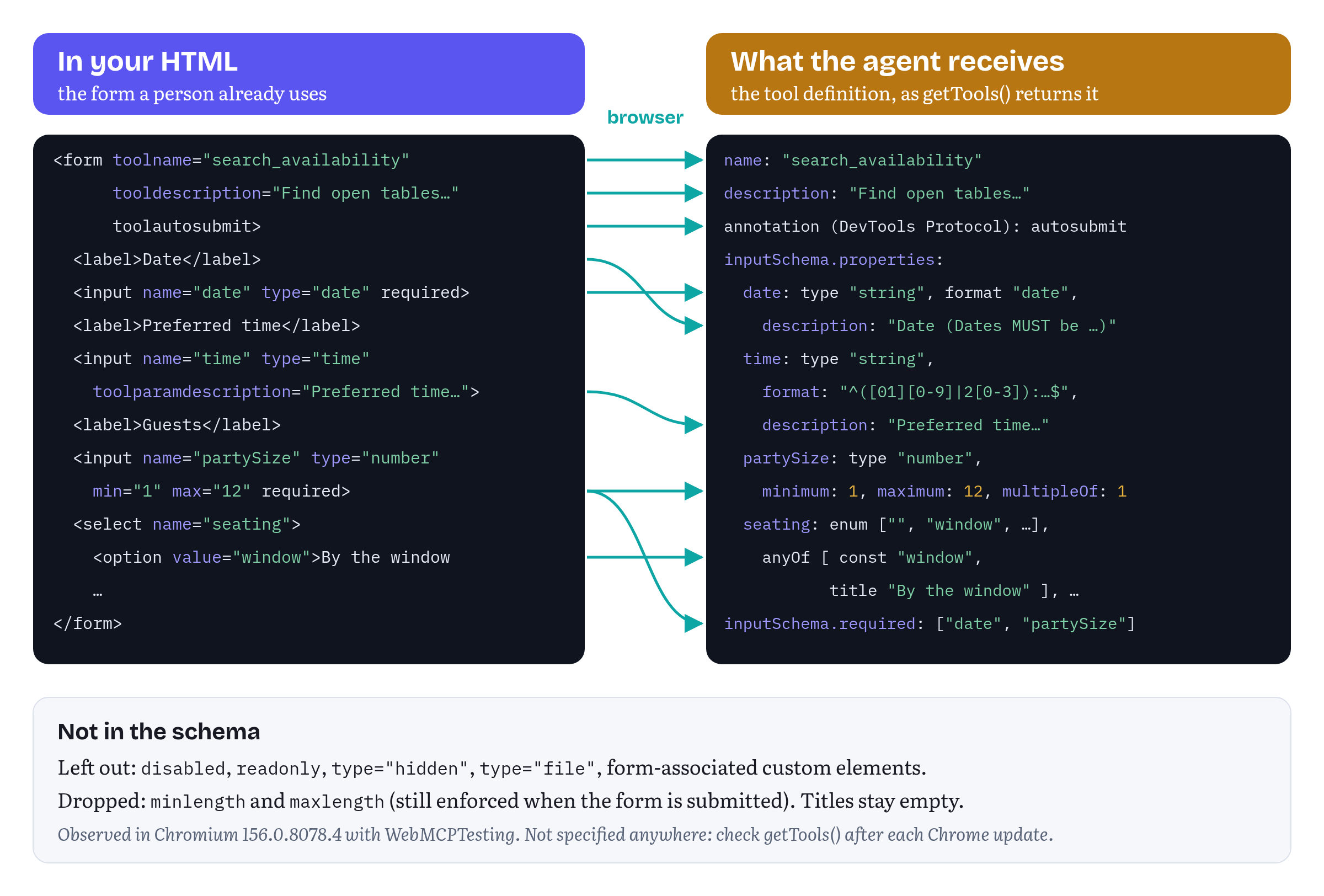
Most of it is what you would hope for. The required attributes became the schema’s required list. min and max became minimum and maximum. The <select> became an enum of its option values, plus an anyOf list that pairs each value with its visible text as a title. (Chapter 11 comes back to this pattern for enums, because the agent sees both what to send and what it means.) The labels became descriptions. Table 8.1 summarizes what I observed for other controls.
Table 8.1 — How Chromium 156 mapped form controls to JSON Schema (observed, 14 October 2026)
| In the form | In the synthesized schema |
|---|---|
type="text", email, url, tel, <textarea> |
"type": "string". pattern is copied. minlength, maxlength and the email/URL type are not |
type="date" |
"type": "string", "format": "date", plus “(Dates MUST be provided in ‘YYYY-MM-DD’ format.)” added to the description |
type="time", datetime-local, color |
"type": "string" with a regular expression in "format" |
type="number", type="range" |
"type": "number" with minimum, maximum, and multipleOf from step (1 by default) |
type="checkbox" (single) |
"type": "boolean" |
Checkboxes sharing a name, <select multiple> |
"type": "array" of an enum, with "uniqueItems": true |
Radio group, <select> |
enum of the values plus anyOf with each value’s label or option text as title |
required |
Listed in required |
A control outside the form with form="…" |
Included |
disabled, readonly, type="hidden", type="file", form-associated custom elements |
Left out |
Source: the probes and tests in this chapter’s folder of the companion repository.5
Some of these details matter in practice.
Times end up in the wrong keyword. In JSON Schema, format takes the name of a defined format such as date, time or date-time, and a regular expression belongs in pattern.14 For time, datetime-local and color inputs, Chromium 156 put the regular expression into format. A model reading the schema will probably still get it. A validator will not. That’s one of the reasons Listing 8.2 describes the time format in words, with toolparamdescription.
Numbers are numbers. A type="number" input becomes "type": "number" with "multipleOf": 1, and not "type": "integer". The meaning is the same, but it’s not how you would write it by hand. The browser also accepted the string "4" for partySize (observed), which makes sense if you think about it: every form field holds a string in the end. So your submit handler should convert values itself, as Listing 8.5 does with Number().
Your empty option is part of the enum. The “No preference” option has the value "", so "" is a valid seating value in the schema. That is accurate, because that’s how a person says “no preference” in this form. Chapter 11 would probably make the parameter optional and leave the empty value out. A declarative tool can’t do that: its schema always follows the form.
Lengths are lost. maxlength="200" on the booking form’s notes field doesn’t appear in its schema. The browser still enforces it when the form is submitted, because every constraint the form has is checked at that moment, whether the schema shows it or not.15
One difference from the imperative API is worth knowing. For imperative tools, Chapter 5 found that the browser passes arguments to your execute callback without checking them against your schema. For declarative tools, Chromium checks the arguments against what the form can hold before it fills in anything (observed).5 A parameter the form doesn’t have was rejected with Input contains a parameter "guests" but there is no such parameter for the tool. A value that is not one of a select’s options was rejected with Invalid value "rooftop" for parameter seating, and a date the date input couldn’t parse was rejected the same way. Useful, of course. But it is not validation of your business rules — more on that in the section on validation.
Still in flux Schema synthesis. Everything in Table 8.1 is Chromium’s current behaviour. The explainer says that precisely how controls “reduce to a JSON Schema that includes
anyOf,oneOf, andmaximum/minimumdeclarations” is yet to be specified.1 Expect it to change. CheckgetTools()after each Chrome update, and keep a test that compares a synthesized schema with a stored copy (like the one behind Listing 8.3) in your suite. It’s the earliest warning you will get.
The life of a declarative call
With the tool registered, what happens when an agent calls it? Figure 8.2 shows the steps, and the rest of the chapter takes them one at a time.
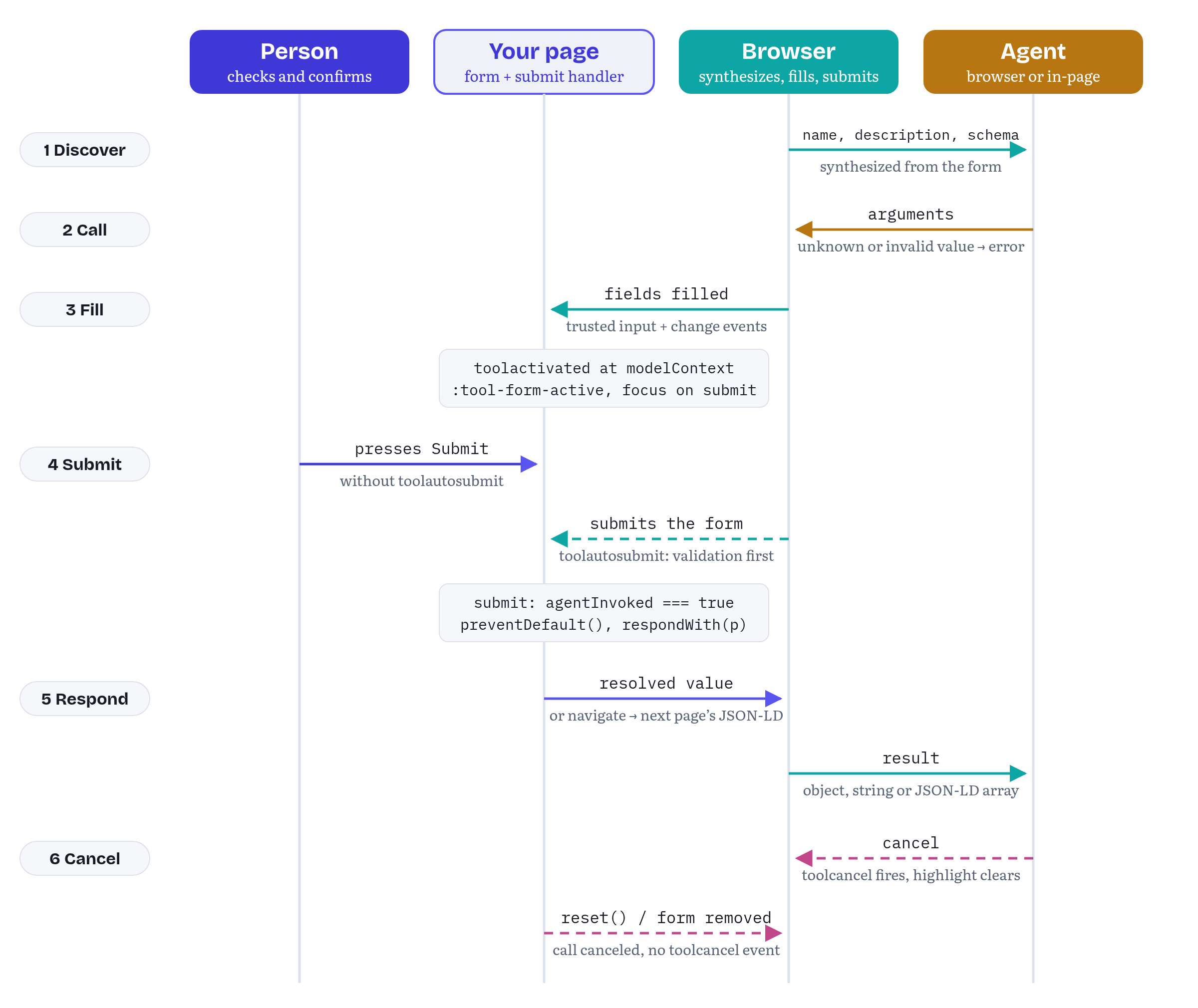
- Discover. The agent sees the tool’s name, description and synthesized schema, like for any other tool. Chrome’s DevTools Protocol also shows tools to debugging clients, and there a declarative tool carries an
autosubmitannotation when its form hastoolautosubmit.16 - Call. The agent sends arguments. The browser checks them against the form, as described above, and rejects anything the form can’t hold.
- Fill. The browser writes the values into the controls. Chrome’s guide says it “brings the form into focus and populates its field” and that “the form remains visible to the user.”2 In Chromium 156, each filled field fired trusted
inputandchangeevents, so code that listens for user input sees the agent’s input the same way (observed). Then the browser firestoolactivatedatdocument.modelContext, starts matching:tool-form-activeand:tool-submit-active, and moves focus to the submit button.5 - Submit. Without
toolautosubmit, nothing else happens until the person presses Submit. With it, the browser submits the form, running the form’s constraint validation first. - Respond. Your
submithandler runs withevent.agentInvoked === true. Either it callspreventDefault()and passes the result toevent.respondWith(), or the form navigates and the agent gets structured data from the next page. - Or cancel. The agent can cancel the call. The page can cancel it too, by resetting the form or removing it.
Let’s follow these steps for Fjord Table.
Submitting: the person’s click or toolautosubmit
The explainer describes toolautosubmit as letting the agent “submit the form on the user’s behalf after filling it out, without requiring the user to check it manually before submitting.” Without the attribute, “the browser brings the submit button into focus, and the agent should then tell the user to check the form contents, and submit it manually.”1
Chrome’s own declarative demo, a restaurant called Le Petit Bistro, leaves the attribute off by default and offers toolautosubmit as a variation.17 And this gives the declarative API something very valuable: a confirmation step built right in. A form without toolautosubmit can’t complete a call until a person presses its submit button. The rule for choosing is short. Use toolautosubmit for forms that only read: search, filter, look up. Leave it off any form that changes something, like booking, buying, sending or deleting. In Chapter 5, book_table needed a confirmation dialog in the site’s own UI. Here the booking form itself does that job.
chapters/08-declarative-api/listings/listing-8-4-book-form-tool.html — the booking form as a declarative tool, without toolautosubmit<form id="book-form" class="booking" toolname="book_table" tooldescription="Fill in a table booking at Fjord Table for the signed-in guest. The guest checks the details and presses Book table to confirm. Nothing is booked until they do."> <label for="book-date">Date</label> <input id="book-date" name="date" type="date" required> <label for="book-time">Time</label> <input id="book-time" name="time" type="time" required toolparamdescription="A time returned by search_availability, 24h HH:MM."> <label for="book-party">Guests</label> <input id="book-party" name="partySize" type="number" min="1" max="12" required> <label for="book-seating">Seating</label> <select id="book-seating" name="seating"> <option value="">No preference</option> <option value="window">By the window</option> <option value="indoor">Indoor</option> <option value="terrace">On the terrace</option> </select> <label for="book-notes">Notes for the kitchen</label> <textarea id="book-notes" name="notes" maxlength="200" toolparamdescription="Allergies or the occasion, in the guest's own words. Optional."></textarea> <button type="submit">Book table</button></form>The description tells the agent how the tool works: it fills in a booking, the guest confirms, and nothing is booked until they do. An agent that reads it knows to ask the user to check the form, instead of reporting a booking that hasn’t happened. The toolparamdescription of the time field points the agent to search_availability, so the two tools work as a pair.
And what does the person see? Fjord Table’s own booking form — filled in, highlighted, with focus on “Book table.” They can change the time, add a note, or walk away. In the demo’s tests, an agent’s book_table call stayed pending, with nothing booked, until the test clicked the button as the person would (observed).5
There is one surprise in the order of events. With toolautosubmit, Chromium 156 dispatched the submit event before toolactivated (observed). Without it, toolactivated came first, and submit came later, when the person clicked.5 So if you use toolactivated to prepare a form (to run your own checks, for example), that only works for forms the person submits. For forms the browser submits, put the checks where the browser will run them: into the form’s constraints, as the section on validation shows.
Answering the agent: agentInvoked and respondWith()
If a form submission reloads or navigates the page, the agent loses its context. That’s why Fjord Table handles both forms in script. The explainer adds two members to SubmitEvent: a boolean agentInvoked, which is true when the submission comes from an agent’s tool call, and respondWith(Promise<any>), which takes the result the agent will receive. Calling it overrides the form’s default action, and “preventDefault() must be called before this method is called.”1 Chrome’s guide says the resolved value “is then serialized and returned to the model as the tool’s output.”2
Listing 8.5 is the handler of the search form. One handler serves both people and agents. It always keeps the person on the page and shows the results, and when an agent called the tool, it also returns them.
chapters/08-declarative-api/search-form.js — one submit handler for people and agents// search-form.js: one submit handler for people and agents alike.import { availability } from './availability.js';import { showSlots } from './booking-ui.js';const form = document.querySelector('#search-form');const dateInput = form.elements.date;// A rule HTML attributes can't express: Fjord Table is closed on Mondays.// The custom validity message is what an agent sees if the check fails.dateInput.addEventListener('input', () => { const monday = dateInput.value !== '' && new Date(`${dateInput.value}T12:00:00`).getDay() === 1; dateInput.setCustomValidity(monday ? 'Fjord Table is closed on Mondays.' : '');});form.addEventListener('submit', (event) => { event.preventDefault(); // stay on this page const data = new FormData(form); const date = data.get('date'); const partySize = Number(data.get('partySize')); const seating = data.get('seating'); const result = availability.search({ date, partySize, time: data.get('time') || undefined }).then((slots) => { const open = seating ? slots.filter((s) => s.seating.includes(seating)) : slots; showSlots(open); // the person sees the result... return { // ...and so does the agent date, partySize, slots: open.map((s) => ({ time: s.time, seating: s.seating })) }; }); if (event.agentInvoked) event.respondWith(result);});Some important things to notice here.
respondWith() is called during the event. The handler starts the search, gets a promise and passes it to respondWith() before returning. The search itself finishes later. Calling respondWith() inside an await or a .then() callback, after the event has finished dispatching, is something neither the explainer nor Chrome describes, and I didn’t test it. Follow the pattern above.
The guard is if (event.agentInvoked). Chromium 156 threw an InvalidStateError when respondWith() was called for an ordinary human submission: “You can only call respondWith on an submit event that has agentInvoked == true.” It also threw when preventDefault() had not been called first (observed).5 In a browser without WebMCP, event.agentInvoked is undefined, so the very same line works everywhere, with no feature detection.
The person sees what the agent gets. showSlots() runs on both paths. It’s the same principle as bookingPanel.showSlots() in Chapter 5: the human watching should see what the agent found.
Listing 8.6 is the booking handler. Same structure, but here the submission is the person’s confirmation.
chapters/08-declarative-api/book-form.js — booking on the guest’s click, and answering the agent// book-form.js: the guest's click on "Book table" is the confirmation.import { availability } from './availability.js';import { showConfirmation, showProblem } from './booking-ui.js';const form = document.querySelector('#book-form');form.addEventListener('submit', (event) => { event.preventDefault(); const data = Object.fromEntries(new FormData(form)); const request = { ...data, partySize: Number(data.partySize), seating: data.seating || undefined, guest: 'Ingrid Hansen' // the signed-in demo user }; const outcome = availability.find(request).then(async (slot) => { if (!slot) { // A refusal (Chapter 11): another time is the guest's choice to make. const reason = `No table for ${request.partySize} at ${request.time} on ${request.date}.`; showProblem(reason); return { status: 'refused', code: 'SLOT_UNAVAILABLE', message: `${reason} Call search_availability and ask the guest ` + 'which other time they want.' }; } const { reference, seating } = await availability.book(request); showConfirmation(reference, request); return { status: 'booked', reference, date: request.date, time: request.time, partySize: request.partySize, seating }; }); if (event.agentInvoked) event.respondWith(outcome); // Clear the form only after the agent has its answer: resetting a form // while its tool call is still open cancels the call (Chromium 156). outcome.then((result) => { if (result.status === 'booked') setTimeout(() => form.reset()); });});agentInvoked stays true for the whole call, including the moment when the person presses the button after the agent has filled in the form. In Chromium 156, a person’s click on the submit button of an agent-filled form produced a submit event with agentInvoked === true (observed).5 That’s what lets Listing 8.6 send the reference number back to the agent that started the booking. A booking the person starts on their own goes the same way, just without the respondWith() call.
As in Chapter 5, a failure the agent should hear about is a value, and not an exception. If the sitting is gone, the agent receives { status: 'refused', code: 'SLOT_UNAVAILABLE', message }. That’s Chapter 11’s status for “a rule says no”: another time would work, but choosing it is the guest’s decision, so the message tells the agent to search again and ask. If the promise passed to respondWith() rejects instead, the agent gets an error with the generic text “respondWith promise was rejected” (observed). Your error message is not passed on, so the agent learns nothing it can act on.5
The last lines of Listing 8.6 exist because of a bug the tests found. The first version reset the booking form inside showConfirmation(), before the promise passed to respondWith() had resolved. In Chromium 156, resetting a form while its tool call is open cancels the call. The agent got Canceled: Tool execution cancelled by a form reset, even though the booking had gone through (observed).5 Waiting for the promise was not enough either: a reset in the promise’s own .then() still canceled the call. The browser handles the response asynchronously, so the reset has to wait one more task, and that’s what the setTimeout() does. Bottomline: don’t reset, remove or rename a tool’s form until the agent has its answer.
Table 8.2 collects what the agent receives in each case.
Table 8.2 — What the agent receives after a declarative call (Chromium 156, observed)
| What the page does | What the agent receives |
|---|---|
preventDefault(), then respondWith() with a promise for an object |
The object. An in-page agent calling executeTool() gets it as a JSON string (Chapter 5) |
respondWith() with a plain value instead of a promise |
The value, as if it were an already-resolved promise |
| The promise resolves to a string | The string, without JSON quotes |
The promise resolves to undefined |
The string "undefined" |
| The promise rejects | An error: “respondWith promise was rejected” |
preventDefault() without respondWith() |
An error: “The site has a programming error: it called preventDefault() on the ‘submit’ event, without also calling respondWith() with the tool result” |
| No handler, the form navigates | The JSON-LD on the next page, as an array (empty if there is none) |
| The form is reset or removed before the answer | The call is canceled |
Source: this chapter’s tests and probes.5
Two rows of this table deserve a warning. For imperative tools, the draft says executeTool() serializes the result as JSON, so a string comes back with JSON quotes, and Chapter 5 showed that Chromium 156 doesn’t do that. Issue #361, opened on 23 October 2026, reported the same mismatch in Chrome 158 and noted that the Web Platform Tests follow Chrome. On 26 October the author of the spec text answered: “The WPT assertions are wrong, and so is Chrome.” In the same thread he agreed that a tool returning undefined should not reject, and the proposal on the table maps it to "null".18 That discussion is about the imperative API, and declarative tools are outside the spec anyway. Whether Chromium will change the “string” and “undefined” rows above together with the imperative ones, I can’t tell you (I haven’t seen its plans). The safe habit works either way: return objects, and parse defensively on the agent side.
Every failure in my tests reached an in-page agent as an UnknownError, except a cancellation the agent asked for itself, which was an AbortError (observed).5 For imperative tools, the spec replaced UnknownError with more specific DOMException types on 8 October 2026, but that change covers only what the spec defines, and declarative tools are not part of it.19 Chromium 156 still returns UnknownError for the imperative cases too. That is the browser lagging the draft (Chapter 5), not a bug in your code.
Answering across a navigation: JSON-LD
Sometimes the form does navigate, either because that’s how the site works or because the script that would intercept the submission hasn’t loaded. The explainer’s original idea was to answer the agent from the page the form navigates to: “the first <script type=application/ld+json> tag on the target page is used as the cross-document tool’s ‘response’.”1 That proposal now lives in a collapsed section of the explainer. The open issue #135 asks the bigger question, “Should the agent receive a response from the next page, after a declarative <form> tool navigates?”, and discusses alternatives, including a purpose-built element and a simple “the navigation succeeded” message.20
Chromium 156 implements a version of the JSON-LD idea. When an agent submitted a GET form with toolautosubmit and no handler, the browser followed the navigation and returned the JSON-LD of the new page to the agent: all of the page’s JSON-LD blocks, as an array, and not only the first one. A page with no JSON-LD produced an empty array (observed).5 Fjord Table’s search form keeps action="results.html" exactly for this case. Listing 8.7 is that page.
chapters/08-declarative-api/results.html — a results page that answers the agent that navigated to it<!doctype html><html lang="en"><head> <meta charset="utf-8"> <title>Fjord Table · Open tables</title> <script type="module"> import { availability } from './availability.js'; const query = new URLSearchParams(location.search); const date = query.get('date'); const partySize = Number(query.get('partySize')); // No await before the JSON-LD is in place: Chromium 156 reads it // when the page finishes parsing, and anything added later is missed. const slots = availability.searchNow({ date, partySize, time: query.get('time') || undefined }); // What a person reads... document.querySelector('#slots').innerHTML = slots.length ? slots.map((s) => `<li>${s.time}</li>`).join('') : '<li>No open tables. Try another date.</li>'; // ...and what the agent that submitted the form receives (Chromium 156). const data = document.createElement('script'); data.type = 'application/ld+json'; data.textContent = JSON.stringify({ '@context': 'https://schema.org', '@type': 'ItemList', name: `Open tables at Fjord Table on ${date} for ${partySize}`, itemListElement: slots.map((s, i) => ({ '@type': 'ListItem', position: i + 1, name: s.time })) }); document.head.append(data); </script></head><body> <h1>Open tables</h1> <ul id="slots"></ul> <p><a href="index.html">Back to booking</a></p></body></html>The comment in the middle records the other finding. Chromium read the JSON-LD when the page finished parsing (observed). Data added after an await, a timer or the load event was missed, and the agent got [].5 Fjord Table’s backend is a fake that answers after 250 milliseconds, so the first version of this page, which awaited it, always returned an empty array. In production the fix is to render the JSON-LD on the server, which most sites that publish JSON-LD do anyway. The demo uses a synchronous searchNow() to stand in for server rendering.
The tests check this path by blocking search-form.js and calling the tool: the browser navigates to results.html, and the agent receives an ItemList with the open times.5 An in-page agent can’t see this result, because the navigation unloads it. Chapter 5 noted that Chrome’s executeTool() resolves to null when a navigation is triggered.
Still in flux Cross-document responses. Issue #135 is still open, and the JSON-LD proposal is the explainer’s second-choice, collapsed text.201 The details I observed (an array of every block, read when parsing ends) are Chromium’s current choices. The explainer’s collapsed proposal also floats sending the page’s entire contents to the model when no JSON-LD is present. Chromium 156 sent an empty array. Prefer
respondWith(). Treat the JSON-LD path as a fallback, and keep the data in it small and factual: it’s untrusted content that goes straight into a model’s context, as the DevTools Protocol’s own documentation for tool output warns.16
Events: toolactivated and toolcancel
The declarative explainer introduced two events, fired at the ModelContext object: one when a tool runs, and one when the agent cancels a call. Their main use is in the page’s UI, to bring the filled form “to the user’s attention” and to tell the user when the agent gives up.1 Since then they have moved into the specification for every tool. Pull request #245, merged on 17 September 2026, added the ToolActivatedEvent and ToolCancelEvent interfaces, each with a toolName, and the current draft fires them for imperative calls as well. Chapter 6 covers the imperative side.214 Chrome’s guide notes that window.ontoolactivated and window.ontoolcancel, an earlier way to listen, “are not supported from Chrome 156”, so listen on document.modelContext.2
Listing 8.8 uses them for the confirmation step that book_table depends on. When the agent fills in the booking form, a banner tells the person what happened and what to do next.
chapters/08-declarative-api/agent-feedback.js — telling the person what the agent just did// agent-feedback.js: tell the person what the agent just did to a form.const banner = document.querySelector('#agent-banner');if ('modelContext' in document) { document.modelContext.addEventListener('toolactivated', ({ toolName }) => { if (toolName !== 'book_table') return; banner.textContent = 'Your assistant filled in this booking. ' + 'Check the details, then press “Book table” to confirm.'; banner.hidden = false; banner.scrollIntoView({ block: 'nearest' }); }); document.modelContext.addEventListener('toolcancel', ({ toolName }) => { if (toolName !== 'book_table') return; banner.textContent = 'Your assistant stopped this booking. Nothing was booked.'; });}Here the feature detection does matter: in a browser without WebMCP, document.modelContext doesn’t exist. The handlers check toolName, because these events fire for every tool on the page, declarative or imperative.
The cancel event needs some care, because the documentation and Chromium disagree. Chrome’s guide says toolcancel is triggered “if a user cancels the agentic operation or the reset() method is invoked.”2 The explainer says the opposite about the page’s own actions: the event “does not fire when the site itself cancels the tool, due to removing the form element or changing its name or description.”1 Chromium 156 followed the explainer (observed). When the agent canceled a pending book_table call, through the DevTools Protocol’s cancelInvocation or through the signal passed to executeTool(), toolcancel fired, the highlight cleared and nothing was booked. The values already filled in stayed in the form. When the page called reset(), the agent’s call ended with Canceled: Tool execution cancelled by a form reset, but no toolcancel event fired. Removing the form ended the call with Tool execution cancelled, since tool definition was updated, also without an event.5 If you need to know about cancellations the page caused, track them yourself — you started them, after all :)
One more observation: toolactivated is not proof that the form was filled. A call with an invalid value (date: "tomorrow") fired toolactivated and was then rejected before any field changed (observed).5
Still in flux Event names and targets. When the first edition went to press, the explainer still called the cancel event
toolcanceled. Pull request #350, merged on 16 October 2026, synced it with the spec and Chrome, so all three now saytoolcancel.2242 Issue #126 discussed whether the events should fire at the<form>or atModelContext, and was closed on 24 September 2026 after #245 settled onModelContext.21 For declarative tools the explainer still lists it as an open question: “should they be fired atModelContextor at the<form>that registered the tool in the first place, and bubble up to the document that way?”1 Chromium fires them atdocument.modelContext.
CSS hooks: :tool-form-active and :tool-submit-active
The explainer adds two pseudo-classes, so authors can highlight a form that an agent has filled in and the person still has to check. :tool-form-active matches the form while its tool is running, and :tool-submit-active matches that form’s submit button.1 Chrome’s guide lists its default styles, a dashed outline on each, and says the states clear when the form submits, the agent cancels or the user resets the form.2 Listing 8.9 gives Fjord Table its own style.
chapters/08-declarative-api/tool-styles.css — showing which form the agent is working on/* tool-styles.css: show the person which form an agent is working on. */@supports selector(:tool-form-active) { form:tool-form-active { outline: 2px dashed #1f5f7a; outline-offset: 6px; background: #eef6f9; } button:tool-submit-active { box-shadow: 0 0 0 4px #f2c94c; }}The @supports selector(…) block is there for a reason. In a browser that doesn’t know these pseudo-classes, a selector that contains one is invalid. In plain Chromium, document.querySelector(':tool-form-active') threw a SyntaxError (observed). In CSS, an unknown pseudo-class makes a selector invalid, and a selector list with an invalid selector in it is invalid as a whole, so the browser drops the entire rule.523 The selector() function in @supports tests whether the browser can parse the selector.24 CSS.supports('selector(:tool-form-active)') was true in Chromium with WebMCP enabled and false without it (observed), so the block applies only where it can work.5 For the same reason, never mix a :tool-* selector with your normal styles in one selector list.
In Fjord Table, the highlight and the banner from Listing 8.8 tell the person the same thing: your assistant filled in this form, please check it. The highlight works for every form automatically. The banner explains what to do next. Chrome’s guide stresses that a visible focus indicator “is critical to inform users and agents where they’re on a page,” and a confirmation step helps only if the person can see what they are confirming.2
Validation feedback to agents
Forms already have a validation system, and the declarative API uses it. With toolautosubmit, Chromium 156 ran the form’s constraint validation before submitting. When it failed, the agent got an error listing each failing field with the browser’s message (observed). For a party of 20:
Form validation failed: partySize: Value must be less than or equal to 12..The doubled full stop is in the original. An agent can live with that.5
The really useful part is that this includes your own messages. The HTML constraint validation API lets a script set a custom validity message with setCustomValidity(), and an element with a non-empty message stays invalid until the message is cleared.15 Listing 8.5 uses it for the rule an attribute can’t express: Fjord Table is closed on Mondays. The listener runs on input, which fires both when a person picks a date and when the browser fills one in, so one listener covers both. An agent that asks for a Monday gets:
Form validation failed: date: Fjord Table is closed on Mondays..The person gets the same message in the browser’s validation bubble when they try to submit. One rule, in one place, for both of them. It follows Chrome’s advice to “validate strictly in code, loosely in schema”: the schema says “a date,” and the code says which dates.13
Two limits apply. First, this works because the check runs while the form is being filled in, before it is submitted. A check that needs the server (is the 19:00 sitting still free?) can’t run there, so it belongs in the submit handler, which reports the result as a value (Listing 8.6).
Second, a failed validation ends the call even when the person is the one submitting. I expected the agent to keep waiting while the person fixed the form. It didn’t. When an agent filled in the booking form for a party of 20 and the person pressed “Book table,” the browser showed the person the error, and at the same moment the agent’s call ended with Form validation failed: partySize: Value must be less than or equal to 12.. (observed). When the person then corrected the number and pressed the button again, that was an ordinary submission with agentInvoked false, so the agent never heard about the booking.5 The agent learns what was wrong and can try again, but it can’t learn what the person did next unless it asks. One more reason to put the clearest possible constraints into the form, so that the agent gets the values right the first time.
Limits: when JavaScript owns the form
Declarative tools work best on forms that HTML already describes completely. The less of the form HTML describes, the less the browser can do with it.
chapters/08-declarative-api/listings/listing-8-10-js-driven-form.html — a form the declarative API can’t drive (fragment)<!-- Looks like a form, but JavaScript does the submitting. --><form id="waitlist-form" toolname="join_waitlist" tooldescription="Put the guest on the waitlist for a fully booked evening."> <label for="wait-date">Date</label> <input id="wait-date" name="date" type="date" required> <button type="button" id="join-waitlist">Join the waitlist</button></form>This form looks fine, and Chromium registered join_waitlist without complaining. But it has no submit button, because JavaScript does the work from a click handler. Every call to it failed immediately with No submit button was found, but for a form without toolautosubmit, there must be a submit button (observed).5 Adding toolautosubmit would not help much either: the browser would submit the form, and the click handler that does the real work would never run. The fix is to make the form a real form, with a submit button and a submit handler. Plenty of forms in single-page apps would benefit from that anyway.
Other limits I found:
- Custom controls are invisible. A form-associated custom element inside the form was left out of the schema (observed). So were controls the user can’t edit (
disabled,readonly) and file inputs.5 A date picker built from<div>s, with a hidden input carrying the value, gives the agent nothing to fill in. - Controlled components need trusted events. Frameworks that keep form state in JavaScript, like React with its controlled inputs, update that state from
inputevents. Chromium 156 dispatched trustedinputandchangeevents for each filled field (observed), which is exactly what those frameworks listen to.5 Whether a particular framework’s state really updates is something to test in that framework. Chapter 10 covers framework integration. - One form, one step. A tool is one form and one submission. A multi-step wizard is several forms that appear one after another, which means several tools that come and go. That can work, but the agent has to discover each step when it appears. One imperative tool that takes everything at once is usually the better choice.
- No annotations, no output schema. Neither the explainer nor Chrome’s guide defines an attribute for
readOnlyHint,untrustedContentHintorconsequentialHint, and the only hint Chromium reported for a declarative tool wasautosubmit.12165 The explainer leaves open whether anoutputSchemawould apply to declarative tools.1 (There is nooutputSchemain the imperative API either, as of the 27 October draft: it is an open pull request, Appendix A has the details.) If an agent should know that a tool is read-only or consequential, register it imperatively. - Silent failures. Bad names and duplicate names produced no error my code could catch. Issue #182 puts a disabled Permissions Policy into the same category, and it’s still open.125
Table 8.3 sums up when the declarative API is a good fit.
Table 8.3 — Declarative or imperative?
| The declarative API fits when… | Use the imperative API when… |
|---|---|
A real <form> with native controls already does the job |
The action lives in JavaScript, not in a form |
| One submission completes the task | The task spans steps, views or several requests |
| The form reads, or a person should confirm by pressing Submit | You need annotations such as readOnlyHint or consequentialHint |
HTML constraints plus a few setCustomValidity() rules cover validation |
Inputs need structure a form can’t express: nested objects, arrays of objects |
| You want the person to see the same form the agent fills in | The tool has no visible form, or must run without changing the UI |
| You can accept behaviour defined by one browser’s implementation | You need the behaviour the specification defines |
Most real sites will use both. The two kinds of tool live in the same registry: getTools() returns them together, and the events and toolchange cover both. Fjord Table could reasonably keep its search as a declarative form and register book_table imperatively, with the confirmation dialog from Chapter 5. This chapter makes both declarative to show how far the attributes go.
Testing declarative tools
You can’t unit-test a declarative tool against a mock. Everything worth testing is the browser’s own behaviour: the schema it synthesizes, the arguments it accepts, the events it fires and what it returns. So the tests for this chapter run in real Chromium, with two kinds of agent.
The first is an in-page agent, using the getTools() and executeTool() methods covered in Chapter 7. The second behaves like a browser agent. Chrome’s DevTools Protocol has an experimental WebMCP domain with invokeTool and cancelInvocation commands, and with events that report tools as they are added and removed, each invocation, and each response with its status (Completed, Canceled or Error).16 A test drives it through Playwright’s CDP session, calls book_table the way an agent would, checks that nothing happens until a simulated person clicks “Book table,” and reads the response.
The tests check the static parts too. Each HTML listing in this chapter is a file in the repository, and a test checks that those files match index.html byte for byte. Another one compares the synthesized schema with the stored Listing 8.3. Chapter 14 covers testing and evals in general. The point here is narrower: if your site depends on declarative tools, a schema comparison and a few protocol-level calls in CI will catch Chrome changing its implementation before your users do. That’s how I re-validated this chapter for this edition: one run, 17 green checks.5
Fjord Table so far
Fjord Table now has two ways to be agent-ready. Chapters 4 and 5 built the imperative version: search_availability and book_table registered from JavaScript, with a confirmation dialog in the site’s own UI. This chapter rebuilt the same two tools from the forms the page already had:
search_availabilityis the search form with three attributes andtoolautosubmit. Its submit handler (Listing 8.5) answers people and agents with the same results, and a custom validity rule tells both that the restaurant is closed on Mondays. If the script doesn’t load, the form navigates toresults.html, whose JSON-LD answers the agent (Listing 8.7).book_tableis the booking form withouttoolautosubmit. The agent fills it in, the page highlights it and explains what happened (Listings 8.8 and 8.9), and only the guest’s click books the table. The handler then returns the reference, or arefusedresult when the sitting is gone (Listing 8.6).
The complete demo is in the companion repository, in chapters/08-declarative-api/, and its README maps each file to its listing. Chapter 9 brings the pieces together into one app and walks through it end to end with Chrome’s own tools.
Chapter summary
- The declarative API turns an HTML
<form>into a WebMCP tool withtoolnameandtooldescription, plustoolparamdescriptionon controls whose label doesn’t say enough. It was removed from the WebMCP specification on 8 October 2026 (PR #338) and was still out of it in the 27 October 2026 draft. It ships in Chrome’s origin trial, so it lives only in an explainer and in Chrome. The Chrome team plans to ship it after the imperative API, while some W3C TAG members asked for the opposite order. Treat it as a progressive enhancement, and its details as Chromium 156 behaviour. - The browser synthesizes the input schema from the form. In Chromium 156: labels become descriptions,
required,min,maxand options carry over, dates get a format hint, times get a regular expression in the wrong keyword, and length limits are dropped. Check what agents see withgetTools(), and keep a copy in your tests. - Unlike imperative calls, Chromium checks declarative arguments against the form: unknown parameters and impossible values are rejected before anything is filled in.
- A call fills the form (with trusted
inputandchangeevents), firestoolactivated, highlights the form and its submit button, and waits. Withouttoolautosubmit, the person’s click on Submit completes the call, which gives you a built-in confirmation step. Usetoolautosubmitonly for forms that read. - In the
submithandler,event.agentInvokedtells you that an agent is waiting. CallpreventDefault(), thenrespondWith()with a promise for the result. Return failures as values in Chapter 11’s shapes, because rejected promises reach the agent as a generic error. Don’t reset or remove the form until the agent has its answer: either one cancels the call. - How results are serialized is still settling (issue #361), so return objects and parse defensively.
- If the form navigates instead, Chromium returns the next page’s JSON-LD as an array, read when parsing finishes. Render it on the server. How cross-document responses should work is still open (issue #135).
toolactivatedandtoolcancelfire atdocument.modelContextand are in the spec for all tools.toolcancelfired when the agent canceled, but not when the page reset or removed the form, whatever Chrome’s guide says.:tool-form-activeand:tool-submit-activestyle the form in use. Wrap them in@supports selector(…), because in other browsers the selector is invalid.- Constraint validation, including
setCustomValidity()messages, reaches the agent as error text when the browser submits the form. It’s the declarative way to validate strictly in code. - The declarative API needs a real form: a submit button, native controls and one submission per task. For actions that live in JavaScript, tasks with several steps, or tools that need annotations, use the imperative API. Most sites will use both.
Notes
Notes
webmachinelearning/webmcp, “WebMCP declarative API” (Declarative API Explainer), sections “Motivation,” “Form attributes,” “Processing model,” “Pseudo-classes,” “Events” and “Integration with other imperative API bits” (read 14 October 2026, retrieved November 2026). https://github.com/webmachinelearning/webmcp/blob/main/declarative-api-explainer.md
Chrome for Developers, “Declarative API” (published 18 May 2026, last updated 25 September 2026), sections “Tool registration,” “Submit the form” and “Modify focus indicator” (retrieved November 2026). https://developer.chrome.com/docs/ai/webmcp/declarative-api
webmachinelearning/webmcp pull request #338, “Remove declarative API from spec” (opened 7 October 2026, merged 8 October 2026), its changes to
index.bsandREADME.md, and the PR author’s comment of 13 October 2026 (retrieved November 2026). https://github.com/webmachinelearning/webmcp/pull/338WebMCP specification, Draft Community Group Report, 27 October 2026, §4.2 “ModelContext Interface,” §4.3 “Events” (ToolActivatedEvent, ToolCancelEvent) (retrieved November 2026). https://webmachinelearning.github.io/webmcp/
Observed in Chromium 156.0.8078.4 (Playwright 1.64 build) with
--enable-features=WebMCPTesting, 14 October 2026, and the full test suite re-run against the same build on 2 November 2026 (17 passed, 0 failed). The tests are in the companion repository,chapters/08-declarative-api/tests/run-tests.mjs. The one-off probes behind Table 8.1 are summarized in that folder’s README. https://github.com/webmaxru/webmcp-book-demos/tree/main/chapters/08-declarative-apiChromium Dash, release schedule (Chrome 156 stable date 20 October 2026, Chrome 157 stable date 3 November 2026) and Stable releases for Windows (latest 156.0.8078.80) (retrieved 2 November 2026). https://chromiumdash.appspot.com/schedule
Chrome for Developers, “WebMCP” overview (published 18 May 2026, last updated 7 October 2026), sections “Use WebMCP APIs” and “Demo” (retrieved November 2026). https://developer.chrome.com/docs/ai/webmcp
webmachinelearning/webmcp issue #22, “Declarative API Equivalent” (opened 5 September 2025, closed 10 March 2026). https://github.com/webmachinelearning/webmcp/issues/22
webmachinelearning/webmcp pull request #26, “Declarative proposal to expose tools via HTML” (opened 17 September 2025, closed unmerged 12 February 2026, superseded by #76). https://github.com/webmachinelearning/webmcp/pull/26
webmachinelearning/webmcp pull request #76, “Declarative API Explainer” (opened 5 February 2026, merged 9 March 2026). https://github.com/webmachinelearning/webmcp/pull/76
W3C TAG design review #1238, “WebMCP,” comment by Christian Liebel for the TAG, 26 October 2026 (an early comment, not a resolution) (retrieved November 2026). https://github.com/w3ctag/design-reviews/issues/1238#issuecomment-6410471845
webmachinelearning/webmcp issue #182, “How to expose failed declarative tool registration” (opened 22 May 2026, still open on 2 November 2026). https://github.com/webmachinelearning/webmcp/issues/182
Chrome for Developers, “WebMCP best practices” by Alexandra Klepper, Maxim Salnikov and François Beaufort (published 18 May 2026, last updated 30 October 2026), sections “Manage tool registration” and “Prioritize reliability” (retrieved November 2026). https://developer.chrome.com/docs/ai/webmcp/best-practices
JSON Schema Validation, draft 2020-12, §6.3.3 “pattern” and §7.3.1 “Dates, Times, and Duration.” https://json-schema.org/draft/2020-12/json-schema-validation
HTML Living Standard, §4.10.20 “Constraints” (custom validity error message and
setCustomValidity()). https://html.spec.whatwg.org/multipage/form-control-infrastructure.htmlChrome DevTools Protocol, experimental
WebMCPdomain (enable,invokeTool,cancelInvocation, eventstoolsAdded,toolsRemoved,toolInvoked,toolResponded, typesAnnotationandTool), injson/browser_protocol.jsonof the ChromeDevTools/devtools-protocol repository (read 14 October 2026, retrieved November 2026). https://github.com/ChromeDevTools/devtools-protocol/blob/master/json/browser_protocol.jsonGoogleChromeLabs/webmcp-tools, “Le Petit Bistro | WebMCP Declarative Demo,” README (read 14 October 2026). https://github.com/GoogleChromeLabs/webmcp-tools/tree/main/demos/french-bistro
webmachinelearning/webmcp issue #361, “executeTool(): spec JSON-encodes strings and rejects undefined; Chrome and WPT do neither” (opened 23 October 2026, open on 2 November 2026), including the spec author’s reply of 26 October 2026 (retrieved November 2026). https://github.com/webmachinelearning/webmcp/issues/361
webmachinelearning/webmcp pull request #339, “Replace UnknownError with specific DOMException types” (merged 8 October 2026, commit b206dae). https://github.com/webmachinelearning/webmcp/commit/b206dae8ba
webmachinelearning/webmcp issue #135, “Cross-document tool response mechanism” (opened 9 March 2026, still open on 2 November 2026). https://github.com/webmachinelearning/webmcp/issues/135
webmachinelearning/webmcp issue #126, “Where to fire
toolactivatedandtoolcanceledevents?” (opened 4 March 2026, closed 24 September 2026), and pull request #245, “Add ToolActivatedEvent and ToolCancelEvent interfaces” (merged 17 September 2026). https://github.com/webmachinelearning/webmcp/issues/126webmachinelearning/webmcp pull request #350, “Editorial: sync explainers with spec (ToolAnnotations link, toolcancel event)” (merged 16 October 2026). https://github.com/webmachinelearning/webmcp/pull/350
Selectors Level 4, §3.10 “Invalid Selectors and Error Handling” (Editor’s Draft, read 14 October 2026). https://drafts.csswg.org/selectors-4/#invalid
CSS Conditional Rules Module Level 4, “Extensions to the
@supportsrule” (theselector()function). https://drafts.csswg.org/css-conditional-4/