“We view browser-using AI as inevitable: so much work happens in browsers that giving Claude the ability to see what you’re looking at, click buttons, and fill forms will make it substantially more useful.”
— Anthropic, “Piloting Claude in Chrome”1
A tent, a deadline and a very patient robot
Lars has a hiking trip in Jotunheimen in three weeks and no tent. On Tuesday evening he opens Trailhead, a Norwegian outdoor-gear store, and instead of clicking through it himself he types into his browser’s assistant panel: “Find me a two-person tent under 4,000 kroner that’s in stock, compare the two best-rated ones, and put the better one in my cart.” Then he goes to make tea.
The assistant starts working the only way most of today’s agents can. It takes a screenshot of the Trailhead homepage and sends it to a model, together with a snapshot of the page structure. The model decides that the magnifying-glass icon is probably search, so the agent clicks it and types “tent”. Another screenshot. The results page has a filter sidebar: a price slider, a “Capacity” accordion that starts collapsed, and an “In stock only” toggle styled as a little pill. The agent drags the slider, overshoots, takes another screenshot, reads the label (“0 – 4 350 kr”) and nudges it back. It opens the accordion, ticks “2 persons” and waits while the product grid reloads. On the first attempt it reads the grid before the new results arrive, and starts comparing tents that are not on the page anymore.
Eventually it opens two product pages, one after another, scrolls each of them to the specifications table, copies weights and pack sizes out of the pixels and picks a winner. On the product page it meets a size selector, a colour swatch and a quantity stepper. It chooses “Moss”, clicks “Add to cart”, and a drawer slides in offering a matching footprint at 20 per cent off. Is that a confirmation? Or an upsell that has to be dismissed before the cart updates? The agent takes another screenshot and thinks about it.
By the time Lars is back with his tea, the job is done. Probably. It took dozens of model calls, a minute or two of wall-clock time and a fair amount of luck. If Trailhead had shipped a redesign that afternoon, or if the filter sidebar had loaded a bit slower, the agent might have put the wrong tent in the cart (or no tent at all), and neither Lars nor Trailhead would ever know why.
I have written about service workers and offline web apps for years, and watching an agent shop like this reminds me of a site without a service worker on a train: everything works, until it doesn’t. This chapter is about that gap, between what browser agents are already asked to do and the way they have to do it today. We look at what browser agents are, how they operate websites, where that breaks, what it costs, and why the website (not only the agent) has a stake in fixing it. At the end I introduce the projects we build throughout the book and say what the book covers and what it doesn’t.
Agents in the browser
The WebMCP specification opens its terminology section with a definition I am happy to borrow. An agent is “an autonomous assistant that can understand a user’s goals and take actions on the user’s behalf to achieve them.” Today, the spec adds, these are typically built on large language model (LLM) platforms “interacting with users via text-based chat interfaces.”2 What makes an agent a browser agent is where it acts. The spec defines a browser agent as an agent “provided by or through the browser that could be built directly into the browser or hosted by it, for example, via an extension or plug-in.”2
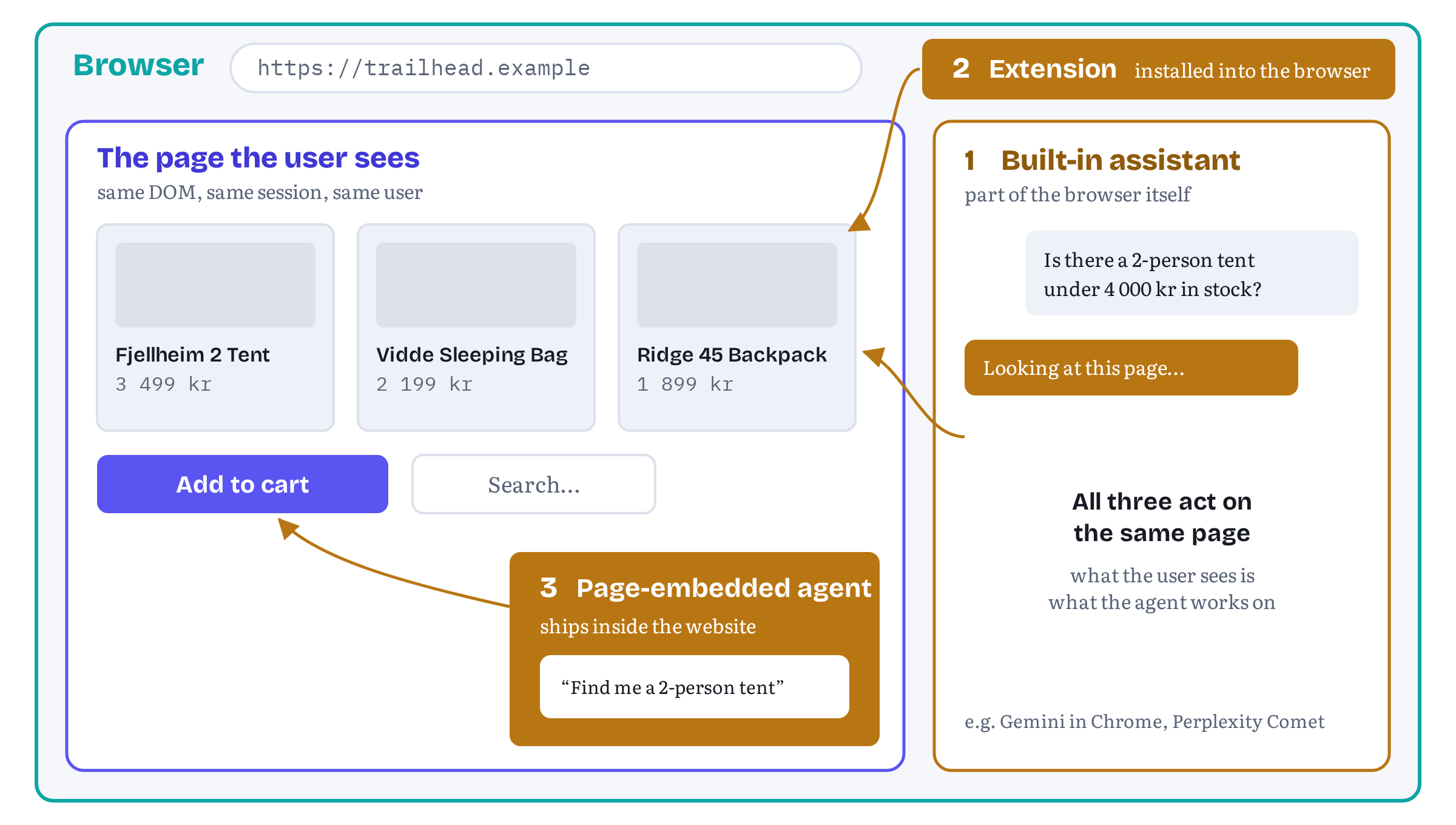
Two years ago that described research demos. In the autumn of 2026 it describes products millions of people can install. They come in three broad shapes, and the difference is where the agent lives relative to the page it acts on (Figure 1.1).
Built into the browser
The most visible shape is the assistant that ships with the browser. In September 2025 Google announced that Gemini in Chrome would act as “an AI browsing assistant” and said it was developing “more advanced agentic capabilities for Gemini in Chrome that can perform multi-step tasks for you from start to finish, like ordering groceries.” The stated ambition was to turn “30-minute chores into 3-click user journeys.”3 OpenAI went further and built a whole browser around its assistant. It introduced ChatGPT Atlas in October 2025 as “a new web browser built with ChatGPT at its core,” with an agent mode in which “ChatGPT may ask you if it should start opening tabs and clicking in your browser to complete the task.”4 Atlas didn’t last. OpenAI’s help centre now says it “has been retired and no longer receives updates,”5 which is as good a reminder as any of how fast this area moves. Perplexity markets its Comet browser, available on desktop and mobile, as “the browser that works for you”.6
These assistants sit in a privileged position. They see every tab, they share the user’s signed-in sessions, and the browser vendor controls the whole stack, from the side panel down to the model.
Extensions
The second shape is the agent that arrives as a browser extension. Anthropic’s Claude in Chrome is the clearest example. It started in August 2025 as a research preview for 1,000 users, “a Claude extension for Chrome where trusted users can instruct Claude to take actions on their behalf within the browser,” and by December 2025 it was available on all of Anthropic’s paid plans.1 Extensions are how agent makers who don’t own a browser get into one. They are also how developers build their own agents. Chrome’s WebMCP documentation offers two extensions for exactly that purpose, an example agent and a tool inspector, and says plainly that “Chrome Extensions can query and execute WebMCP tools with content scripts.”7
A close relative is the agent that runs a browser for you somewhere else. OpenAI’s Operator drove a remote browser in the cloud that the user could take over at any moment, and in July 2025 it was folded into ChatGPT as “ChatGPT agent”.8 The browser is not the one on your desk anymore, but the technique for operating websites is the same. And so are its problems.
In the page
The third shape is easy to miss: an agent that a website ships inside itself. A support assistant in the corner of a SaaS dashboard, a shopping helper on a store’s product pages, a copilot inside a document editor. These agents are part of the site (or embedded into it by a third party), and they act on the page from within. The WebMCP explainer counts them explicitly: tools “can be invoked by AI agents, including those built into the browser, hosted in iframes, or running in extensions.”9 A page-embedded agent can even run its model on the user’s device. Chrome’s Prompt API exposes Gemini Nano, a model that runs locally in the browser and needs no network connection after its first download.10 As a PWA person I find this one especially nice: an agent that keeps working offline. Chapter 7 builds an agent of this kind, and the book’s Test Agent project uses the same idea to exercise tools.
All three shapes share one constraint. Whoever built the agent, it ends up in front of a web page that was designed for people, and it has to figure out how to use it.
Actuation: using the web like a person
Chrome’s documentation has a name for how agents do that today: actuation, “the act of an agent simulating manual mouse clicks and text input, as though it were the human user engaging with your website.”7 The WebMCP explainer describes the same technique from the agent’s side. General-purpose agents “often rely on observing the browser state through a combination of screenshots, and DOM and accessibility tree snapshots, and then interact with the page by simulating human user input.”9
Under the product names, almost every actuating agent runs the same loop:
- Observe. Capture the current state of the page: a screenshot, a serialised slice of the DOM, the accessibility tree, or some mix of the three.
- Decide. Send that observation, the user’s goal and the history so far to a model, and ask for the next action.
- Act. Turn the model’s answer into a click at some coordinates, a keystroke, a scroll or a navigation.
- Repeat until the model decides the task is done, or gives up.
OpenAI’s description of its Computer-Using Agent shows how general this is. The model “processes raw pixel data to understand what’s happening on the screen and uses a virtual mouse and keyboard to complete actions.” Because it works through the graphical interface “just as humans do,” it can “perform digital tasks without using OS- or web-specific APIs.”11 Anthropic’s computer use documentation spells out the same loop from the developer’s side: the model asks for a screenshot or an action, your application performs it and returns the result, and the model asks again.12
That generality is the big strength of actuation. It needs nothing from the website. Any page a person can use, an agent can at least try to use, today, without anybody’s permission or cooperation. That’s why browser agents could appear so quickly. And that’s also where almost everything that goes wrong with them comes from.
Where actuation breaks
The explainer is blunt about the weakness. Many of the challenges faced by assistive technology “also apply to AI agents that struggle to navigate existing human-first interfaces when agent-first ‘tools’ are not available,” and “even when agents succeed, simple operations often require multiple steps and can be slow or unreliable.”9 Lars’s tent shopping touched most of the failure modes. I sort them into four groups.
Layout changes
An actuating agent infers what the site does from how the site looks. Every inference is tied to the presentation of one particular day. Rename “Add to cart” to “Add to bag”, move the filters from a sidebar to a drawer, swap a native <select> for a custom listbox, and the inference has to be made again. Sometimes the model makes it again correctly. Sometimes it doesn’t, and the failure is silent: the agent fills in the wrong field, or reports success when nothing happened.
The people who caused the breakage have no way to know. Trailhead’s designers ran their usability tests with people, not agents. Nothing in their tooling tells them that the redesign that improved human conversion has just broken every assistant that used to shop there.
Ambiguous controls
Human interfaces lean on context that people supply without noticing. A field labelled “Name” might want a full name or only a first name. A date picker on a hotel site sets check-in or check-out, depending on which half of the form you are in. A quantity stepper might add to the cart immediately, or only when you press the button below it. Chrome’s documentation uses the first example as a reason to build tools: a tool can tell an agent whether “a field requires a full name versus a separate first and last name.”7
People resolve this kind of ambiguity from experience. Agents resolve it by guessing, and a guess is only as good as the model’s reading of a screenshot.
Multi-step forms and live state
Real tasks are rarely one click. Booking, checkout, filing a support ticket and changing a subscription are sequences of steps, and each step depends on the state left by the previous one: a filtered result list, a selected time slot, an item in a cart, a half-filled form. Single-page applications change that state asynchronously, and much of it is invisible. An agent that reads the page too early sees stale results, as Lars’s agent did. An agent that reads it too late may miss a toast message that has already faded away. Every extra step is one more observation, one more model call and one more chance to drift.
Hostile content
The fourth failure mode is newer, and it’s the one that worries browser makers most. An actuating agent reads everything on the page as potential guidance, including text the site owner never wrote: a product review, a forum comment, an email in a webmail inbox. In August 2025 Brave’s security team showed how to exploit this in Perplexity’s Comet. Instructions hidden behind a spoiler tag in a Reddit comment were enough. When a user asked the assistant to summarise the page, it opened the user’s Perplexity account page to read their email address, triggered a one-time password, read it from the already signed-in Gmail, and posted both as a reply to the comment.13 Brave’s conclusion was that “traditional protections such as same-origin policy (SOP) or cross-origin resource sharing (CORS) are all effectively useless” when an agent follows instructions from untrusted content with the user’s full privileges.13
Anthropic published its own numbers the same month. In red-team testing of 123 prompt-injection test cases across 29 attack scenarios, browser use without the new mitigations showed “a 23.6% attack success rate”. The mitigations brought it down to 11.2 per cent, and a set of browser-specific attacks (form fields hidden in the DOM, for example) went from 35.7 per cent to zero.1 Better, but not zero across the board, and the company said explicitly that it wanted “to get these percentages much closer to zero” before a wide release.1
Prompt injection is not only an actuation problem, of course. Any agent that reads untrusted text has it, agents that call tools included, and Chapter 12 deals with it at length. But actuation makes it worse in a specific way. When everything on the page is input for the model, the page’s content and its controls look exactly the same. A structured interface draws a line between the two.
The bill: cost, latency and reliability
Let’s say actuation worked every time. It would still be expensive, because of the shape of the loop. Every step costs at least one model call, and every call carries an observation.
Observations are not small. Anthropic’s documentation for its computer use tool notes that long agent loops “accumulate screenshots quickly (roughly 1,000–1,800 input tokens each).”12 A task like Lars’s, a few dozen steps, spends tens of thousands of input tokens on screenshots alone, and more if the agent keeps older screenshots in the history so the model can see what changed. DOM and accessibility-tree snapshots trade pixels for text, but they are often no smaller. None of that is the model reasoning about tents. It is the model working out where the buttons are.
Latency follows from the same arithmetic. Each step is a round trip to a model plus the time the page needs to react. Anthropic lists latency first among the limitations of computer use: it “might be too slow compared to regular human-directed computer actions,” so developers should “focus on use cases where speed isn’t critical.”12 OpenAI, introducing agent mode in Atlas, called it “an early experience” that “may make mistakes on complex workflows,” and said it was improving “reliability, latency and complex task success.”4
Reliability is the hardest cost to see, because it shows up as a percentage on a benchmark and not as a line on an invoice. WebArena, a benchmark built from fully functional websites in four common domains (e-commerce, social forums, collaborative software development and content management), gave the field its first sobering number in 2023: the best GPT-4-based agent of that time completed 14.41 per cent of tasks end to end, against 78.24 per cent for humans.14 Agents have improved fast since then. OpenAI later reported that its Computer-Using Agent reached 58.1 per cent on WebArena and 87 per cent on WebVoyager, a benchmark of simpler tasks on live websites, while noting that it “still needs more improvements to close the gap with human performance on more complex benchmarks like WebArena.”11 These numbers will keep climbing, so please check the current figures instead of trusting mine. But the structure of the problem stays the same. An agent that has to rediscover the interface on every visit is always one misread away from failure, and the more steps a task takes, the more misreads it can collect.
Still in flux Benchmark results for browser agents move every few months, and vendors report them on different task sets, step budgets and dates. The figures in this section are the ones published in the cited sources: the original 2023 WebArena baselines and the results OpenAI published for its Computer-Using Agent. Treat them as illustrations of the gap, not as a current league table.
Figure 1.2 puts the two styles of interaction side by side. On the left is the loop described above. On the right is the alternative this whole book is about: the page tells the agent what it can do, as a named tool with a typed input, and the agent asks for it in one call.
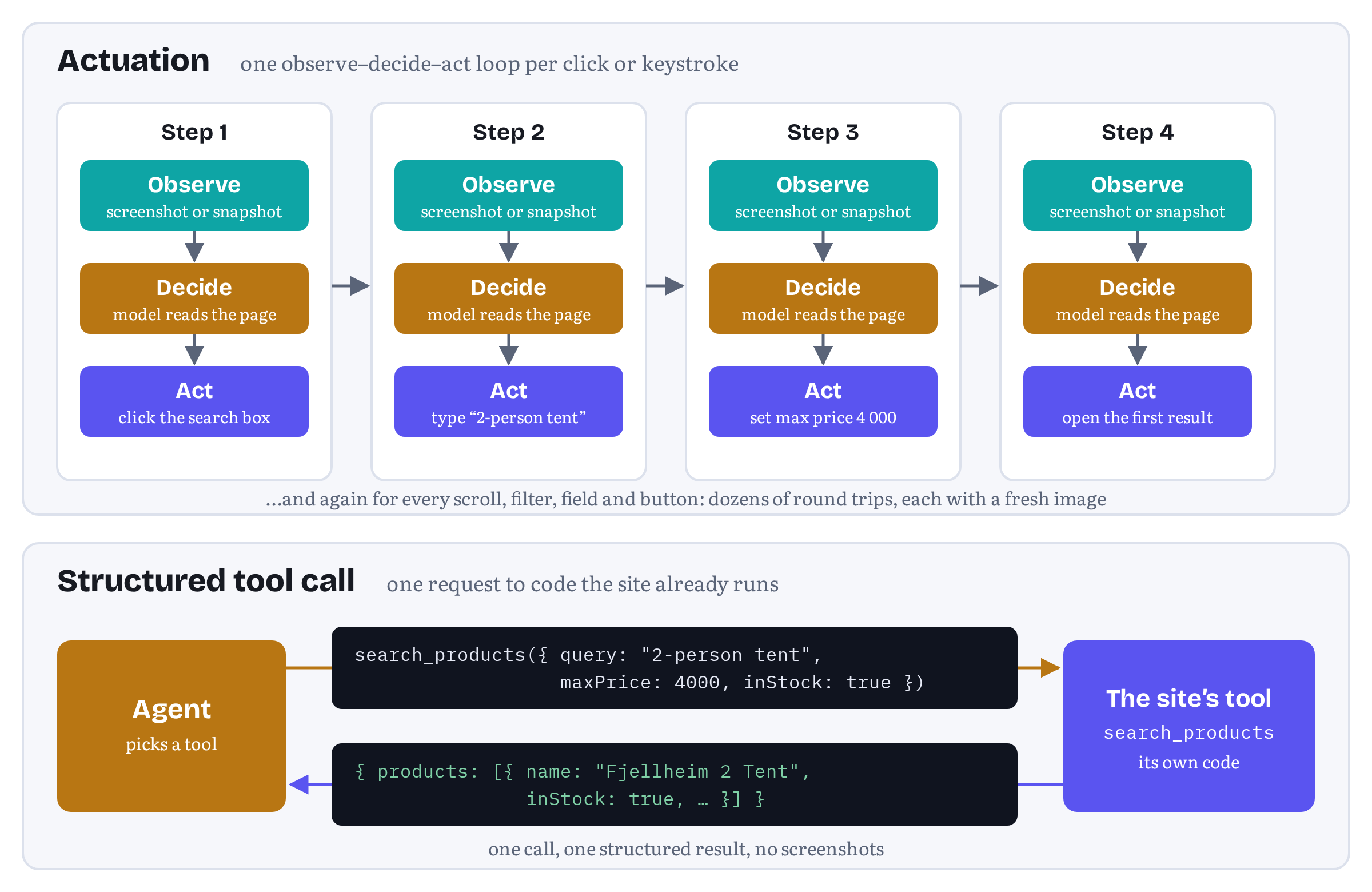
Table 1.1 sums up the difference.
| Actuation | Structured tools | |
|---|---|---|
| What the agent sees | Pixels, DOM or accessibility tree | Tool names, descriptions and input schemas |
| Model calls per task | One or more per click, keystroke or scroll | Roughly one per meaningful action |
| Effect of a redesign | Can break silently | None, as long as the tool contract holds |
| Ambiguity | Resolved by the model’s guess | Resolved by the site’s description and schema |
| Who decides the path | The agent | The site, with the agent choosing among offered tools |
| Needs site cooperation | No | Yes |
Table 1.1 — Actuation and structured tools compared.
Please look at the last row. Structured interaction isn’t free: somebody has to build the tools, and that somebody is the site. So the next question is “why would a website bother?” (and not “how do agents get better at clicking?”).
Why sites have a stake
It is tempting to call agent reliability the agent maker’s problem. The agent is theirs, the model is theirs, the bill is theirs. But let’s look at the tent purchase from Trailhead’s side.
The site loses the sale when the agent fails. An agent that gives up on a confusing filter sidebar doesn’t file a bug report. It tells the user it couldn’t do it, or it goes to a competitor whose site happened to be easier to operate. A site that agents can use reliably is, quite literally, a better shop for customers who send agents.
The site has no say in how it is used. An actuating agent decides on its own which path to take through your site. It may wander into the account settings looking for a delivery address, or fill in a form your support team would rather it didn’t touch. The explainer frames this as a question of control: WebMCP gives agents “an alternative means to interact with the web that give the web developer more control over whether and how an AI-based agent interacts with their site.”9
The site risks being replaced by an integration. The obvious way to make an agent reliable is to skip the website and call an API. That works for some tasks, and Chapter 3 covers the Model Context Protocol, which makes it easy. But the explainer lists what this costs interactive web applications: the user interface is bypassed and context is lost, state and authentication have to be replicated on a separate server, and the site has to build and run that server.9 Its goal is the opposite, to “prevent disintermediation of web apps by backend integrations by adapting front-ends for use by agents, rather than replacing them.”15 For many businesses the website is where the brand, the upsell and the customer relationship live. Chrome’s documentation makes the same point from the user’s side: tools run visibly on the page, so “users gain trust that tasks are completed as expected,” and this “keeps your brand and human-centered design choices intact.”7
The site already has the code. Everything an agent needs to search Trailhead’s catalogue, add an item to the cart or read the cart back already exists in Trailhead’s front end, because the human interface needs it too. The explainer’s goal of code reuse says exactly this: “Any task that a user can accomplish through a page’s UI can be turned into a tool by reusing much of the page’s existing client-side code.”15
Put these four points together and agent-readiness stops being a favour to agent vendors. It becomes ordinary product work, like accessibility, search-engine optimisation or a good mobile layout: a way to make your product work for how people arrive at it now. Personally for me, this is the strongest argument of all: the web has adapted to new kinds of visitors before.
Humans and agents in the same tab
There is one more reason to care, and it shapes the whole of WebMCP: in the browser, the user is usually right there.
The agents in this chapter mostly work in the user’s own browser, in tabs the user can see, with the user’s signed-in sessions. That is a very different setting from an agent working on a server overnight. It allows a kind of cooperation that backend integrations struggle to offer. The agent does the tedious part, and the user watches, corrects and approves.
Agent makers built their safety stories around this. OpenAI’s Operator asked the user to take over when entering “sensitive information into the browser, such as login credentials or payment information,” and before “finalizing any significant action, such as submitting an order or sending an email,” it “should ask for approval.”8 Claude in Chrome asks users “before taking high-risk actions like publishing, purchasing, or sharing personal data,” and lets them grant or revoke access per site.1 Google described its own goal for Gemini in Chrome as “you’ll remain in control as Chrome handles the tedious work.”3
What these safeguards have in common is that the agent decides when to ask. The site, which knows which of its actions really matter, has no way to say so. Is “Add to cart” reversible? Is “Place order” the point of no return, or is another confirmation screen coming? Is the footprint offer in the sliding drawer an ad or part of the purchase? An actuating agent has to guess, and so does its safety layer.
The WebMCP explainer puts this cooperation first among its goals. The very first item is to “enable human-in-the-loop workflows,” supporting “cooperative scenarios where users delegate tasks to AI agents while maintaining visibility, history, and control over web pages.”15 Its non-goals tell just as much. WebMCP is not meant for “fully autonomous workflows” where no browser interface is present, and it is not a “replacement of human interfaces”: “The human web interface remains primary,” and “agent tools augment rather than replace user interaction.”15 Chrome’s documentation states the matching limitation candidly. While tools may work in headless environments, the API is “primarily designed for local browser workflows with a human in the loop.”7
This is the picture I’d like you to carry through the book. The page stays the user’s page. The agent is a capable assistant sitting next to the user, and the site gives it proper tools instead of leaving it to poke at buttons. When an action matters, the site shows its own confirmation, in its own interface, and the user clicks it. Fjord Table’s book_table tool does exactly this in Chapter 5.
Structured interaction, briefly
What would it take for Lars’s agent to do its job without guessing? Trailhead would need a way to tell the agent, in a form a model can use directly, what it offers: “I can search products by query, category, maximum price and stock status. I can compare two to four products. I can add a product to the cart. I can show you the cart.” Each capability would have a name, a plain-language description and a precise description of its inputs. And calling it would run Trailhead’s own code in Lars’s tab, updating the page he is looking at.
That is a tool, in the sense the AI industry has used the word since 2023. Chapter 2 explains how tools became the common unit of agent capability, from function calling in model APIs to OpenAPI-based plug-ins and agent protocols. Chapter 3 covers the Model Context Protocol, which standardised tools for backend services. Chapter 4 introduces WebMCP, which brings the same idea into the page. Its specification describes the result in one sentence: pages that use WebMCP “can be thought of as Model Context Protocol servers that implement tools in client-side script instead of on the backend.”2
WebMCP is not finished, and it is not uncontroversial. Chapter 4 and Chapter 15 cover the politics in detail. For now, two facts are enough. Chrome and Edge both run origin trials of the API, so you can ship it to real users in those browsers today, and Chrome also has a flag for local development.167 And Chrome’s documentation positions WebMCP the same way this book does: it “offers higher accuracy for agentic task completion, and it can be added as a progressive enhancement.”7 Progressive enhancement means exactly what it meant for service workers. Your site keeps working as before, for people and for actuating agents. Agents that understand tools simply get a better way in.
Still in flux The products named in this chapter change quickly. Assistants gain and lose agent features, extensions move out of preview, and pricing and availability vary by country. WebMCP support among agents is younger still. When I re-checked the explainer’s implementation status page on 2 November 2026, it listed WebMCP as supported in ChatGPT Desktop, experimental support in Brave’s Leo, origin trials in Chrome (from version 149) and Edge (from version 150), and Meta Ray-Ban Display support as on its way, off by default and enabled per device.16 Check that page, not this chapter, before you decide which agents your tools will meet first.
The projects in this book
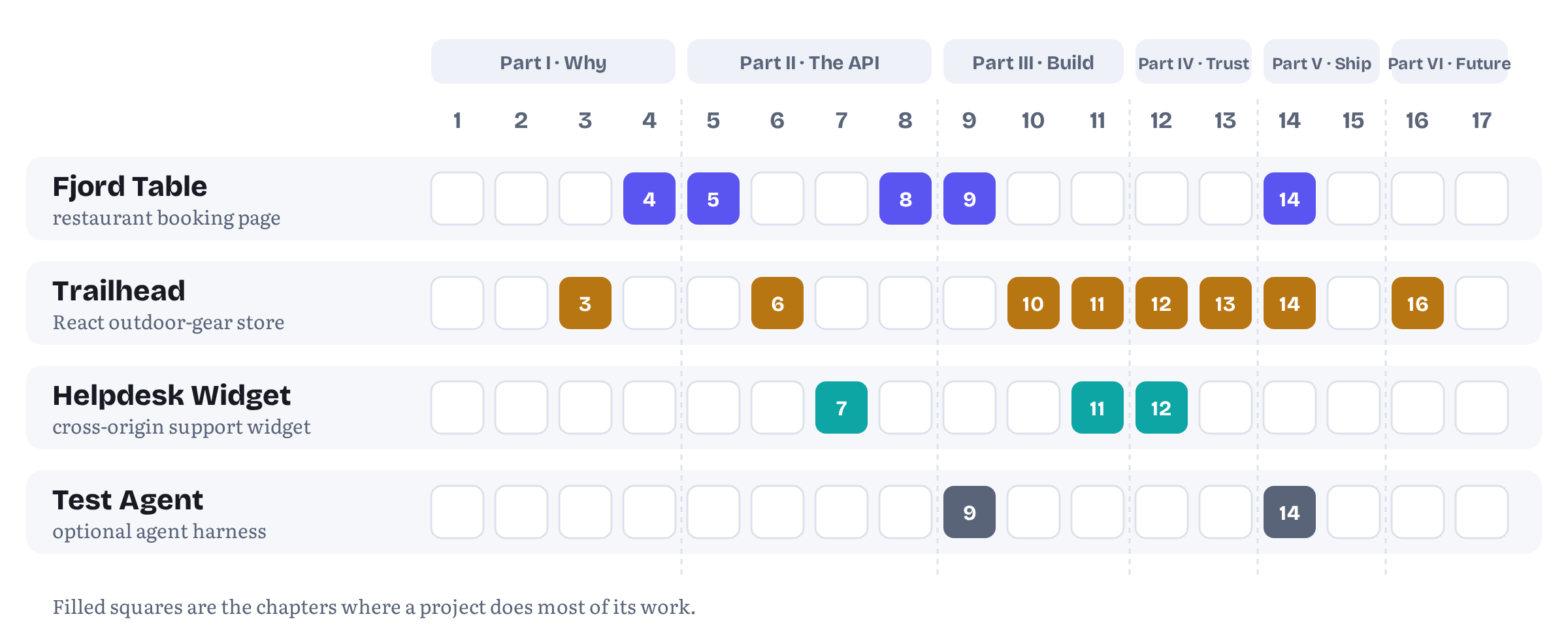
Concepts are easier to hold on to when they are attached to something you build. Four projects run through the book. You will meet each of them properly in the chapters that use it, but here is the cast, with the chapters where each one does most of its work (Table 1.2 and Figure 1.3).
Fjord Table is a small restaurant in Oslo with a booking page. It is modest on purpose: a date, a time, a party size and a seating preference. It is the book’s first WebMCP site. Chapter 4 uses it to show the idea, and Chapter 5 gives it two tools, search_availability and book_table. The second one never completes a booking without the guest confirming it in Fjord Table’s own dialog. Chapter 8 rebuilds its form with the experimental declarative API, Chapter 9 takes it end to end, from the flag to deployment, and Chapter 14 puts its tools under test.
Trailhead is the outdoor-gear store from the opening of this chapter: a React and TypeScript storefront with prices in Norwegian kroner. It is the book’s main production-shaped app. Its tools are search_products, compare_products, add_to_cart, get_cart and checkout. The last one is marked as consequential, so the page shows its own confirmation and nothing is bought without the user’s click. Trailhead also gets a companion backend MCP server in Chapter 3, which makes the difference between server-side and in-page tools concrete. It carries the chapters on annotations and errors, frameworks, tool design, security, privacy, testing and the business case.
Helpdesk Widget is a support widget made by a fictional vendor, Supportly, and embedded in a fictional accounting dashboard, Ledgerly. The widget and the dashboard come from different origins, which is exactly where the web’s security model gets interesting. Its tools (search_articles, create_ticket and get_ticket_status) are the book’s test case for cross-origin rules and page-embedded agents in Chapter 7, and for the threat models in Chapter 12.
Test Agent is optional. It is a minimal agent harness, built either as an extension or as an in-page agent using Chrome’s on-device model through the Prompt API. You can use it to call your tools and run evaluations without depending on any particular commercial assistant. We build it in Chapter 9, and Chapter 14 runs it as the in-page counterpart to its eval harness.
| Project | What it is | What it teaches | Main chapters |
|---|---|---|---|
| Fjord Table | An Oslo restaurant’s booking page | First tools, confirmation in the site’s own UI, the declarative API, an end-to-end first app, testing | 4, 5, 8, 9, 14 |
| Trailhead | A React + TypeScript outdoor-gear store, prices in NOK | Annotations, errors, frameworks, tool design, consent, evals, the business case, plus a backend MCP server | 3, 6, 10–14, 16 |
| Helpdesk Widget | Supportly’s widget inside the Ledgerly dashboard | Permissions Policy, cross-origin exposure, in-page agents, cross-origin threats | 7, 11, 12 |
| Test Agent (optional) | A minimal agent harness | Calling tools and running evals without a commercial assistant | 9, 14 |
Table 1.2 — The running projects and where they appear.
Every code listing in the book is also in the companion repository, webmaxru/webmcp-book-demos on GitHub, organised by chapter, with tests that run each example against a mock of the API and, where possible, against Chromium with WebMCP enabled.17 This chapter and the next have no code. From Chapter 3 on, almost every chapter does.
What this book covers, and what it doesn’t
This is a book for people who build web applications and want them to work well with AI agents. It assumes you are comfortable with JavaScript, and for some chapters with TypeScript and React. It doesn’t assume you know anything about AI agents, MCP or WebMCP.
Here is what it covers:
- Why. Part I (Chapters 1 to 4) explains the problem, the history of tools as the unit of agent capability, the Model Context Protocol, and where WebMCP came from.
- The API. Part II (Chapters 5 to 8) covers WebMCP in depth: registering tools, annotations, the life of a tool call, errors and cancellation, frames and origins, and the declarative form-based API that Chrome still ships but the specification has dropped.
- Building. Part III (Chapters 9 to 11) builds real apps: a first app end to end, WebMCP in React and Angular, and how to design tools that agents actually use well.
- Trust. Part IV (Chapters 12 and 13) covers threat models, prompt injection, privacy, consent and keeping the human in the loop.
- Shipping. Part V (Chapters 14 and 15) covers testing, debugging and evaluations, and an honest map of browser support and the standards process.
- Strategy. Part VI (Chapters 16 and 17) is for product managers and technical leaders as much as for developers: what agent-readiness means for a business, and where things are heading.
If you are a product manager or a tech lead, you can read Part I, the opening of each chapter, Part IV’s discussion of risk and Part VI without following the code.
And here is what it doesn’t cover:
- How to build an agent. The book is about the site’s side of the conversation. It explains enough about agents to make sense of how your tools will be used, and the optional Test Agent is deliberately small. It is not a guide to prompting, model selection or agent frameworks.
- Backend integrations in depth. Chapter 3 teaches enough MCP to build a working server and to understand WebMCP’s vocabulary. For production MCP servers, the protocol’s own documentation goes much further.
- Making actuation better. Your site should still work well for agents that click, and much of what makes a site easier to click through for agents (semantic HTML, proper labels, a good accessibility tree) is good for people too. The explainer is explicit that WebMCP “will not conflict with these existing automation techniques.”9 But this book is about the structured alternative, not about tuning your markup for screenshot readers.
- A stable standard. There isn’t one yet. WebMCP is a draft. The current version of the specification, dated 27 October 2026, describes itself as a Draft Community Group Report that “is not a W3C Standard nor is it on the W3C Standards Track.”2 The book teaches the API as it stands in that draft and in the Chromium origin trials, marks every unsettled part with a Still in flux note like the ones in this chapter, and explains the debates so you can follow them after you finish reading.
Still in flux Every factual claim about the specification, browsers and vendors in this book has a footnote with its source, and for documentation pages, the month it was checked. This edition was re-checked against the specification, the explainer repository and Chrome’s WebMCP documentation in early November 2026. When a footnote and the live specification disagree, the specification wins. Appendix D collects the API changes that have already happened, so you can recognise older code when you see it.
Chapter summary
- Browser agents act on web pages on the user’s behalf. They come built into browsers (Gemini in Chrome, Perplexity’s Comet, and for a while OpenAI’s ChatGPT Atlas), as extensions (Claude in Chrome), and embedded in pages, sometimes running an on-device model.
- Most of them work today by actuation: observing the page through screenshots, DOM and accessibility-tree snapshots, then simulating clicks and keystrokes, one model call per step.
- Actuation needs nothing from the site, which is why it spread so fast. It also breaks on layout changes, ambiguous controls and multi-step flows, and it treats everything on the page (hostile text included) as potential instructions.
- It is expensive and slow. Each screenshot costs roughly a thousand or more input tokens, vendors list latency as a known limitation, and published benchmarks still show a gap between agents and people on complex web tasks.
- Sites have a stake: they lose sales when agents fail, they have no say in how agents use them, they risk being bypassed by backend integrations, and they already have the front-end code agents need.
- In the browser the user is usually present. WebMCP’s first goal is human-in-the-loop cooperation, not full autonomy, and it lets the site (which knows which of its actions matter) show its own confirmations.
- The alternative is structured interaction: the page offers named, described, schema-typed tools, and the agent calls them. Chapter 2 traces how tools became the industry’s unit of agent capability, Chapter 3 covers MCP, and Chapter 4 introduces WebMCP.
- Four projects run through the book: Fjord Table, Trailhead, Helpdesk Widget and the optional Test Agent. Their code lives in the companion repository.
Notes
Notes
Anthropic, “Piloting Claude in Chrome” (25 August 2025; updates of 24 November and 18 December 2025). https://www.anthropic.com/news/claude-for-chrome
WebMCP specification, Draft Community Group Report, 27 October 2026, Status of this document, §1 Introduction and §2 Terminology (retrieved November 2026). https://webmachinelearning.github.io/webmcp/
Parisa Tabriz, “Chrome: The browser you love, reimagined with AI”, Google Keyword blog (18 September 2025). https://blog.google/products/chrome/chrome-reimagined-with-ai/
OpenAI, “Introducing ChatGPT Atlas” (21 October 2025). https://openai.com/index/introducing-chatgpt-atlas/
OpenAI Help Center, “ChatGPT Atlas retirement” (read 15 October 2026: “ChatGPT Atlas has been retired and no longer receives updates”). https://help.openai.com/en/articles/20001371-chatgpt-atlas-retirement
Perplexity, “Comet Browser: a Personal AI Assistant” (product page). https://www.perplexity.ai/comet
Chrome for Developers, “WebMCP” (published 18 May 2026, updated 7 October 2026), including “Why WebMCP?”, “Use cases”, “Limitations” and “Imitate an agent to test your tools” (retrieved November 2026). https://developer.chrome.com/docs/ai/webmcp
OpenAI, “Introducing Operator”, including the update of 17 July 2025 (“Operator is now fully integrated into ChatGPT as ChatGPT agent”) and the section on safety. https://openai.com/index/introducing-operator/
WebMCP explainer (README), introduction, “Background and Motivation” and “Existing web actuation techniques”, webmachinelearning/webmcp (retrieved November 2026). https://github.com/webmachinelearning/webmcp
Chrome for Developers, “The Prompt API” (published 20 May 2025, updated 26 August 2026). https://developer.chrome.com/docs/ai/prompt-api
OpenAI, “Computer-Using Agent”, including “How it works” and the benchmark table. https://openai.com/index/computer-using-agent/
Anthropic, “Computer use tool”, Claude API documentation, including “How computer use works”, “Manage screenshot history” and “Limitations”. https://docs.anthropic.com/en/docs/agents-and-tools/tool-use/computer-use-tool
Artem Chaikin and Shivan Kaul Sahib, “Agentic Browser Security: Indirect Prompt Injection in Perplexity Comet”, Brave blog (20 August 2025). https://brave.com/blog/comet-prompt-injection/
Shuyan Zhou et al., “WebArena: A Realistic Web Environment for Building Autonomous Agents”, arXiv:2307.13854 (v1 25 July 2023, v4 16 April 2024), abstract. https://arxiv.org/abs/2307.13854
WebMCP explainer, “Goals & Non-Goals” (retrieved November 2026). https://github.com/webmachinelearning/webmcp#goals--non-goals
WebMCP, “Browser and Agent Implementation Status”, webmachinelearning/webmcp (retrieved November 2026). https://github.com/webmachinelearning/webmcp/blob/main/implementation-status.md
webmaxru/webmcp-book-demos, the companion repository for this book. https://github.com/webmaxru/webmcp-book-demos